





DevTK0
Members
-
Joined
-
Last visited
-
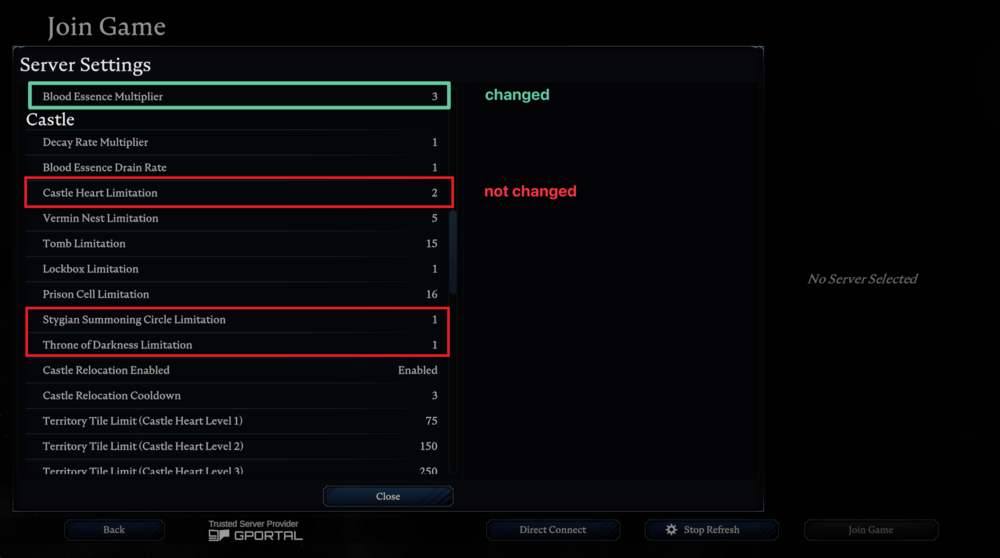
So basically, if you change any of the3 settings mentioned in .../vrising/save-data/..., they don't work (it will remain as the default). All other settings can be changed just fine. For example, changing the following settings: { "BloodEssenceYieldModifier": 3.0, "CastleStatModifiers_Global": { ... "CastleLimit": 5, "NetherGateLimit": 4, "ThroneOfDarknessLimit": 4 } ... } My understanding is that the configs in .../vrising/save-data/... are partial configs that the game will use to override the default configs in .../vrising/VRisingServer_Data/StreamingAssets/... Which is why if you change them in .../vrising/VRisingServer_Data/StreamingAssets/... it seems to work. To be clear again, only these 3 specific settings behaves this way. It might be a problem with the way the game handles these 3 settings specifically, but when I tested the exact same ServerGameSettings.json file in Windows, the game was able to update these configs just fine, so I'm encountering this problem only with the docker image. Personally, It doesn't really bother me whether or not this is fixable. I just thought I'd let you know in case anyone else has the same problem.
-
The following settings don't work for vrising: "CastleLimit": 2, "NetherGateLimit": 1, "ThroneOfDarknessLimit": 1 But if you set them in: /VRisingServer_Data/StreamingAssets/Settings, you're able to change those configs. I can see that the docker container copies over this file into the volume so I'm not sure if this a problem with the container or vrising itself. Directly changing the values in that file is not a problem but the issue is that the file is reset whenever vrising has an update.
