DaedricTritone
Members
-
Joined
-
Last visited
Everything posted by DaedricTritone
-
Hi guys! I built a VM and want to move data that I have collected from the VM into my server, but it's doing it over WIFI for some reason. Is there a more efficient way to do this>
-
Thank you so much, JorgeB!
-
Thank you! It will rebuild without losing data?
-
Thank you so much, JorgeB! I really appreciate it. Sorry, I'm still a little ignorant on some things within Unraid, so hopefully this is what you meant. googoodrive-diagnostics-20250603-2113.zip
-
I'm stressing a little bit. I do have parity, thankfully, but one of my drives is showing "All existing data on this device will be OVERWRITTEN when array is Started." How do I avoid losing my data?


-
This worked even with group 10 being disabled. Thank you so much!!! I truly appreciate you
-
This is amazingly helpful! Thank you so much! I've done everything with the exception of step two because group 10 is still grayed out. Is there a work around for this?
-
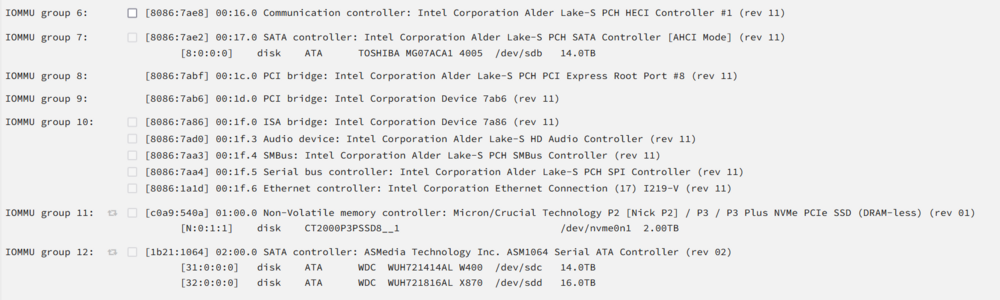
Now all of my IOMMU groups should be visible. Would it help to post my XML?
-
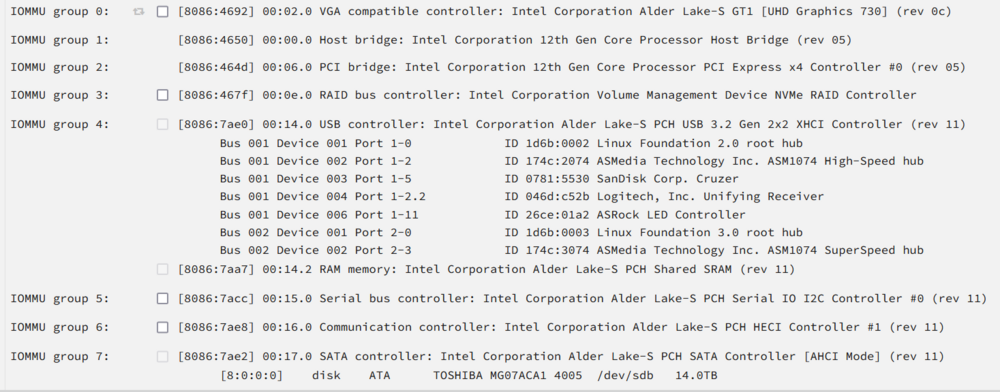
Sorry, thank you for pointing that out. Here is more of the IOMMU information
-
Hi all! I've watched Spaceinvader One's videos on VMs, GPU passthroughs, and read countless forums, but I can't figure it out. I have an Asrock B660M mobo and an Intel i5-12400. I have a Windows 11 VM set up and it can run on a virtual graphics card, but I would like to use it to stream either Apollo or Sunshine with Moonlight, so I'd like to use the dedicated graphics card. I think that the main issue comes down to the graphics card and the sound card not being connected, but I can't select the correct IOMMU group as it is grayed out. What am I doing wrong?

-
Hi all! I've set up a VM for a workstation for music production. My server is downstairs. I plugged in the USB devices that I would like to use, but I need access to them with my laptop. My question is how do I use the USB ports of my laptop so that I can plug in my piano and audio interface to use the music production software on the VM? Thank you for any help!
-
You guys saved me! I just had this issue and following the steps posted fixed my issues. I love this community!
-
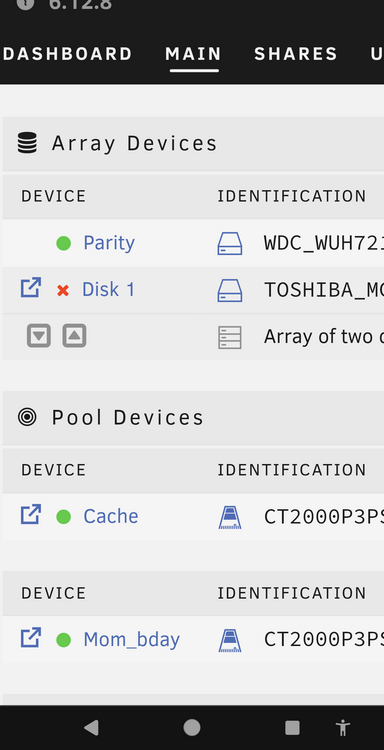
This is a relatively new drive (February) and has not given me any issues. I ran a SMART report and there were no errors. I replaced the power cables and rebooted Unraid. It did this when I was uploading a lot of pictures to Immich. Is there anything that I can do to try and save the drive or is it dead?
-
Thank you so much for your help! I truly appreciate you!
-
Lol! Thank you for your help! Is there a way to reboot without losing data on my drives? I don't have parity set up yet. I have the hard drive, but I've been nervous to set it up because I don't want to lose data! Sorry for being a newbie and I appreciate your advice and help!
-
Hi all! I still a newb with Unraid. I made the mortal mistake of removing an external hard drive without unmounting it by accident. Now when I plug it in, it won't let me access files to transfer to my main hard drives with Krusader. I'm scared to reboot because I don't want to lose the data on my hard drives as one time I did that and lost everything. I'd love any solutions or help! Thank you for reading this!