pfdt
Members
-
Joined
-
Last visited
-
Ok thank you for your answer, now I know !
-
Thanks for the reply, JorgeB! I’m still a bit confused though. I want to make sure I understand correctly: When you say “the remaining space can only be used as a single pool”, does that mean: The remaining data partitions (8GB on Optane + ~2TB on NVMe) must be merged into one single pool together? Or can I create two separate independent pools: Pool 1: ~8GB from the Optane data partition Pool 2: ~2TB from the 990 EVO data partition (my main cache pool)? I really need them as two separate pools. Could you clarify if Unraid 7.3 allows this, or if it forces those partitions into a single pool? Thanks again!
-
Hey everyone, I'm considering switching to internal boot but I can't find clear information anywhere (forum or docs) about one specific thing. Here's my setup: Array: 2x 16TB HDD Parity: 1x 16TB HDD Cache pool: 1x 2TB NVMe Motherboard: no M.2 slots left, only a PCIe 4.0 slot (no bifurcation support) My plan is to add a PCIe adapter with a 16GB Intel Optane module for internal boot. Ideally I'd partition it in two: one boot partition (~8GB) + one separate small pool for another use I have in mind. So far so good: I'm fairly confident this part is doable, and I'm not looking to use the PCIe slot for a larger NVMe (no need for it right now). The part I can't find any info on: Is it possible to mirror the internal boot between: An 8GB partition on the Optane (with the remaining 8GB used as a separate pool) An 8GB partition on my existing 2TB NVMe (with the remaining ~2TB still used as a cache pool) In other words: does internal boot mirroring work across partitions on two different-sized drives? Or does it require full drives? Thanks in advance, any experience or insight is much appreciated!
-
Hello I'm back with my vpn update problem (here is my first post about it). The recent backups went well but yesterday it failed due to the vpn container update. So the problem is definitely here. But I've checked the container id using "docker ps -a" and it is the same before and after the update. I don't know if it can be fixed. For now I have disabled the auto update for this container.
-
Ok done, I let you know when it happens again
-
Hello KluthR, ok I will do a docker ps -a next time. But it it helps : when it happened I can easily start the stopped containers in the Unraid UI. Thank you Kilrah, I've checked and yes : PIA have been updated the last times. I've made a couple of test and discovered that no : the problem doesn't occur every time. My 2 manual backups of the day finished without any problem. So the update of the vpn container is a good lead...
-
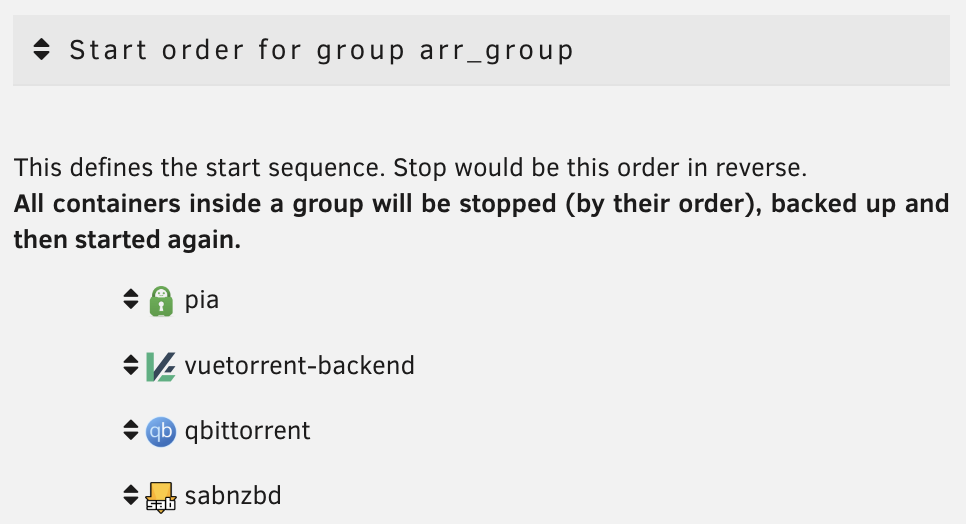
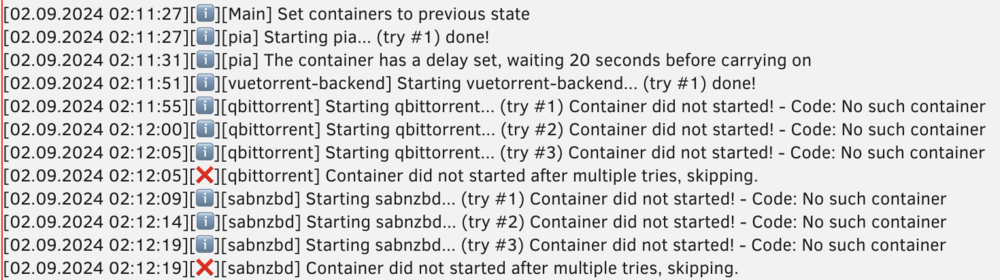
Hello, I always have the same problem with my backups and cannot find a solution : my containers which depends on another container (a vpn network) failed to restart. I have these containers : PIA : my vpn app (with a starting delay of 20 seconds) qbittorrent : depends on the network of PIA (--net=container:pia) sabnzbd : depends on the network of PIA (--net=container:pia) In the plugin, these 3 containers are grouped in a dedicated folder : During backup : 🟢 All the containers stop well (in the reverse order) 🟢 All the containers backup and update well 🟢 PIA restart successfully and then wait for 20 seconds 🔴 qbittorrent and sabnzbd failed to restart, even after 3 tries The stop and restart orders seem OK but I don't understand the problem. PIA only needs 5s to start, after 20s it is fully working. I have tried with a higher starting delay after PIA but the problem is the same. I've find discussions with this problem in the forum but the solution was to create a group which is already done here. Here is an extract of the log : Please can you tell me what I am doing wrong ?