aliaghil
Members
-
Joined
-
Last visited
-
Well, I never had issues using those labels to add a link or show a container icon in the Unraid web UI. It is weird that this is happening after updating to 7.3.2.
-
No, that's the compose I use. All I did was copy their image file to that path.
-
Yeah, that is what I thought. So, a temp Band-Aid to have a script to copy them over during startup. Easy peasy :) Wondering why some of them exist there? That means something copied them over, but not all?!
-
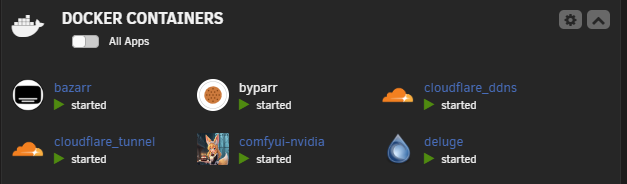
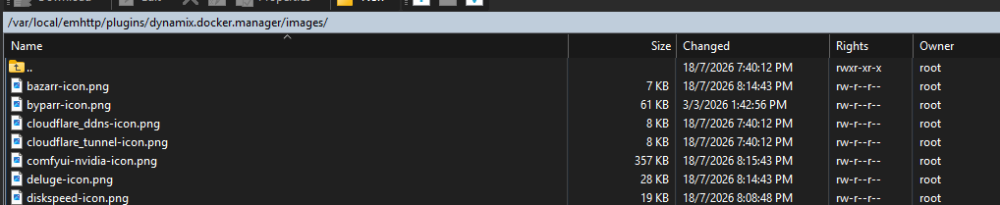
Well, after scratching my head for a bit and digging, I have found a solution 😊 If you are using Docker Compose with labels, then this will fix yours. So, pay attention to your container name, and make sure its icon exists in /var/local/emhttp/plugins/dynamix.docker.manager/images with this format contianrname-icon.png Don't forget -icon In the name 😊 The thing I didn't try is a restart, so I am not sure if it stays after restarting the server.
-
I also have the same problem. I am deploying containers via Portainer, and 2 of them use the same icon. One showing, the other not. # Name name: cloudflare services: # CloudflareD Tunnel cloudflaretunnel: image: cloudflare/cloudflared:latest container_name: cloudflare_tunnel hostname: cloudflare_tunnel environment: - TUNNEL_TOKEN=xxxxxxxxxxxxxxxxxxxxxxxxxxxxxxxxxxx - PUID=99 - PGID=100 - TZ=Australia/Sydney labels: - net.unraid.docker.managed=dockerman - net.unraid.docker.icon=/mnt/user/appdata/icons/cloudflare.png command: tunnel --no-autoupdate run networks: - frontend restart: always # CloudFlare DDNS by Favonia # https://github.com/favonia/cloudflare-ddns cloudflare_ddns: container_name: cloudflare_ddns hostname: cloudflare_ddns image: favonia/cloudflare-ddns:latest environment: - PUID=99 - PGID=100 - TZ=Australia/Sydney - CLOUDFLARE_API_TOKEN=xxxxxxxxxxxxxxxxxxxxxxxxxxxxxxxxxxx - DOMAINS=xxxxxxxxxxxxxxxxxxxxxxxxxxxxxxxxxxx - PROXIED=false - IP6_PROVIDER=none - SHOUTRRR=xxxxxxxxxxxxxxxxxxxxxxxxxxxxxxxxxxx labels: - net.unraid.docker.managed=dockerman - net.unraid.docker.icon=/mnt/user/appdata/icons/cloudflare.png networks: - frontend restart: always # Networks networks: frontend: external: true So weird. I tried a web link like `https://raw.githubusercontent.com/prophetse7en/cloudflare-tunnel/main/cloudflare-icon.png`, same result I tried the same PNG file from another location, without any luck. I tried to use `net.unraid.docker.icon="file:///mnt/cache/appdata/_icons/custom-icon.png"`, still no luck.