





dr_bluescreen
Members
-
Joined
-
Last visited
Everything posted by dr_bluescreen
-
So the Problem is that after I had changed a setting on the Container it has to always redownload the tailscale executables. But the servers are super slow because the 1.80.0 update just released. If it would be possible to have these executables cached somewhere that would be great ^^ Executing Unraid Docker Hook for Tailscale Detecting Package Manager... Detected Advanced Package Tool! Installing packages... Please wait... Packages installed! Tailscale not found, downloading... Please wait... /tmp/tailscale/tail 3%[ ] 1024K 10.0KB/s in 63s /tmp/tailscale/tail 7%[> ] 2.29M 11.9KB/s in 65s /tmp/tailscale/tail 12%[+> ] 3.63M 14.9KB/s in 63s
-
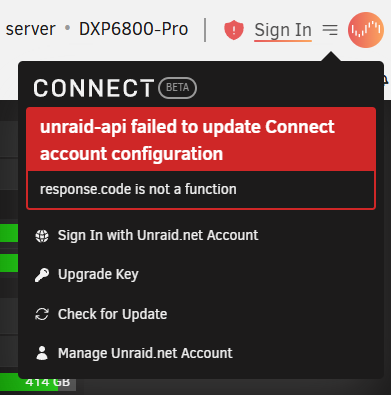
It all started with sporadic connection Issues. And because I just want my Flash Backup reliable working I thought reinstalling would fix the issue. But now I can't even Register my Server anymore... Thats all I get after going through the Registartion flow. Here is the Report <-----UNRAID-API-REPORT-----> SERVER_NAME: DXP6800-Pro ENVIRONMENT: production UNRAID_VERSION: 7.0.0 UNRAID_API_VERSION: 3.11.0 UNRAID_API_STATUS: running API_KEY: NO_API_KEY MY_SERVERS: signed out CLOUD: STATUS: [error] ERROR [API key is missing] MINI-GRAPH: STATUS: [PRE_INIT] SERVERS: ONLINE: OFFLINE: ALLOWED_ORIGINS: http://localhost, https://localhost, https://TAILSCALE.ts.net, https://IPV4ADDRESS, https://dxp6800-pro, https://IPV4ADDRESS.HASH.myunraid.net, https://IPV6ADDRESS.HASH.myunraid.net, https://IPV4ADDRESS.HASH.myunraid.net, https://IPV6ADDRESS.HASH.myunraid.net, https://connect.myunraid.net, https://connect-staging.myunraid.net, https://dev-my.myunraid.net:4000 </----UNRAID-API-REPORT-----> I have attached the /var/log/unraid-api/stdout.log file. It seems that my server can reach the Apikey server. if I run a curl command from my Unraid Machine it works root@DXP6800-Pro:/# curl --request POST \ --url https://keys.lime-technology.com/validate/apikey \ --header 'Content-Type: application/x-www-form-urlencoded' \ --data guid=REDACTED \ --data apikey=unraid_REDACTED {"valid":true} So I'm now clueless why the Plugin fails and can't connect... I Hope somebody can help me. stdout.log myservers.cfg
-
First of all thank you for the plugin 👍 I saw that in this https://github.com/miskcoo/ugreen_dx4600_leds_controller/pull/12 you modified the script to skip the smart check on unraid. But it would be great if we could hav a red blinking for such cases. Could the pulsing led for spundown / standby drives be implemented? If a drive is physically removed and not offline, can it be two different things or is there no way to determine what happend to the drive? I'm still new to Unraid, but if i could help modding the script and testing I would try to help
