





fusselnerd
Members
-
Joined
-
Last visited
-
Scrub of all disks resultet in four currupted files. I deleted the files and resetted the btrfs scrub stats, then run scrub again: 0 errors. Is there anything else I should check/do before bringing the server online?
-
As you suggested here I checked the other disks for errors with btrfs dev stats /mnt/<disk> and it turned out that all disks have errors: root@GrayBigBerta:/mnt# btrfs dev stats /mnt/disk2 [/dev/md2p1].write_io_errs 0 [/dev/md2p1].read_io_errs 0 [/dev/md2p1].flush_io_errs 0 [/dev/md2p1].corruption_errs 22 [/dev/md2p1].generation_errs 0 root@GrayBigBerta:/mnt# btrfs dev stats /mnt/disk4 [/dev/md4p1].write_io_errs 359 [/dev/md4p1].read_io_errs 1 [/dev/md4p1].flush_io_errs 0 [/dev/md4p1].corruption_errs 71 [/dev/md4p1].generation_errs 0 root@GrayBigBerta:/mnt# btrfs dev stats /mnt/disk5 [/dev/md5p1].write_io_errs 0 [/dev/md5p1].read_io_errs 0 [/dev/md5p1].flush_io_errs 0 [/dev/md5p1].corruption_errs 287 [/dev/md5p1].generation_errs 0 root@GrayBigBerta:/mnt# btrfs dev stats /mnt/disk6 [/dev/md6p1].write_io_errs 0 [/dev/md6p1].read_io_errs 0 [/dev/md6p1].flush_io_errs 0 [/dev/md6p1].corruption_errs 12 [/dev/md6p1].generation_errs 0 except the recovered disks: root@GrayBigBerta:/mnt# btrfs dev stats /mnt/disk1 [/dev/md1p1].write_io_errs 0 [/dev/md1p1].read_io_errs 0 [/dev/md1p1].flush_io_errs 0 [/dev/md1p1].corruption_errs 0 [/dev/md1p1].generation_errs 0 root@GrayBigBerta:/mnt# btrfs dev stats /mnt/disk3 [/dev/md3p1].write_io_errs 0 [/dev/md3p1].read_io_errs 0 [/dev/md3p1].flush_io_errs 0 [/dev/md3p1].corruption_errs 0 [/dev/md3p1].generation_errs 0 Questions: I intend to run scrub in a small script to scrub all disks after one after another. What parameters should I use? Will this do (for each disk)? btrfs scrub start -B /dev/disk# As I understand array disks have single disk file systems. Therefore automatic repair should not be possible, right? Should I use the -r option?
-
Hi, Sync and data restore finally finished without errors. Also no errors in syslog and drive logs. Respective shares are shown as protected.
-
oh sorry, here we go
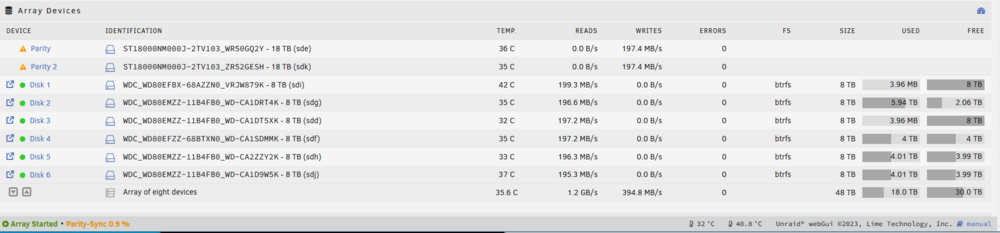
-
Thanks a lot! I started the sync and formated both disks. Also, no other disks were listed.
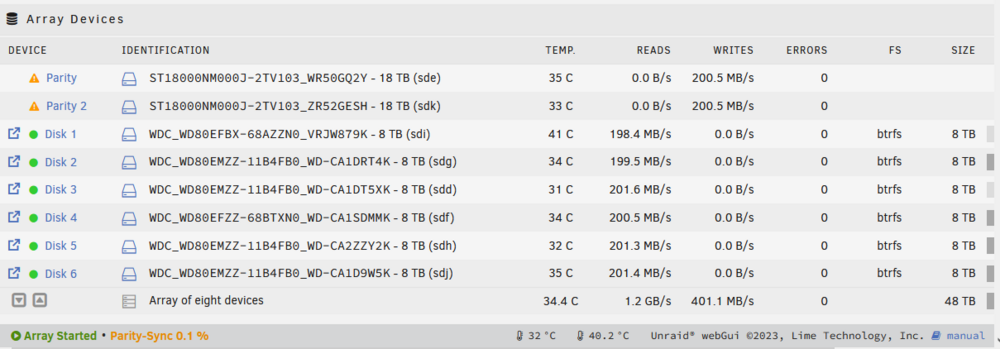
-
Hi @trurl Oh I see, thank you for correcting me! I stopped the sync and did a New Config, again, and assigned the two disks. I would now start the array to start the parity-sync. Is this the correct order?
-
Allright, I did a new config with all disks assigned the same as before except the two disabled disks. Parity is syncing now. Then I'll format the two disks, assign them and recover the backed up data. This might take a couple of days. I'll get back to you when it's finished for the last steps (I guess), scrubbing and error-reset. Thank you so far.
-
Correct. If I mount them or start the array with emulated disks I get the error "Unmountable... missing file system" or so. In syslog it's shown that the BTRFS filesystem ist corruped (ERROR: superblock checksum mismatch). We tried to restore the superblock but it was not possible because I started the rebuild by mistake. Now, I restored the actual data by hand (UFS). I didn't assign the disks or started the array since then. PS: You also mentioned in a previous post that I should scrub the other disks and reset the errors.
-
Sure [...left out pool and single disks...]
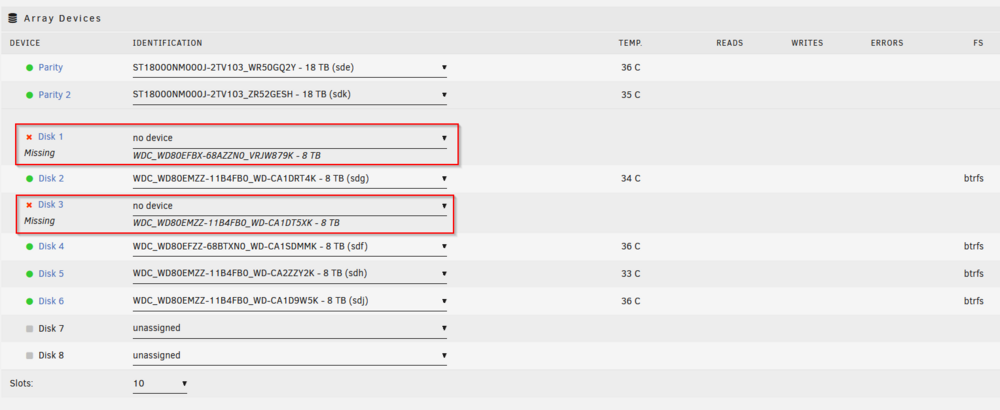
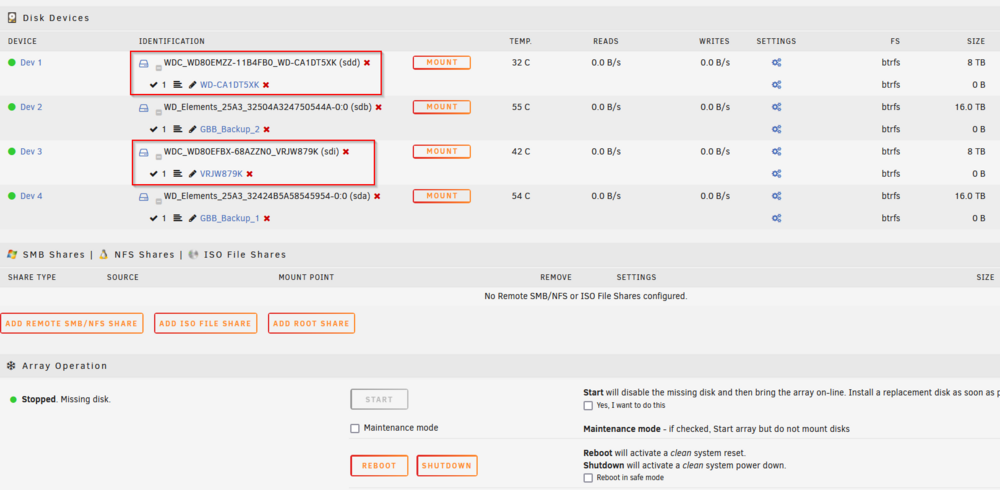
-
Hi @JorgeB Hi finally had time to do the recovery: with UFS I managed to restore almost all data and backed it up. Thank you very much for that tip. What will be the next step?
-
Thank you! 🙏
-
Yeah, it's the same result: root@GrayBigBerta:~# btrfs-select-super -s 2 /dev/md1p1 ERROR: superblock checksum mismatch ERROR: superblock checksum mismatch No valid Btrfs found on /dev/md1p1 ERROR: open ctree failed root@GrayBigBerta:~# btrfs-select-super -s 2 /dev/md3p1 ERROR: superblock checksum mismatch ERROR: superblock checksum mismatch No valid Btrfs found on /dev/md3p1 ERROR: open ctree failed
-
I see, thank you! Can you recommend a read about btrfs and Unraid array? I'm missing the fundamentals, obviously, so I'd like to dig into it a bit.
-
Here we go: root@GrayBigBerta:~# btrfs-select-super -s 1 /dev/md1p1 ERROR: superblock checksum mismatch ERROR: superblock checksum mismatch No valid Btrfs found on /dev/md1p1 ERROR: open ctree failed root@GrayBigBerta:~# btrfs-select-super -s 1 /dev/md3p1 ERROR: superblock checksum mismatch ERROR: superblock checksum mismatch No valid Btrfs found on /dev/md3p1 ERROR: open ctree failed
-
Hi @JorgeB Rebuild is complete. Next step is right? Could you please guide me through the process? Got it and I keep it in mind. I went through the Unraid docs again, it's mentioned there several times. Lesson learned the hard way... The only issue I have is, that I couldn't see if the drives are mountable before starting the array. And starting the array will automatically trigger the rebuild (though I might remember it wrong). So in the future, I will test a temporary failed disk before e.g. by mounting it separatly, before starting the array, if such a situation ever happens again. And of course, keep an eye open for fs errors. But maybe this is a topic for another discussion.



