





Unready
Members
-
Joined
-
Last visited
Everything posted by Unready
-
Hello, awaiting some new cabling after the holidays. Still planning on updating. Thanks for the continued help. Also, a question. Since this cache is mirrored, shouldn't I be able to remove the indicated drive, and the system should account for it using its mirror? I haven't tested yet, but I'd like to confirm my understanding.
-
Diagnostics attached. Thanks again! zion-diagnostics-20251227-1348.zip
-
Sure, copied below. I wasn't sure if it was meant to be "sdn1" so ran it both ways. root@Zion:~# fdisk -l /dev/sdn fdisk: cannot open /dev/sdn: Input/output error root@Zion:~# fdisk -l /dev/sdn1 fdisk: cannot open /dev/sdn1: No such file or directory
-
Sure! There wasn't much output from either. root@Zion:~# zdb -l /dev/sdn1 cannot open '/dev/sdn1': No such file or directory root@Zion:~# blkid /dev/sdn1 root@Zion:~#
-
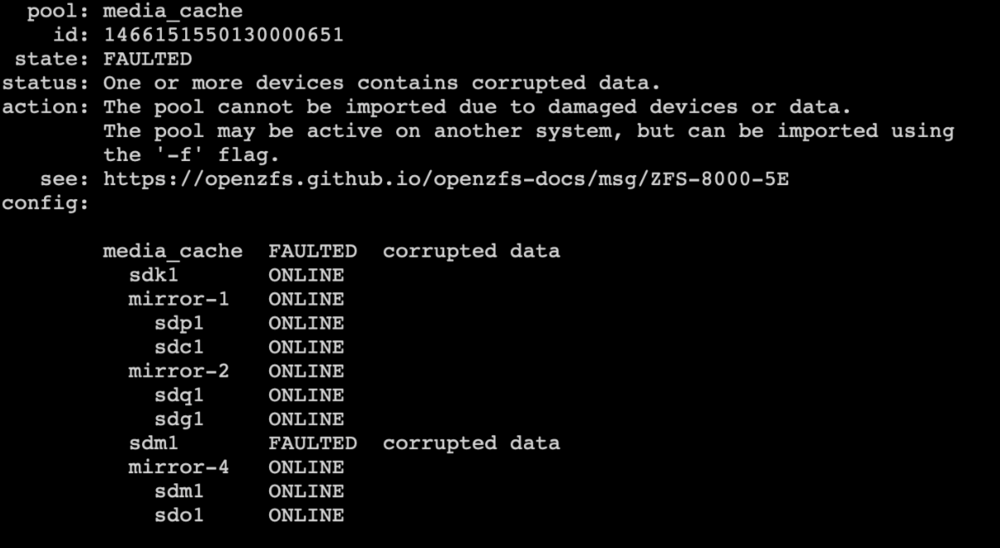
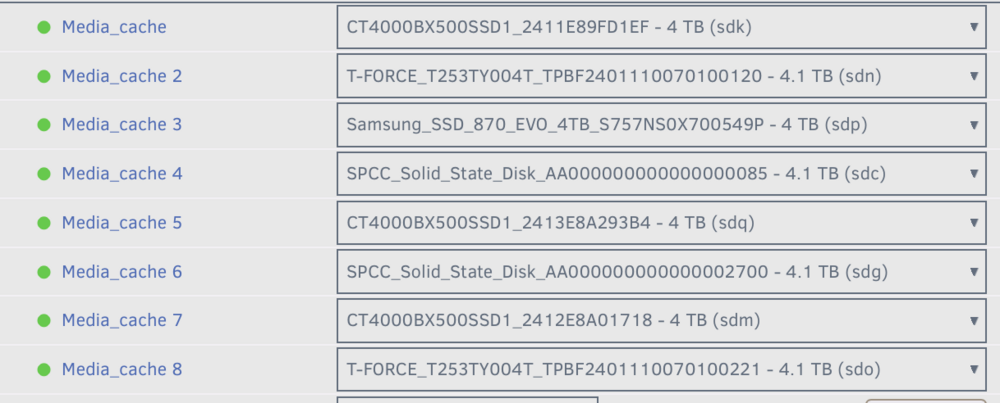
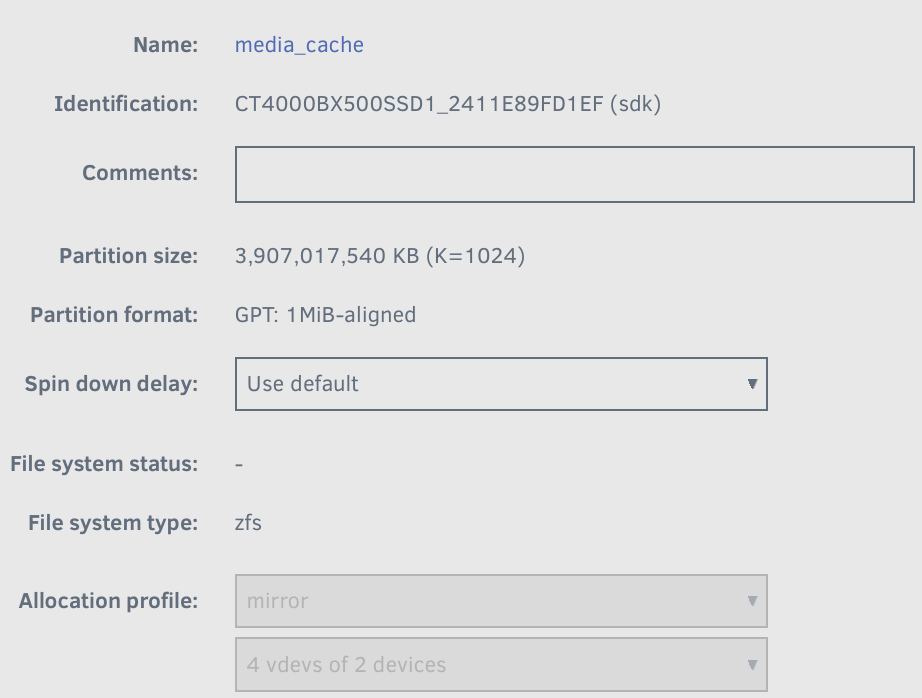
The pool was originally configured as 4 mirrored pairs. There's an 8th drive not listed in the zfs import. "sdn1" (seen below, Line 2 in the main tab details excerpt) isn't present in the zfs import results. (Instead, "sdm1" showed up twice also re-pasted below.) I ran zdb -l for all 8 known devices, only 7 results returned. I confirmed it was "sdn1." root@Zion:~# zdb -l /dev/sdk1 | grep txg | head -n 1 zdb -l /dev/sdp1 | grep txg | head -n 1 zdb -l /dev/sdc1 | grep txg | head -n 1 zdb -l /dev/sdq1 | grep txg | head -n 1 zdb -l /dev/sdg1 | grep txg | head -n 1 zdb -l /dev/sdm1 | grep txg | head -n 1 zdb -l /dev/sdo1 | grep txg | head -n 1 zdb -l /dev/sdn1 | grep txg | head -n 1 txg: 4342827 txg: 4342827 txg: 4342827 txg: 4342827 txg: 4342827 txg: 4342827 txg: 4342827 root@Zion:~# zdb -l /dev/sdn1 | grep txg | head -n 1 root@Zion:~# My fingers-crossed theory is that somehow it got sdm1 confused for sdn1, which is the actual mirror for sdk1. So it thinks the data is corrupted. Hope I'm making sense. Thanks again.
-
Hello, having issues with the primary ZFS pool on a running system (not restart related). [Reviewed other threads, couldn't find exact troubleshooting. But happy to delete and go to another thread if directions are elsewhere] My media_cache zfs pool is 4 mirrors of SSDs. Noticed the system had unmounted the pool. Terminal reports (zpool import) that it's faulted/corrupted data. Immediately standing out is the missing mirror-3. Also, sdm1 appears twice. I'm hoping there's a fix that preserves data, since the pool is transitory and not backed up. Again, happy to review a resource that might be helpful. The link from the screen shot wasn't particularly optimistic. zion-diagnostics-20251216-1601.zip
-
Hello @Djoss, Thanks for a great tool. I'm unsure if there is a way to prefer files in a specific path when hard-linking duplicates. By default, the grouped duplicates are sorted by path (alphabetically.) Since my preferred path (on my faster cache pool) appears last, Czkawka will use the non-preferred (slower HDD array) location as the "original." Have I misunderstood or missed something? Thanks again.


