





makem
Members
-
Joined
-
Last visited
Everything posted by makem
-
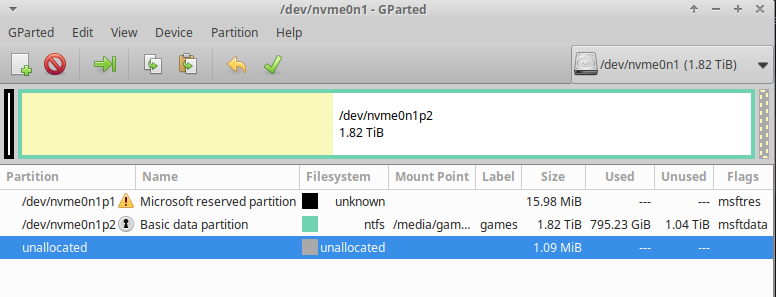
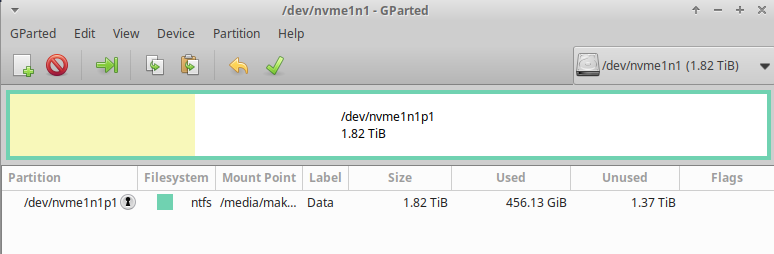
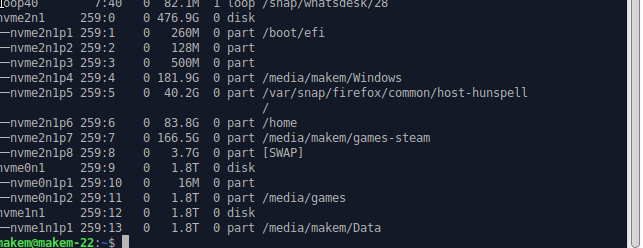
I am, wondering, as the diagnostics 'only reported one nvme'. Has it been assumed that the nvme I am concerned with is inside the NAS? I am concerned about a PC which controls the NAS and which uses the NAS to store data as do another two PCs and mobile phones. This Pc is not able to store data on the NAS from one of it's nvme's.
-
BIOS shows the nvme's and tests are passed. Perhaps the gparted images will help?
-
It is not the cache and it is one of a pair of nvme's which are in use and working correctly for 2 or 3 years. I cannot use another slot as they are all taken. I will take a look at the BIOS.
-
Diagnostics were posted earlier but repeated below. nas-diagnostics-20240922-2347.zip
-
I have checked in Windows and it was closed fully. I noticed that it was not visible in Unassigned Devices there either. Does it need to be mounted in /mnt/disks and if so, how? Can the Unassigned Devices plugin deal with internal nvme drives?
-
Thank you for your time. The nvme was new when I built the machine 2 or 3 years ago. There is another one too. It has always been used as a place for an archive of stuff gathered over the years. It is formatted NTFS as it can also be accessed from a Windows dual boot OS. nas-diagnostics-20240922-2119.zip
-
I have a NAS with 2 parity drives and two data drives in the array. I also have a 2TB nvme used as an archive and I would like to access the data it contains. I don't know where to start and research seems to be only related to adding drives to the array or as external ones. Is it a form of mapping? My OS is Ubuntu 24.04 Can I get some pointers to start me off in the right direction please?
-
The folders are: /mnt/addons /mnt/remotes /mnt/rootshare These folders are all empty and may have been left over from an install of Portainer which has been removed. I have checked and they are not in use by any Dockers. Fix Common Problems does not report a problem. I came across these folders whilst editing file paths otherwise I would never have known they existed. Can anyone tell me how to remove the folders please?
-
TY Embarrassed lol
-
I have the plugin installed but it appears to be doing nothing. When I click on the icon I get no reaction. Should the icon react? If I want to remove the plugin, how would I do it? Should I re-install it?
-
Thank you both but I did say I don't use Windows. I believe the correct Linux method is via NFS. However, I am aware from previous experience that if a mistake is made in the fstab format it can play havoc with the system for a relative novice to deal with. Hence I ask for Linux guidance. But I gather that some, maybe most Linux users prefer SMB when working with Unraid. I cannot fathom which is better in my simple Unraid system therefore I tend to think Linux and NFS.
-
Unraid ver. 6.12.13 Ubuntu ver. 24.04 I find many guides but most are for Windows OS. What I request is a guide specifically for those of us using Linux only and wanting to map network drives (NFS?). In my case the /mnt folder using the fstab to mount permanently. Please. I understand the /mnt folder may be removed in the future. Could this be borne in mind too?
-
The system resumed (everything was alive) but I could not access the GUI.
-
nas-diagnostics-20240903-2331.zip.crdownload My recent install of Unraid is working fine so I installed the Dynamix S3 plugin and sent it to sleep using the sleep button on the main GUI page. It went to sleep and after a few minutes, using miniWOL I sent a WOL signal but it did not wake up. I had to push the button and make hard shutdown to get back in. I have checked the Dynamix Support but don't see any solution there. There appear to be many threads on the net but I don't want to mess up a clean install. I am so new to this so I ask for help please. 🙂 Edit: I tried to get the diagnostics and I get 'Unconfirmed 656777.crdownload' Unraid ver: 6.12.11
-
Thank you both. I will be using SMB shares rather than NFS.
-
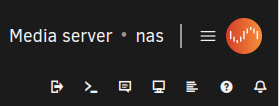
I have been working through setting up the server using 'root' and as soon as I access the WebUI I am logged in as root. As a Ubuntu user I am used to not working as a root user unless necessary therefore I made and set up a user in my name. However, to login as that user I first need to log out of the root user. The way to do this is not apparent in the WebUI. A search of the forums returned nil. Can I ask how to log out of ver. 6.12.11 please? I find that if I change the display to white I have a logout option in the top bar but that seems a long winded was of logging out.
-
I am new to Unraid and had 6 dockers running correctly until I made some change to paths in radarr. Since then I am unable to access the WebUI for that instance. I have followed many web pages with similar problems but have been unable to find a solution that works for me. May I have assistance please? Unraid 6.12.11 radarr_logs.txt
