





Matthewmilesuk
Members
-
Joined
-
Last visited
-
Thanks for the reply. weird thing is, I’ve tried four different cards (all the same model, but a couple of different revisions); so clearly my Poweredge R720 doesn’t agree with something… I’ve got a couple of 12G SAS cards (LSI) - will give these a go and see if anything different happens and provide an update!
-
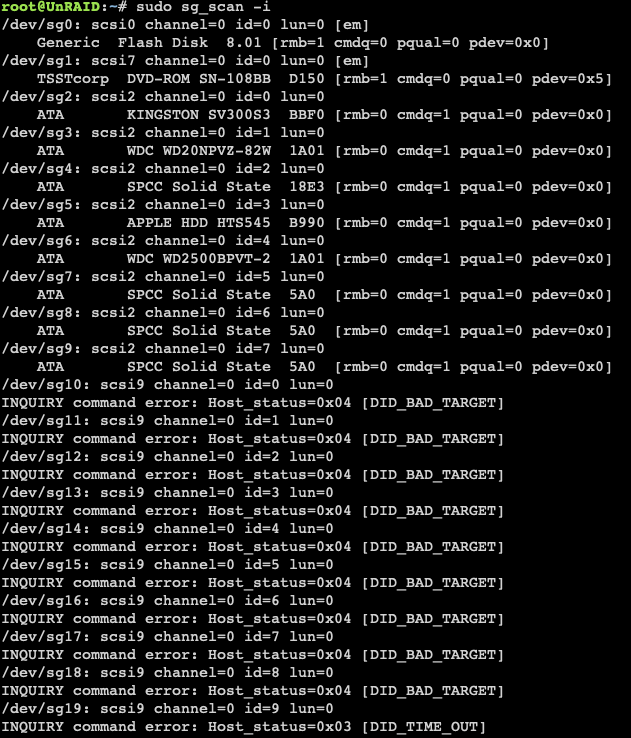
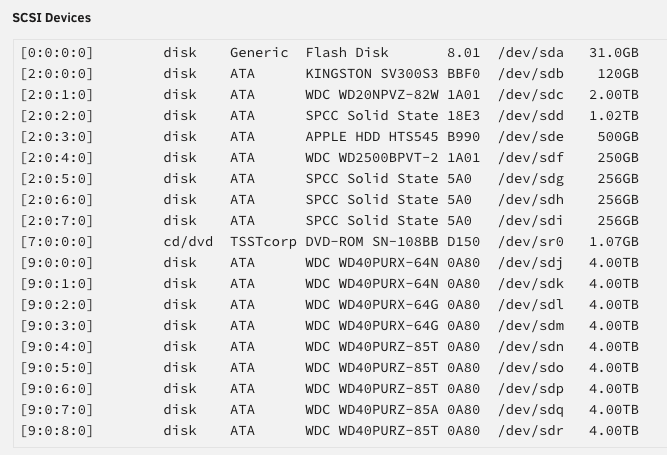
I've also attached the results from sg_scan within the console, along with a screenshot showing that the drives are recognised ok in the system devices section. The disks in question are the Western Digital 4.0Tb drives at the bottom of the list.
-
Hi All I've got a PM8003 Netapp SAS card, which is being recognised by my Unraid system without any issues (as far as I can tell). This is connected to a Netapp DS4246. I can see the drives in the enclosure listed in system devices, but they don't show up in the 'main' screen to allow me to add them to my array (or do anything else with them!). Would anyone be able to help, please? I've attached the diagnostics info in case this helps. unraid-diagnostics-20240902-1441.zip
-
Matthewmilesuk joined the community
-
I agree with the above. I think there are some commercial decisions which could be made here - specifically to increase adoption and market share away from ready-made solutions like Synology and Qnap. I have only been using Unraid for a fortnight, and was tempted by the “Unraid array” option as I have outgrown my Synology NAS in terms of drive bays. The thought of having a 30-drive array was VERY appealing, and I equated this to the SHR/SHR2 format that Synology offers - parity protected, can grown in drive capacity over time, can use variable size drives. When I found out I could only set this up as a single array (and then had to use other pool options), I was a bit disappointed. However, 14 days of playing has convinced me Unraid is the right solution for me and I’ve just bought a lifetime license. I would consider myself fairly technical - I’m not a sysadmin, dev, etc in everyday life, but am an experienced ‘tinkerer’ and home enthusiast. My suggestion would be to create wizards in the system to help with core functionality: Initial config How do you want to use the system? NAS-type device (no VM or Docker) Apps & Services (docker and/or VMs) All rounder (show me everything) Create a storage space What is the purpose you’re trying to achieve? Parity protected storage long-term Unprotected, fast, SSD storage Etc This is LESS about the file system type and more about the end goal. Less technical users won’t know the difference between xfs, zfs, btrfs, etc. and most won’t care. They want to know their data is protected against a couple of drive failures, if it’s fast for multimedia creation, if it’s safe for long time storage of documents, etc. Create a cache Outline WHY this would help What drive types are best (SSD or NVME) Create as a read or write cache (again, Synology offers this) If you’re looking to tempt people away from the other ready-built players, then you have a real opportunity to not only win market share but also educate your customer base. Give simple or advanced options for config, remember that not everyone has been using the software for years and it can be very daunting! YouTube and the community forums have been SUPER helpful for me, but there is an opportunity for Limetech to create some basic e-learning (which isn’t hard these days!). System overview, understanding different filesystem types, docker management, VM management, community applications, etc. help build up knowledge so users become more invested in your ecosystem. You could possibly look at certification options for installers/professional users too? Lastly, could you publish a planned development roadmap? For example, there’s lots of “ooh multiple Unraid arrays will be supported” but no idea of when this will likely be, so people end up drawing their own conclusions which can lead to misinformation being spread and potentially hurting the product. Could you pin down features (and requests you’re progressing from this thread) into a basic roadmap: V7.0 - major release (clearly outlining features like you’ve done with the beta releases, but AHEAD of release) V7.1 - multiple unraid arrays, new mobile UI, iOS and android unraid connect companion app V7.2. - etc I don’t think anyone would be upset if features get bumped to a later release and an explanation given ahead of time, and it’s not something to hold you to account over (well, maybe a little), but it would help manage customer expectations and let everyone understand where their requests feature, plan for any major upcoming changes, etc. This should be fairly easy if you’re using an Agile-based sprint planning cycle or Kanban approach? One final thing… I’d personally like to thank the Limetech team for your hard work, community engagement, and thoughtful development. It shows true passion for your product, and means that it continues to meet the needs of your customers. Lots of companies don’t get this right, but from what I’ve seen so far; you are nailing it! I’d be very happy to chat through with the developers or other Limetech colleagues to give a total “newbie” view or feedback if that’s of interest.


