SerpentMage
Members
-
Joined
-
Last visited
-
Sorry for necro'ing the thread. So far it hasn't happened again. Only other thing I remember doing after the last time was uninstalling the Dynamics System Info plugin. Marking JorgeB's reply as the solution and I'll make a new post with the logs and such if it happens again. Thanks! -Serp
-
Will do, I wasn't sure if enabling the Local Syslog Server would automatically write out it's own syslog there too. Thanks for the help!
-
Hello All! Sorry for the vague title, I'm a little stumped where to go to get more info on this one. I have Unraid 7.1.4 running on a 45HomeLab HL15. Over the past month or so I've had a few instances where i wake up in the morning and Unraid isn't replying to anything on network. No docker containers, Web UI, SSH, nothing. I try getting in via the IPMI interface and the first time or so it happened I tried logging in but it never accepted my password. When it happened this morning, I'd enter the username via the IPMI console, and it would throw the version information and toss me back to the UserID login prompt, never asking for a password. There were messages on screen that mentioned something about Dynamix. But I'm an idiot and deleted my old screenshot and didn't take a new one this morning. After this happened the previous time I setup a Raspberry Pi as a syslog server and pointed Unraid to it. The last message I see there is "2025-08-04T17:43:17-06:00 Ascension monitor_nchan: Stop running nchan processes". Ascension is my Unraid server, there are no messages for 2 hours before that, and nothing after until the server came back online. I don't see any hardware faults in the IPMI interface. I could set Unraid to mirror syslog to flash to see if it'll record something more useful but I'm weary of doing that because it can go a week or more without happening and it could cause extra wear on the flash drive which I had to replace not too long ago due to a failing flash drive. I've had to kill power either via the button or via IPMI, as trying to do a safe shutdown via IPMI doesn't work. Once it comes back up, it goes through the parity check, finds 0 errors, and everything seems to be ok until it happens again. Only other odd thing I've experienced lately was that my Plex container would randomly start filling the docker.img. Once it reached 100% used, it would go back to normal. I removed that Plex install a few days ago and that issue has not returned, so not sure if this is related at all. I know there's not a ton to go on, but any suggestions on what else I can do to try and find out what's causing this or any other specific information I can try to provide? Thanks, -SerpentMage
-
Wanted to give a quick update on my previous issue. HW Transcoding is still not working. I was able to get both Jellyfin and Frigate working using the P4000 card, so it does not appear to be an issue with the card as far as I can tell. Also double checked that software transcoding works fine. I installed Plex again using a different repo (linuxserver's) as a test, same issue. I also uninstalled, deleted and reinstalled Plex using the official repo which is what I'm currently running on. I also pulled a log bundle from plex while it was buffering after trying to get it to do HW transcoding and it was just sitting there buffering. I'll admit I'm not 100% sure what I'm looking for but I wasn't able to see any specific errors or anything of note. Any assistance or even links to known good guides would be greatly appreciated. 30DEC2024 update - It's now working and I have no clue why. Removed all of the settings and such to get the video added, restarted the container, readded the same settings, restarted container again, and it's working. I'm marking it down to either A- It's haunted. B- It hates me or C- It's haunted and hates me. I'll stop necroing the thread now. Thanks all!
-
SerpentMage changed their profile photo
-
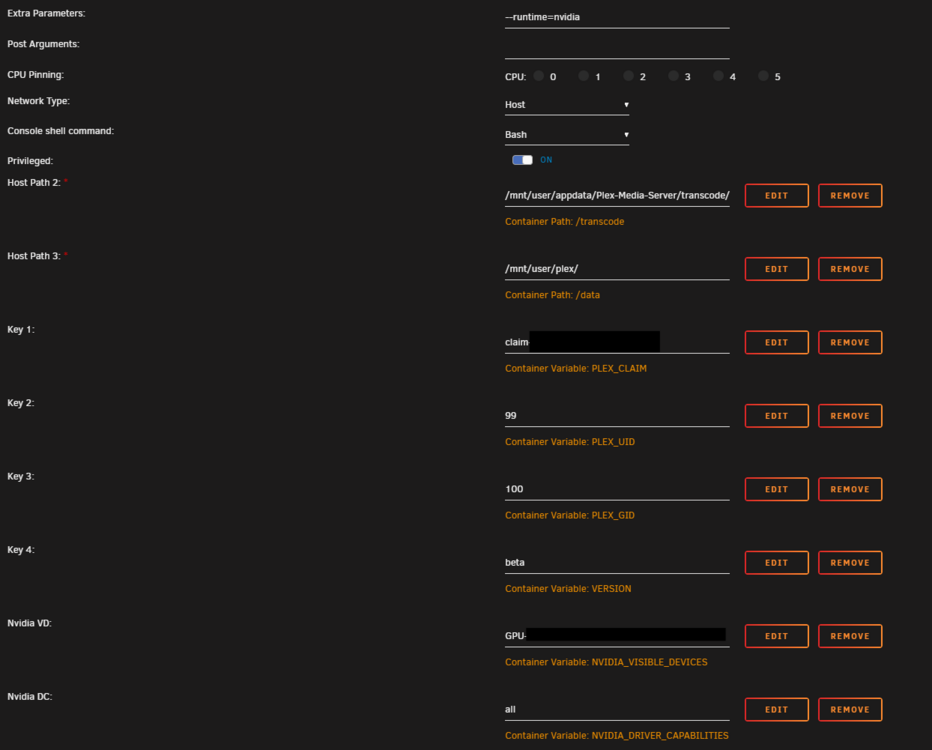
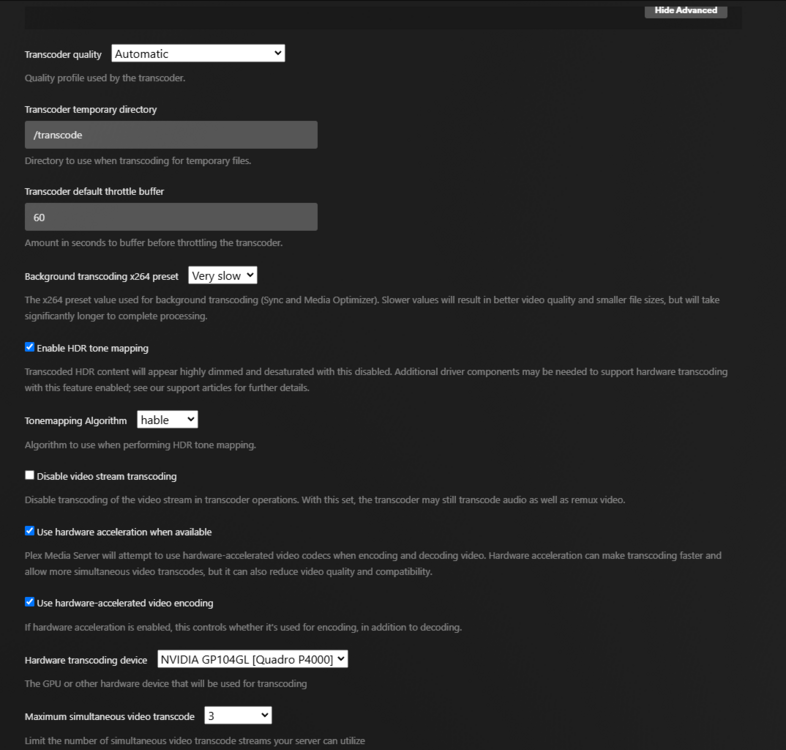
Hello All! Apologies if I missed something to fix this easily. Recently installed a Quadro P4000 in my Unraid server. Got the NVidia-Driver plugin from ich777 installed. It sees the card and as far as I can tell not seeing an issue. Plex has been running on my server for a few months with no issues. Tried getting the P4000 setup in Plex for hardware transcoding. At first it wasn't showing up in the dropdown for Hardware Transcoding Device. It took some doing and much searching, but was able to resolve that and it let me assign the P4000 as the transcoding device. Issue is whenever I try to transcode anything, playback freezes like it's buffering, but nothing happens. The Plex dashboard shows the stream still there, not transcoding, the timer is going but the preview image never changes. I've let it sit for a minute or so seeing if it'll show an error, but as far as I've seen it never does. Not sure what information you may need but I've included a couple screenshots of the docker variables and the transcode settings in Plex. *Note* most of the configs I've seen do not have the "Nvidia Driver Capabilities" variable. I set this while troubleshooting, it was doing the same thing before and after setting that variable. Any assistance or guidance would be greatly appreciated.
-
Sounds good, I'll run one more non-correcting check just to be safe. Thanks for the advice!
-
Only a few weeks into my Unraid journey, so apologies if I'm doing something wrong. I ran a scheduled Parity Check Sunday (yesterday) (starting at midnight), when I woke up it was still running and had found 70 errors. I quickly went to the forums and found similar posts. Those posts noted that it is not good to have "Write corrections to parity" enabled for scheduled checks. I checked mine and found that it was enabled, so I stopped that scheduled check and ran a new one without Write corrections to parity. When it finished it found 329 errors. In looking at other posts and general research I found that a couple causes of parity check errors are failing disks and memory errors. While migrating some drives from my old TrueNAS server to this new Unraid server, one of the old drives died. I do not believe it was ever a part of the array, if memory serves it died while I was trying to format it and get it ready for preclearing. I RMA'd the drive and the replacement is in the array and working fine. To be cautious I ran a SMART test on all my drives, including both parity drives. All drives passed. A few days into setting up the server, I did have an issue where one of my two RAM sticks stopped responding and Unraid essentially locked/crashed and required a hardboot to come back. I believe this most likely caused the parity errors. For a few days (can't remember the exact timing), maybe a week, the server ran on one RAM stick only. I swapped the RAM sticks around and this got both sticks back up and running. There have been no issues since. I ran Memtest this morning and it passed with no errors. This is where I'm not sure how to proceed. I feel the server is fine, but I'm not sure if I should run another Parity Check and tell it to write the corrections, or if there is something else I should do. Any advice would be greatly appreciated!
-
So I think I fixed it? I got a different USB drive, created a new boot drive and it worked. Odd thing is, I did this same thing earlier with this same drive. I'll admit I very possibly messed something up and/or got the USB drives mixed up. I was doing this while working earlier today. So yeah, sorry for the false alarm. Thanks for trying to help trurl! -Serp
-
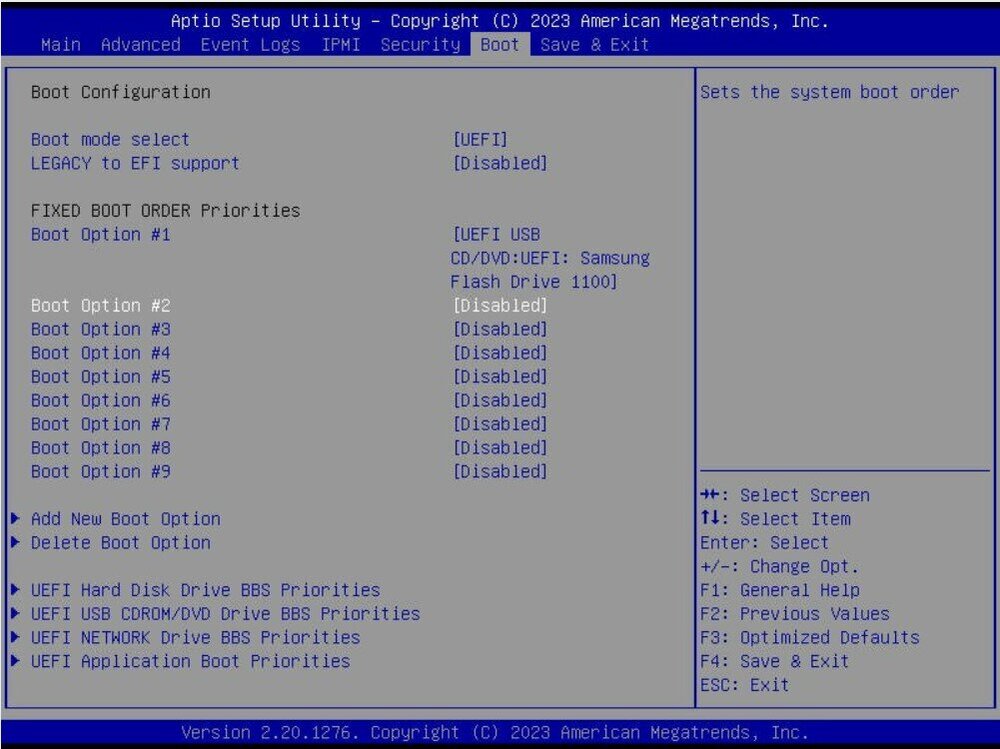
Currently the only boot device I have enabled is the Samsung USB drive and is still booting to the same screen as above.
-
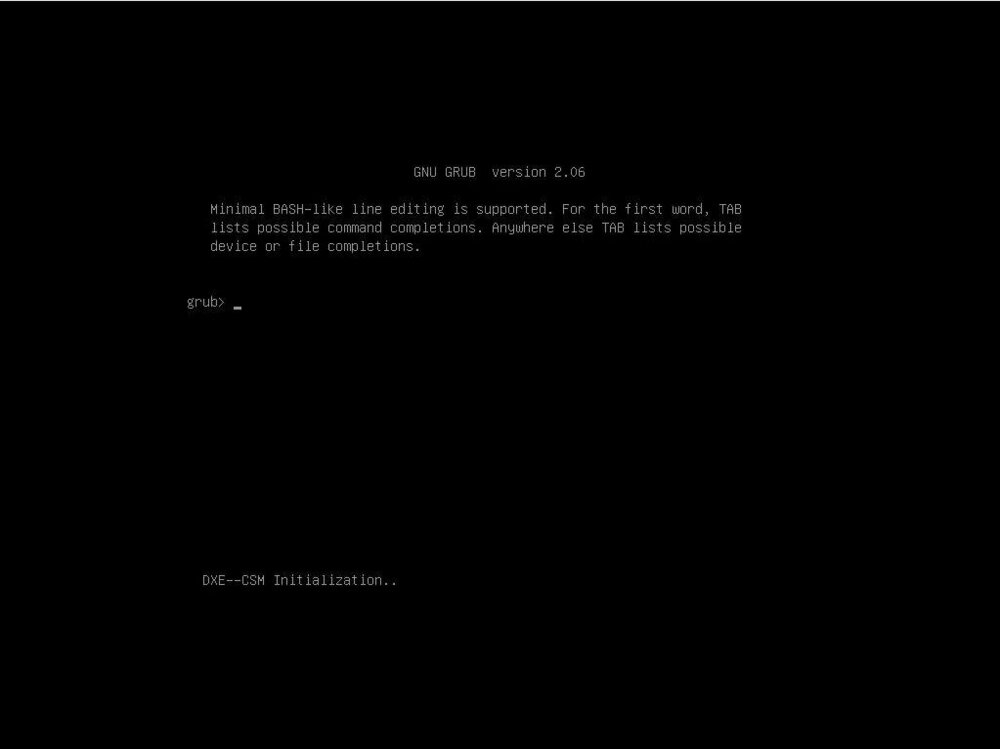
Hello all! Firstly, my apologies if there's an answer in the forums for this already. I did search but was unable to find it. I am trying to setup my first Unraid server. It's running on a Supermicro X11SPH-nCTF. To make it more fun, it's also my first Supermicro motherboard for what it's worth. Short version is when I try to boot the server to Unraid I get to the screen in the attached screenshot. I used the USB drive in a different machine and it boots fine. My best guess is that it's some BIOS setting or something I'm not familiar with. I have tried a number of boot orders and boot settings that unfortunately I can't remember at the moment. The server was originally built and running Rocky Linux off an NVME drive and I made sure to boot into that before trying Unraid. It booted into Rocky with no issues. Sorry if there needs to be more info, please let me know and I'll provide what I can. Thanks in advance!