rory13
Members
-
Joined
-
Last visited
Everything posted by rory13
-
Hi, has anyone found a fix to this problem, if not I would like to raise an issue, where is the best place to do this? When a container network type is set to "container" (e.g a container networked via gluetun VPN) and the host network container (gluetunvpn) is set to auto update, when it auto updates the client network containers (e.g container going through gluetunvpn) is not rebuilt until you click in the docker tab in unraid. Container stays down infinitely until visiting unraid webgui and heading into docker. In short, any containers networked via a container set to auto update do not rebuild automatically after auto update
-
Anyone had any luck with GPU in threadfin? Just been trying to pass my Nvidia GPU through and not been successful yet. But I know it should be technically possible. Does anyone know if there is a specific env variable for this container? I've tried the good old --runtime=nvidia NVIDIA_VISIBLE_DEVICES = all etc Thanks
-
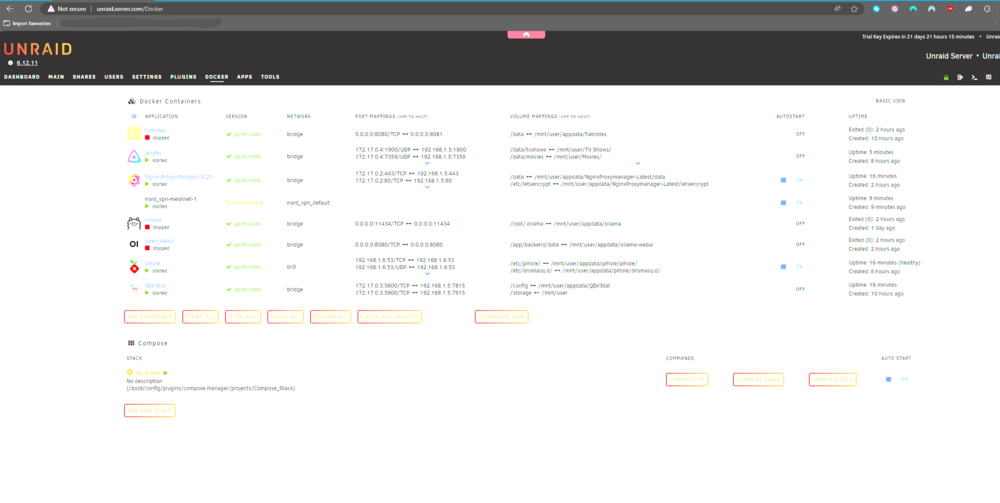
Hi everyone, having recently started my journey into homelabs I have made good progress today but have one concern. I feel the data usage from the docker.img file is quite large. Almost 40GB. As you can see the pool with containers in looks like so: Apologies for the blown out image here (snip and sketch makes my screen go bright, beats me) but here are the containers I have running: My initial thought would be the compose add on and nord VPN as they are the only non community addons I have done however I noticed the size almost doubled once I had installed jellyfin and nginx Deleting the docker containers and re-adding them doesnt seem to have an effect but I can see that its definetly the docker image taking up all that space. I have 2 AI models downloaded for ollama AI but even then about 5GB each, doesnt seem right! Any ideas would be well appreciated being new to home labs all together I am sure I have messed up somewhere. Should the space free up when I remove a container?