





Darkstormyrain
Members
-
Joined
-
Last visited
-
No nothing, I ended up doing a factory reset yesterday which solved it somehow.
-
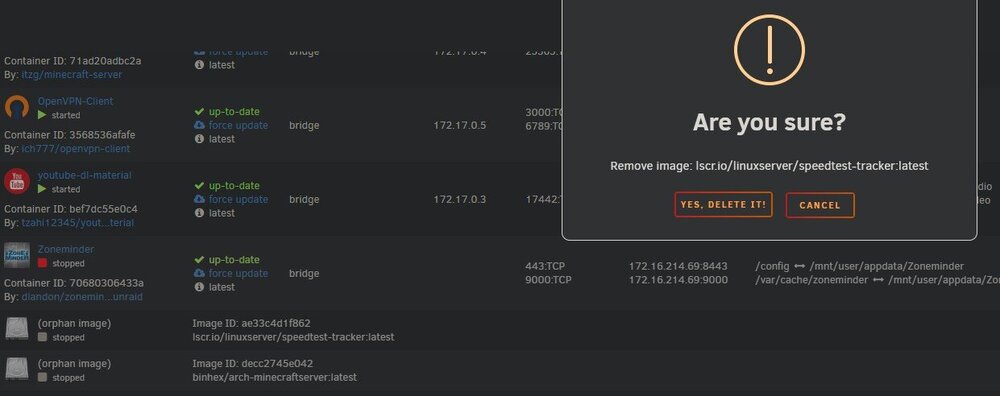
For some reason when I click on "Yes Delete It" nothing happens like its not registering the click but clicking cancel does something. This happens for orphan images. Also I cannot click on "start" on any docker container from the docker tab but when I go to dashboard I can start stop restart etc with no issues. I've used 4 different browsers to test this including one clean install with no extensions. And have tried on multiple devices (android phone, chromebook, PC). This has been happening for the past two weeks and I even tried updating to 7.0.0.4 beta from 7.0.0.2 to see if that solves it which it did not. What might be the cause of this?
-
Do you have network discovery turned on? Windows settings > network internet > advanced network settings > advanced sharing settings > private networks > click on network discovery
-
I think read caching would be a perfect addon. I have a QNAP NAS that has that ability. I set up an SSD cache drive just for playing games on steam. All of my steam library is installed on the NAS and lets say I've been in a big Cyberpunk 2077 mood the first load may take a bit longer but after that it takes almost 0 time to load up the different areas and top it off with a 10gbe connection its just like it was installed directly on your computer except that you can access it on any computer in your house without having to install it on each. That is how I would use it.
-
No bashing me because I'm just screwing around going for speed and I don't care about redundancy or data safety and that being said I created a pool 5x6tb SAS3 hdd in Raid 0 and the cache pool with 2x SAS3 sdd in raid 0 and have a single NVME in the array When I try to create a share from the 30tb pool I made I cannot select the cache setup so is this not possible? I see that I can select cache while using the array but I don't want to use the array unless I can set it in raid 0 for this experiment and it seems from the GUI its not possible. Am I missing something?
