





rbarr110
Members
-
Joined
-
Last visited
-
Thank you for the reply, especially the REBOOT part. Fan appears to be being controlled again by the motherboard.
-
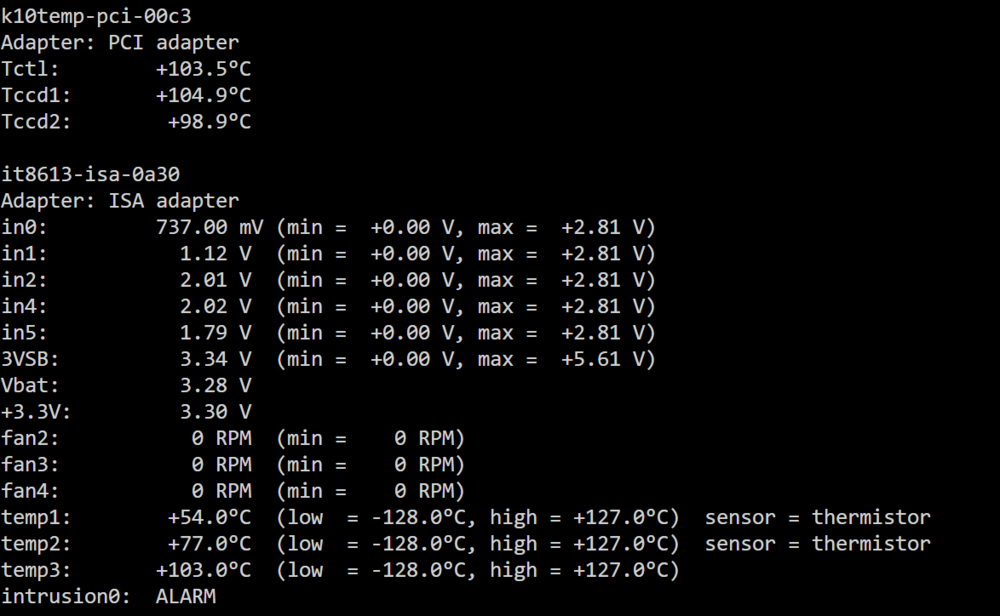
Dynamix Auto Fan Control I can get the fans controlled, Fan1 - Blows on my drives, Fan2 - Is one of the Case Fans Fan 3: The fan over my AMD 7945 APU. I am having an issue when my drives go idle, the temps drop and the fans stop even though I have the lowest setting to be 15%. I have had 3 random system shutdowns, that I believe (but not sure) are due to the APU getting hot because Fan 3 stops. I have tried to disable the fan control for Fan 3, but then it runs at 100% non-stop. Before I installed the fan control plugin, I believe the motherboard was automatically controlling the speed for that fan. How can I restore this functionality? Or how can I make it so Fan 3 never goes completely idle? APU temps getting over 100c when fans go idle.
-
I was able to set up the VM and get in without much trouble. However, when I am in the VM I have no network access. I find that odd as it was working when installing. During the install it made me verify my icloud account and things were sent to my cell phone to verify the account, so it was working during setup? Any suggestions?
-
Thank you. After messing around for a few hours I came to that conclusion.
-
I have been watching all kinds of videos etc on an Unraid setup. I am in unraid and can assign drives. However, what I want to do, I don't know how or see a way to do it. I want to setup drive for drive parity. Example... (2) 20 TB drives (2) 10 TB drives (2) 4 TB SSD's I want each of the drives be a parity/backup of each of the corresponding "matching" drives where the SSD's are the cache drives. I cannot figure out how to make each drive have it's own specific parity drive. Any help or schooling on this is greatly appreciated.

