JayDee73
Members
-
Joined
-
Last visited
-
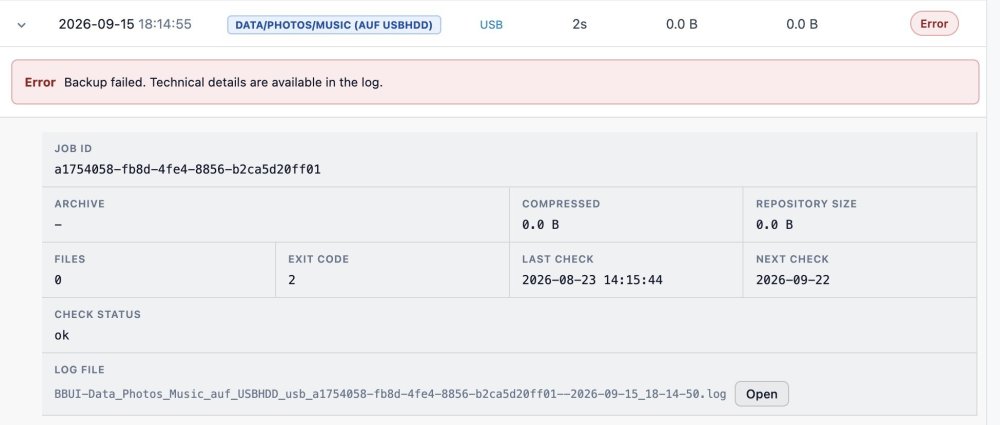
This is the error message: Log said: 2026-09-15 18:14:50 INFO ━━━━━━━━━━━━━━━━━━━━━━━━━━━━━━━━━━━━━━━━━━━━━━━━━━━━━━━━━━━━━━━━━━━━━━━━━━━━━━━━ 2026-09-15 18:14:50 INFO PHASE 3: BORG BACKUP (CREATE) 2026-09-15 18:14:50 INFO ━━━━━━━━━━━━━━━━━━━━━━━━━━━━━━━━━━━━━━━━━━━━━━━━━━━━━━━━━━━━━━━━━━━━━━━━━━━━━━━━ 2026-09-15 18:14:50 INFO Repository: /mnt/disks/USBHDD/borg-backup/borg-backup-data 2026-09-15 18:14:50 INFO Backup paths: /mnt/user/photos /mnt/user/music /mnt/user/data/Backup /mnt/user/data/Hausbau /mnt/user/syncthing /mnt/user/immich /mnt/user/immich-gen 2026-09-15 18:14:50 INFO Excluded paths: none 2026-09-15 18:14:50 INFO Exclusion markers: none 2026-09-15 18:14:50 INFO Performance: Compression=lz4 2026-09-15 18:14:50 INFO File activity output: disabled 2026-09-15 18:14:50 INFO Cache: /mnt/user/borg-backup-ui/cache/usb_data_photos_music_usb 2026-09-15 18:14:50 INFO 2026-09-15 18:14:50 INFO Borg create starting... (7 paths, compression=lz4) 2026-09-15 18:14:52 INFO Warning: Attempting to access a previously unknown unencrypted repository! 2026-09-15 18:14:52 INFO Do you want to continue? [yN] Aborting. 2026-09-15 18:14:52 INFO Cache initialization aborted 2026-09-15 18:14:52 INFO terminating with error status, rc 2 2026-09-15 18:14:52 ERROR ERROR: Borg create failed (exit 2) And because of this "previously unknown..." I did a Refresh. We had this error already in another situation a couple of weeks ago, and you told me to refresh. I did remember this and did it again. ;-) So, to answer your next question: Yes, the backup is unencrypted. No, I didn't have restarted Unraid straight beforehand. But wait....I restarted it about 4 days ago because of a new network card driver. So yes...between the last successful job and the latest failed one there was a restart. And yes, you told me that a permanent fix for this is still in the making and until then, a Unraid restart leads to this behaviour. So in the end it's not related to the USB mount problem, but to the "unencrypted backup" problem?! And regarding the last questions: I refreshed every job, not all of them with the general button. JD
-
Thanks for the Update. USB Backup jobs are up & running again. But a small note: I had to refresh the repositories to get them going again. Without a new refresh, the job still failed.
-
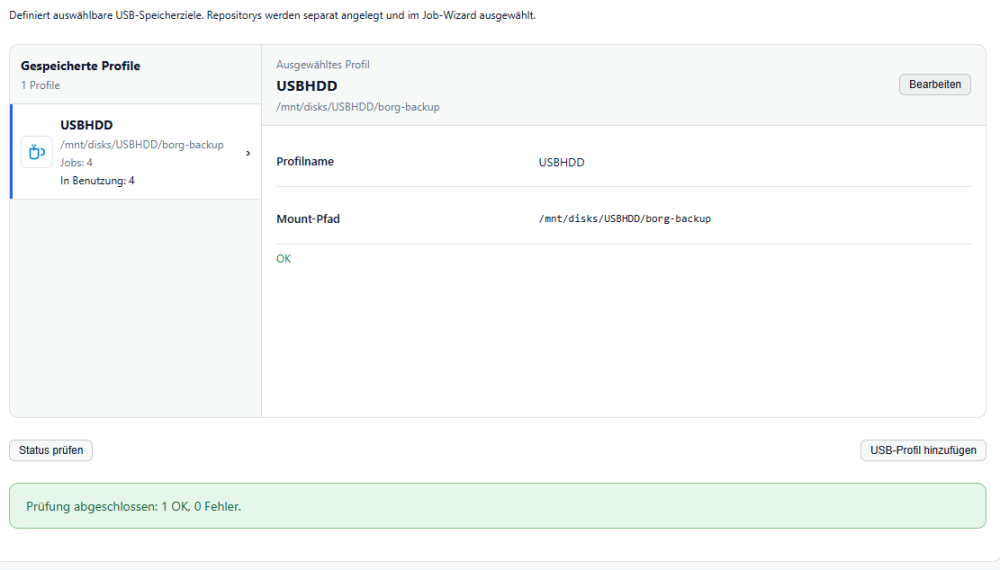
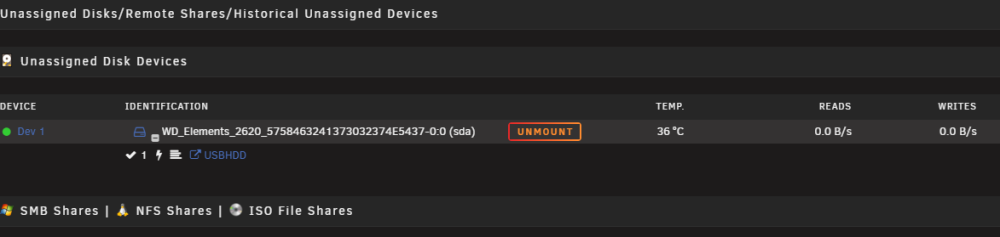
Maybe I do have another issue.... I am running weekly backups for quite some time now. They all went successful. But yesterday 4 out of 5 failed. All do have in common that they have my USB HDD as a target. The fifth job to Hetzner Storagebox went without problems. So no general issue I think. Log says that USB HDD isn't mounted: 2026-09-15 07:01:30 INFO 2026-09-15 07:01:30 INFO Created lock file (PID: 3767891) 2026-09-15 07:01:30 INFO Parity check enabled (ABORT_ON_PARITY_CHECK=true) 2026-09-15 07:01:30 INFO USB mount check enabled: /mnt/disks/USBHDD/borg-backup 2026-09-15 07:01:30 INFO Saving skipped status: USB is not mounted: /mnt/disks/USBHDD/borg-backup 2026-09-15 07:01:30 INFO Saved backup status: /mnt/user/borg-backup-ui/status/2026-09-15_07-01-30_Data_Photos_Music_auf_USBHDD_usb_a1754058-fb8d-4fe4-8856-b2ca5d20ff01.status 2026-09-15 07:01:30 INFO Notification event processed (event=backup_skipped source=backup_job unraid=True email=False apprise=False apprise_mode=queued apprise_profiles=[]) 2026-09-15 07:01:30 INFO Unraid dashboard widget cache updated (backup finalization) But USB Profile Check says "all good": Unraid Dashboard says: USB Drive is mounted: And Access to the drive (e. g. through the hyperlink shown above (USBHDD)) is also possible. The only thing that changed (from my perspective): Updates of the Plugin. Maybe the "job id update" could play into this? Any thoughts? Regards, JD
-
Interesting. After these steps and a rescan of FCP the warning was gone. So I assume you won't need the output of the cfg and the version numbers?
-
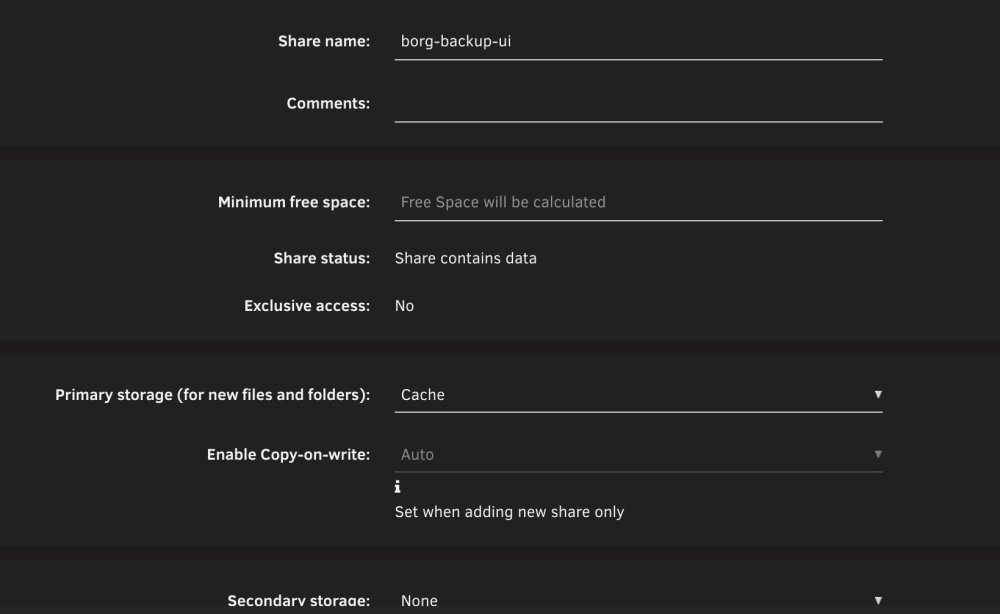
I do have another question. I've ran the "Fix Common Problems" Plugin today (I am doing this from time to time...) and it threw a warning regarding Borg Backup UI: I don't really understand why the Plugin thinks that Borg Backup UI is an "array only share". I've created the share as a Cache-Only share: Do you have any explanation for this? Can you reproduce this? And of course: What can I do to solve this warning? Regards, JD


-
Dito bei mir. Sobald ich mit dem Standardtreiber L1 (also Helper Mode 2) setze, bricht der Speed auf 450Mbit ein. Nutze eine 2.5Gbit-Anbindung, ist also deutlich unter den Möglichkeiten. Allerdings bricht es auch nur in einer Richtung ein. Speed zu Unraid hin ist 450Mbit, in die andere Richtung 2.35Gbit. Dafür komme ich hoch bis C10.
-
Das Phänomen habe ich bei mir auch. Entweder C3 und voller Speed, oder höhere C-States, aber dann bricht die Netzwerkperformance ein. Habe schon tausend Dinge probiert, und keine Lösung gefunden. Falls das jemand bei diesem Board mit höheren C-States UND voller 2.5G-Performance hinbekommen hat, gerne melden. @_alo_ : Meines Wissens nach zeigt er zwar L1 aktiv an, aber trotzdem erreicht man eben nur C3. Oder aber (mit einem anderen Treiber), hat man bessere C-States, aber dann weniger Durchsatz (gemessen mit iperf). Ist halt abhängig davon, ob man den Stock-Treiber aus Unraid nimmt oder den Plugin-Treiber. Der eine macht gute C-States möglich, der andere macht volle Performance. Auch hier: Wenn das bei dir anders ist, sag gerne mal Bescheid.
-
Thanks for the explanation. To be honest: How can I achieve this? Can I specify this "extra parameter" anywhere in the GUI? Haven't found that yet...Or is a "special combination" of the four retention values an equivalent of "keep the last three backups"?
-
I can confirm that this workaround has also worked for me. Thanks for that! In addition to that, I do have a question (it's most probably not an issue itself...): I do make a backup of my two VMs (one Linux based, the other one Windows 11). Same retention as for the rest, and one backup job per week. What I have observed through the last couple of runs is, that the Repository increases quite a bit with every run. Several additional GB per run. Of course, the two VMs are "changing", but besides from usual OS updates, nothing special was added. But maybe this simply is "by design" how Borg works? What I was thinking about: Is it possible to do a full backup with every run (so no incremental) and specify some kind of "only keep x full backups"? So that with e. g. 3 kept backups, the oldest one would always be deleted when a fourth backup begins? This would result in a "nearly stable" amount of Storage space needed, right?
-
I am using Borg Backup UI for several weeks now. My schedule for my five jobs is "once a week", which happened again yesterday night. The weeks before, all five backups went succcessfully. But yesterday, four out of five backups failed. These were all local backups, which aren't encrypted. The fifth backup is to Hetzner storagebox (encrypted), this was successfull. All failed backups showed this in the log: 2026-09-08 02:45:42 INFO ━━━━━━━━━━━━━━━━━━━━━━━━━━━━━━━━━━━━━━━━━━━━━━━━━━━━━━━━━━━━━━━━━━━━━━━━━━━━━━━━ 2026-09-08 02:45:42 INFO PHASE 3: BORG BACKUP (CREATE) 2026-09-08 02:45:42 INFO ━━━━━━━━━━━━━━━━━━━━━━━━━━━━━━━━━━━━━━━━━━━━━━━━━━━━━━━━━━━━━━━━━━━━━━━━━━━━━━━━ 2026-09-08 02:45:42 INFO Repository: /mnt/disks/USBHDD/borg-backup/borg-backup-appdata 2026-09-08 02:45:42 INFO Backup paths: /mnt/user/appdata /boot/config/plugins/dockerMan 2026-09-08 02:45:42 INFO Excluded paths: none 2026-09-08 02:45:42 INFO Performance: Compression=lz4 2026-09-08 02:45:42 INFO File activity output: disabled 2026-09-08 02:45:42 INFO Cache: /mnt/user/borg-backup-ui/cache/usb_appdata 2026-09-08 02:45:42 INFO 2026-09-08 02:45:42 INFO Borg create starting... (2 paths, compression=lz4) 2026-09-08 02:45:43 INFO Warning: Attempting to access a previously unknown unencrypted repository! 2026-09-08 02:45:43 INFO Do you want to continue? [yN] Aborting. 2026-09-08 02:45:43 INFO Cache initialization aborted 2026-09-08 02:45:43 INFO terminating with error status, rc 2 2026-09-08 02:45:43 ERROR ERROR: Borg create failed (exit 2) Besides the several Plugin-updates in the last week, nothing has changed. I also did a reboot yesterday (before the backup jobs started) because of the folder permission thing. Any thoughts what could have happened? The log says "previously unknown (and unencrypted) repository". But how can it be unknown? As I did backup jobs before... Regards, Stefan
-
Another question (and I hope I won't receive a trophy for "most annoying user" :-) ): When backing up containers, one has to choose the appdata folder to be backed up. So far, so good. But what about the individual container configuration stored in the xml files on the flash storage? Will they also be backed up "automagically" in the background within the appdata-job? Yes, when I do have another job for the flash, the xml files will be backed up with this job. But it would be more fitting if they will be stored together with the appdata itself, won't it? What is your opinion about that?
-
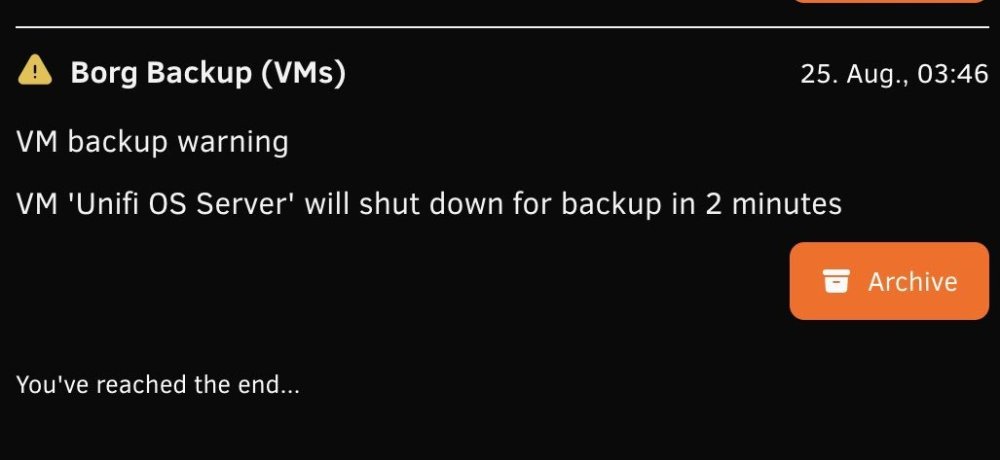
Is it intentional, that during a VM backup process, a warning regarding the shutdown will be thrown in Unraid notifications? I know, a shutdown of a VM could be a scary thing 🤣, but in this case it is more of a "expected behaviour", right? So maybe this could be categorized as a informational notification (therefore a green check mark, no yellow exclamation mark)? What do you think?
-
Good morning, thanks again. So I will add this to my VM backup job. Another one: I have created several jobs, ran all of them (all were successfull according to the UI) and also did a restore test for every job, which also went successfully. As I was curious, I observed the live log with every task (most of the time...). With nearly every task, I encountered an "error icon" within in the live log on the upper right at one time during the task (not permanently!). But after a refresh, the icon was gone. And, as I said, the tasks themselves have finished with no errors at all. Two examples: Do I have to be concerned that I now have corrupted backups? As mentioned, the restore tests (Level 2) were all fine. And the backups are also listed with status success in the History tab. PS: As you might see, I am also from Germany. ;-) But I'll stick with English here, as maybe other users around the world can also benefit from my findings.


-
Great, thank you! This helps. On to the next one. ;-) When backing up VMs, it seems that it is "enough" to just back up the domains folder, which means the .img file of every VM. Is the file really everything one needs to get this VM going again? Let's say you backup this img file to an external backup environment and your primary Unraid system literally "burns down". Can I set up a new Unraid system, install your plugin and do a restore job (=restore the img file)? Or do I need more? For example, the well known Appdata Backup plugin offers the possibility to backup "VM meta data", which seems to be the /etc/libvirt/qemu folder.
-
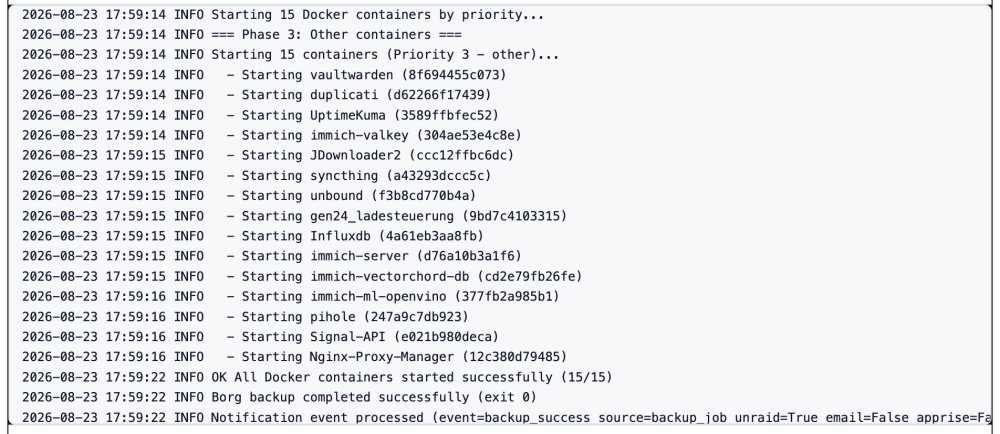
Hi, thank you for this awesome plugin. I was desperately searching for a "one-stop-shop-solution" replacing my different backup programs (Appdata-Backup, VM-Backup, Duplicati). This plugin seems to be what I am looking for. That being said, I am testing your plugin for my different needs. One of them is my docker containers (about 20). When doing a first test-run, I saw the logs saying something about "priorities" when re-starting the containers. What is that about? I haven't found any priority-settings in your Borg-UI, nor in the Unraid Docker section. According to the log, all my containers are "priority level 3". As I do have some DB containers who should start first, I'd like to use this priority feature. How can I achieve this?