





David7
Members
-
Joined
-
Last visited
-
Thank you, that made it work for me! It's unbelievable how Wildcard more and more screws up the technical basis of their game. I've been hosting (and playing, but not anymore for myself) ARK sincve 2018, and it constantly gets worse.
-
I am also new to running servers in Docker (see above), but from my experience so far: UDP 1 Port is missing for you Scorched Earth server and you also have to set - for each port - the same value both for Container and Host port. Like you did for the Island server. So UDP 1 7779 Host Port points to 7779 Container port.. etc. Example from my 2nd server:
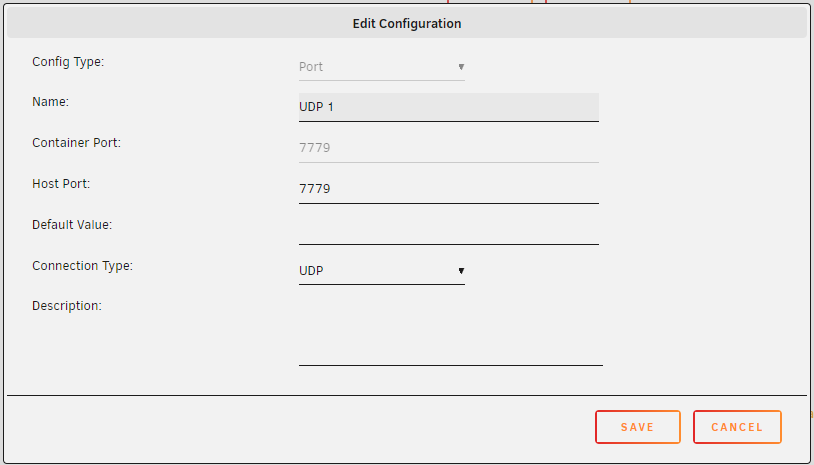
-
To install multiple instances of the same docker container, you need to follow this:
-
David7 changed their profile photo
-
Thanks! None of that worked actually.. but it led me to the right track: First, there is no port mentioned in the log. I remember that it was with ASE, but not in ASA. Also there are no ports set in the GameUserSettings.ini - I also remember that they are taken over from comand line options for ASE server, but apparently not with ASA. I then added port=7779 manually to the .ini - still same issue. While googeling for some more information on what actually works in the .ini and what not (official wiki might be wrong..?) I came across this post: And that was the solution. I removed the spaces in the "Server Name" setting in the Docker Container settings, and I can now successfully connect to the 2nd server! Btw, I also tried to put the "Server Name" in the container settings also in quotation marks, but it seems that they are not "transferred". In the GameUser Settings.ini it's then still without quotation marks. So long story short: If you are running more than one ASA server, do not use blanks / spaces in the server session name.
-
Hi, first of all, thank you @ich777 for you great work here, that is really nice and true community work! I am struggeling with running two Ark Survival Ascended containers in parallel. A couple of months ago I startet with the first ASA Server, it still works fine. I also do have quite some expierince with ASE servers running on linux or windows, and by that I am also aware of different ports etc. when running more than one server instance. As I wanted to start a second server, I installad a 2nd container. But apparantly I have some kind of misunderstanding how ports etc. work in combination with docker and bridged connection. First server is standard with port 7777 UDP. Second server, based on my previous expierience, I try to setup with 7779 UDP. But whatever combination I try with Container port mappings app to host (7779 to 7779, 7777 to 7779) and Game start parameter (?Port=7777 or ?Port=7779), it results in Both servers are listed in the Ark Server Browser, with different maps etc.. so this are the two different servers. If I connect to the second server (7779), my connection "is routed" to the first server, and I join the game there. All relevant ports are also forwarded in my router, to the unraid machine. Not sure if this is sufficent information, but I hope I can get some help to understand what I am doing wrong. :)

