





Storken
Members
-
Joined
-
Last visited
-
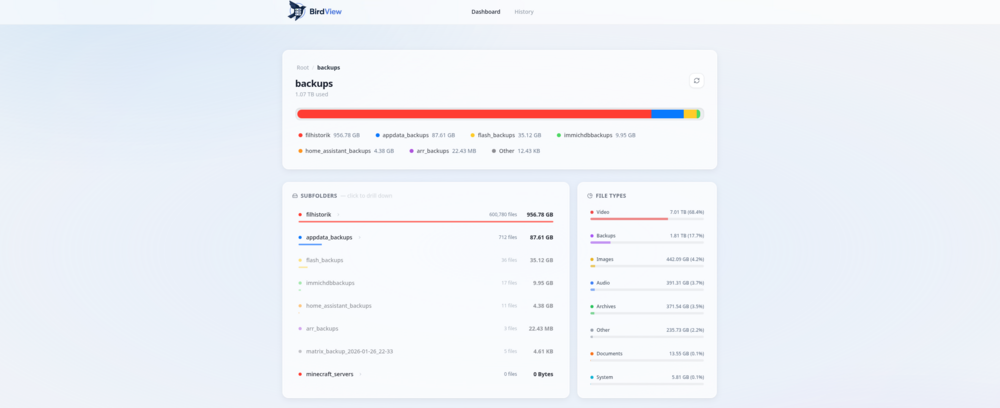
Application Name: BirdView Docker Hub: https://hub.docker.com/r/storken/birdview Github: https://github.com/storkenlorken/birdview XML: https://raw.githubusercontent.com/storkenlorken/birdview/main/unraid-templates/BirdView.xml I made a tool to help get a better handle on where all the space is going on my server. It scans your drives and breaks everything down into a simple, visual dashboard so you can see exactly what's eating up your storage. It’s built in Go so it’s pretty quick even with millions of files. One thing I wanted to get right was how it identifies files. Instead of just looking at extensions (like .zip or .mp4), it also looks at the folder path. This means things like Time Machine backups, Docker data or Plex metadata get categorized correctly even if the files themselves don't have standard extensions. How categories are identified Video: ".mp4", ".mkv", ".avi", ".mov", ".wmv", ".flv", ".webm", ".m4v", ".ts", ".m2ts" Audio: ".mp3", ".wav", ".flac", ".m4a", ".aac", ".ogg", ".opus", ".wma" Images: ".jpg", ".jpeg", ".png", ".gif", ".svg", ".webp", ".bmp", ".tiff", ".heic", ".heif" Archives: ".zip", ".tar", ".gz", ".rar", ".7z", ".iso", ".bz2", ".xz", ".dmg", ".pkg", ".deb", ".rpm", ".zim", ".pst", ".ost" Documents: ".pdf", ".doc", ".docx", ".xls", ".xlsx", ".ppt", ".pptx", ".txt", ".md", ".csv", ".rtf" Backups: ".bak", ".old", ".tmp" OR PATH INCLUDES "timemachine", "backups", "sparsebundle", "backupbundle" System: ".db", ".sqlite", ".sqlite3", ".sql", ".log", ".env", ".json", ".yaml", ".yml", ".xml", ".conf", ".config" OR PATH INCLUDES "docker", ".plex" History BirdView tracks storage growth by saving periodic snapshots of your file system into an embedded SQLite database. Each snapshot records the size and file count of every directory in your path allowing the UI to reconstruct the growth history for any specific folder. Envoriment variables Setting Unraid Default Description Storage to Scan /mnt/user The root folder BirdView will analyze. AppData (Database) /mnt/user/appdata/birdview Where the history and settings are stored. Scan Interval 7 How often (in days) to automatically scan. Web UI Port 8080 The port for the dashboard.
-
I found that the problem was my PC. I installed iperf on another server. Reinstalled NIC drivers and replaced all ethernet cables but no success.
-
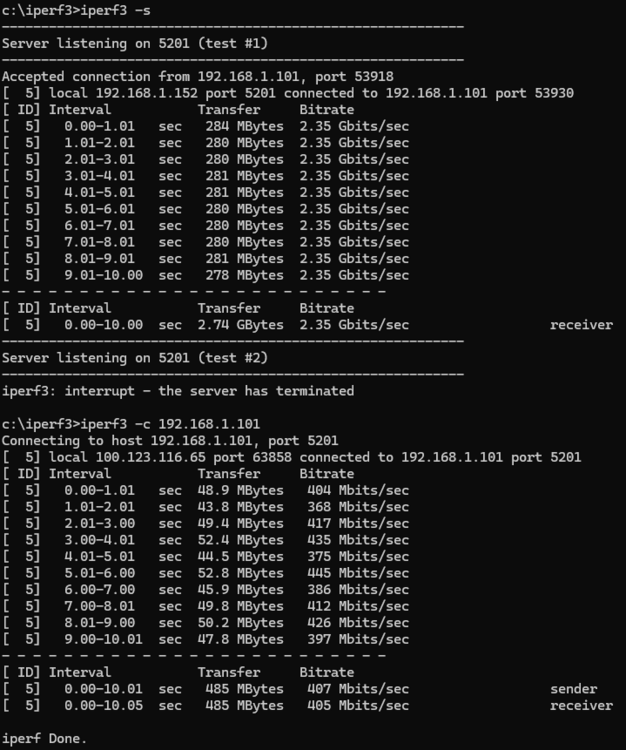
Hi. It seems like my connection is capped one-way. I get very slow transfers. Does anybody know what could cause this? IP adress of my PC: 192.168.1.152 (i dont know why the tailscale IP is there but 100.123.116.65 is my PC's) IP adress of my Unraid server: 192.168.1.101 Sometimes even my home assistant server running on a RPi shows up there... it's weird.. [EDIT] Reading a file from the server 18 MB/s Writing a file to the server 52 MB/s I've tried diffrent CAT5e cables and I've tried diffrent NIC's. Just installed a 2.5 gigabit network card with no change in transfers at all. Thank you! itxserver-diagnostics-20250127-1731.zip
-
I think theres an bug when chosing included/excluded discs. They have no drop-down menu. It appeared when removing a disk that where excluded. I've tried restarting. It is now stuck on excluding a disk I no longer have. itxserver-diagnostics-20250123-1753.zip
-
I don't even know where to begin. It's the same speed with a ethernet cable directly between the PC and the Unraid server. It must be a server problem. Same with every PC i try.
-
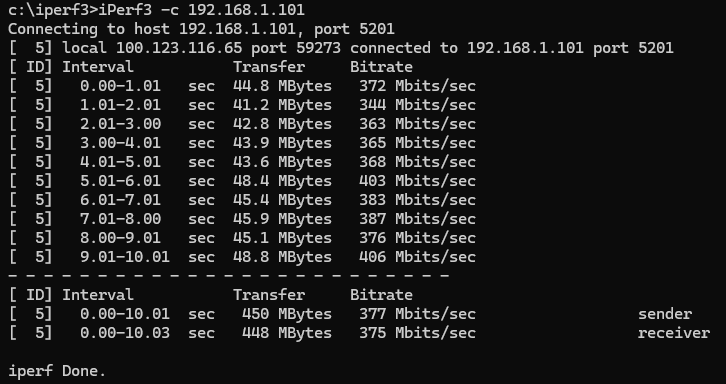
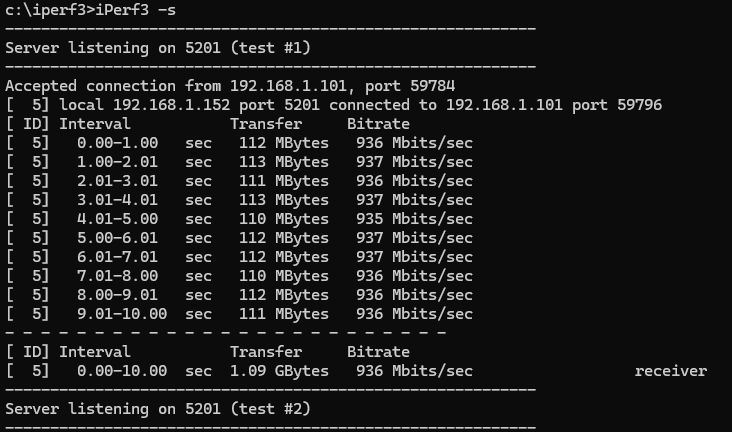
PC: 192.168.1.152 Unraid server: 192.168.1.101 I seem to only get 350 Mbits/s when Unraid acts as the iperf server.. hmm, conslutions?
-
Yes i've done that. Iperf showed a good 1 gbps connection
-
Yes. SMB shares. I've tried diffrent PC's all wirered rj45.
-
Thank you so much man! A simple solution thanks to Unraid but you really helped me. It's a very precarious situation. You wouldnt have an idea why my read/writes are so slow though? It's still 50 mb/s read and 12 mb/s write.
-
Okay so I pressed "Fix" and got this:
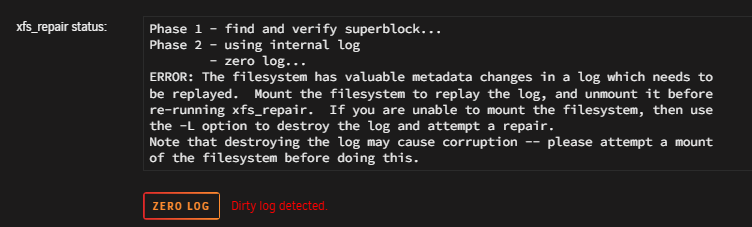
-
Okay thanks! I've got this: Phase 1 - find and verify superblock... Phase 2 - using internal log - zero log... ALERT: The filesystem has valuable metadata changes in a log which is being ignored because the -n option was used. Expect spurious inconsistencies which may be resolved by first mounting the filesystem to replay the log. - scan filesystem freespace and inode maps... - found root inode chunk Phase 3 - for each AG... - scan (but don't clear) agi unlinked lists... - process known inodes and perform inode discovery... - agno = 0 - agno = 1 - agno = 2 - agno = 3 - agno = 4 - agno = 5 - agno = 6 - agno = 7 - agno = 8 - agno = 9 - agno = 10 - agno = 11 - agno = 12 - agno = 13 - agno = 14 - agno = 15 - agno = 16 - process newly discovered inodes... Phase 4 - check for duplicate blocks... - setting up duplicate extent list... - check for inodes claiming duplicate blocks... - agno = 0 - agno = 1 - agno = 7 - agno = 2 - agno = 5 - agno = 3 - agno = 4 - agno = 6 - agno = 8 - agno = 9 - agno = 10 - agno = 11 - agno = 12 - agno = 13 - agno = 14 - agno = 15 - agno = 16 No modify flag set, skipping phase 5 Phase 6 - check inode connectivity... - traversing filesystem ... - traversal finished ... - moving disconnected inodes to lost+found ... Phase 7 - verify link counts... Maximum metadata LSN (1:1540509) is ahead of log (1:1536657). Would format log to cycle 4. No modify flag set, skipping filesystem flush and exiting. Should I press "Fix"?
-
So, i've had a lot of issues the past week with my Unraid system. It all started with slow read/write speeds. Iperf showed a good 1 gbps connection and diskspeed showed that my disks where performing good. Then I got a lot of errors in my syslog saying: Jan 21 02:34:27 itxserver kernel: ata6: COMRESET failed (errno=-16) Jan 21 02:34:27 itxserver kernel: ata6: hard resetting link Jan 21 02:34:29 itxserver kernel: ata6: SATA link up 1.5 Gbps (SStatus 113 SControl 310) Jan 21 02:34:29 itxserver kernel: ata6.00: configured for UDMA/33 Jan 21 02:34:29 itxserver kernel: ata6: EH complete Over and over again during read/write. I then checked moved my SATA cables around and i think this error corresponds to my disk5 (TOSHIBA_MG09ACA18TE_Y430A057FJDH 18TB). After I booted up again I didn't get the ata6 error, but the speeds where still slow (50 mb/s read, 18 mb/s write). After another reboot my disk5 now says: "Unmountable: Wrong or no file sysem". What do I do now? I do have pairity. Do i re-format the drive and re-create it from parity? Thank you! This has been a nightmare for days now. itxserver-diagnostics-20250122-1920.zip



