






zflash
Members
-
Joined
-
Last visited
Everything posted by zflash
-
In case anyone stumbles across this, my fix was to shut down the server, plug the flash drive in my Windows PC and run chkdsk /f
-
I have included the diagnostics after an upgrade attempt. toaster-diagnostics-20250315-1526.zip
-
Hi, I am currently on 7.0.0 and getting an error when I try to update to 7.0.1 My cache drive has over 100GB in free space. Where can I find more information on why this failed?
-
I bought my HBA and cable but now I realized my SAS drives are host-managed. Is there any way to make host-managed SMR SAS drives to work with Unraid?
-
Thanks, I am thinking of getting the 9207-8i, is that SAS2?
-
They probably thought the HBA card was powering the drives. Sounds easy enough, thank you. Is this cable called "Mini 4 SAS 36-Pin SFF-8087 To 4 SAS 29-Pin SFF-8482 Cable Connectors with 15 Pin SATA Power"?
-
Thanks, I will get a LSI HBA as suggested but I am still a little confused as to how these drives get power. Looking at the cables provided, it doesn't look like they will fit my drives. I will not be using a backplane. Please see picture of my drive.
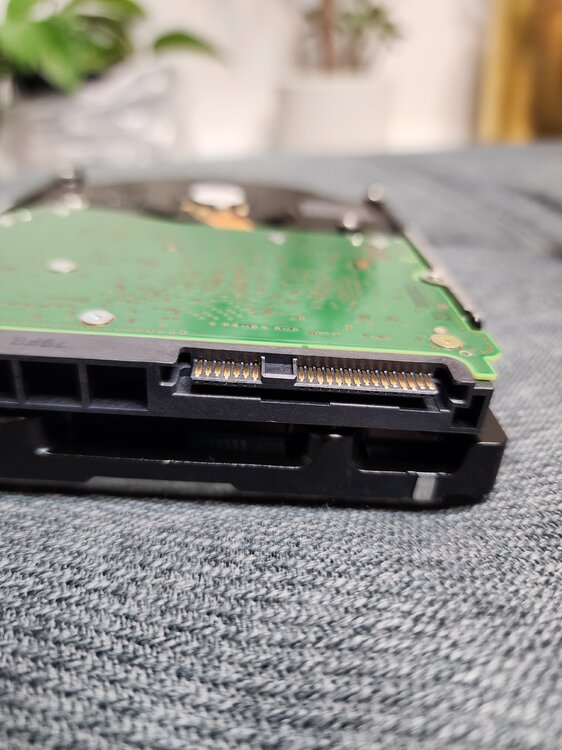
-
I am trying to build a new NAS and migrate my current Unraid setup to a new rig. I have some free 14Tb drives from work, but they are SAS drives. I've been doing research online and it seems many posts tell people to just go with SATA. I feel like six 14Tb SAS drives aren't cheap, so I would like to build off these drives. Can someone let me know what type of HBA card is suggested and also what cable I would need? I saw some SFF-8643 to SFF-8482 cables but I'm not sure if the SAS drives can be powered from those.
-
Thank you both. I will acknowledge the error and proactively shop for a new drive to replace this parity drive. My other drives do not show warnings and showing "healthy". I currently do not have any notifications setup, but I will look into that now.
-
Hey all, this is my first post on the forums. I have a parity drive which recently showed an error. Upon checking the attributes, it highlighted "reallocated sector count" - see attached picture. I tried running the SMART extended self-test but it completed without any errors. Can someone let me know what this means?



