fargotto48
Members
-
Joined
-
Last visited
Everything posted by fargotto48
-
I understand that I'm trying to "stretch an owl onto a globe". And the meaning of UNRAID is different (flexible disk replacement, own raid logic). Sorry for the off-topic Unraid is simply too cool a system (virtualization, docker, applications, frequent updates). Even for non-standard solutions, it is better than OpenMediaValute (complete crap), or TrueNAS (yes, slightly better, but it is not the same)
-
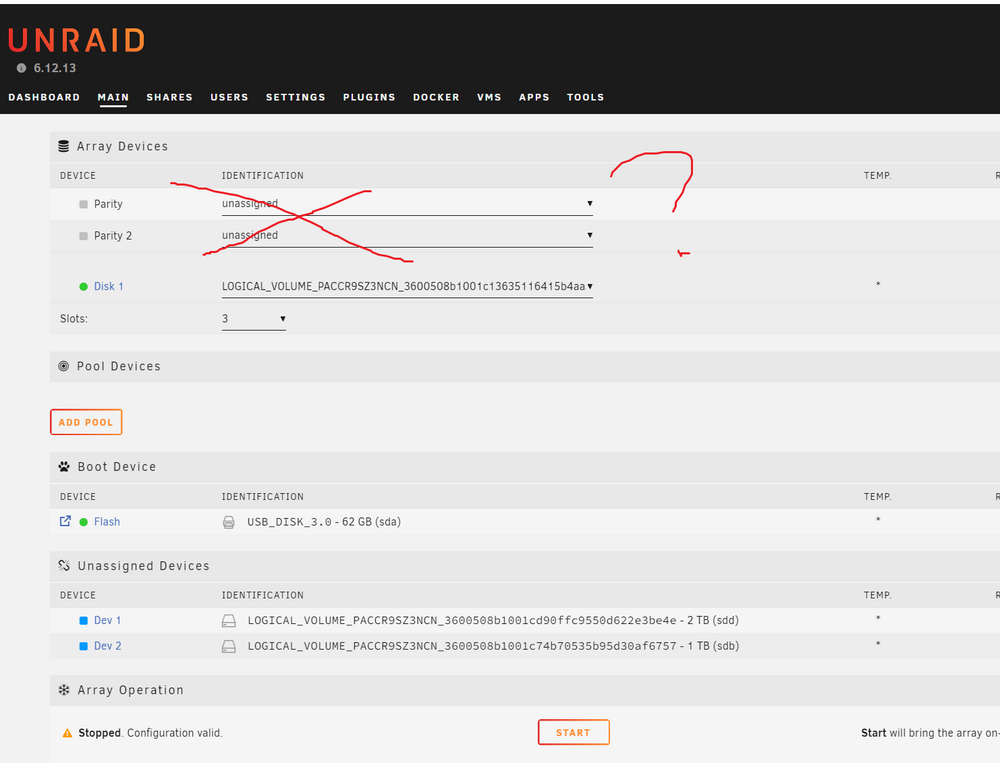
And in principle, p410 does NOT officially support this. It's just a "hack" and it is not required to work correctly. I'm not particularly upset. The question is different. Can I disable the warning about the absence of Parity? (I don't need it, my RAID controller does this). As an array, I have a RAID10 300 GB mirror made of two SAS disks. I will throw the other 2 RAID10 mirrors on a remote computer via iSCSI. I would like to remove Parity so that the green light is on instead of the "triangle"
-
In general, I think so, after rebooting, the p410 controller, although it sees that it is in HBA mode, "doesn't like" it. And it "breaks" or puts some of the disks into emergency mode. Conventionally, this problem can be solved by DISABLE the boot initialization of the p410. So that it does not load at all, but is seen as a "dumb" adapter in the system. There is no such option on the old HP Gen5 server, I cannot disable the PCIe devices. Therefore, I simply made 3 RAID10 mirrors again. Pros: the battery and 1 GB cache work, the disks work together (in UNRAID, all disks work on their own and the speed is not summed up). But there is a MINUS - I DO NOT KNOW whether the disk is out of order, because of the logical array. I need to go to the server room and look or reboot remotely and look. But I don't think it's a problem, it's not my main storage, it's mostly a trash heap
-
That is, the problem is much deeper. After rebooting, most likely the controller itself sees that "something is wrong". And goes crazy. After all, the HBA mode is not actually officially supported on the p410 and p410i On Monday, when I come to work, I will try to remove the 1GB cache board and the super capacitor.
-
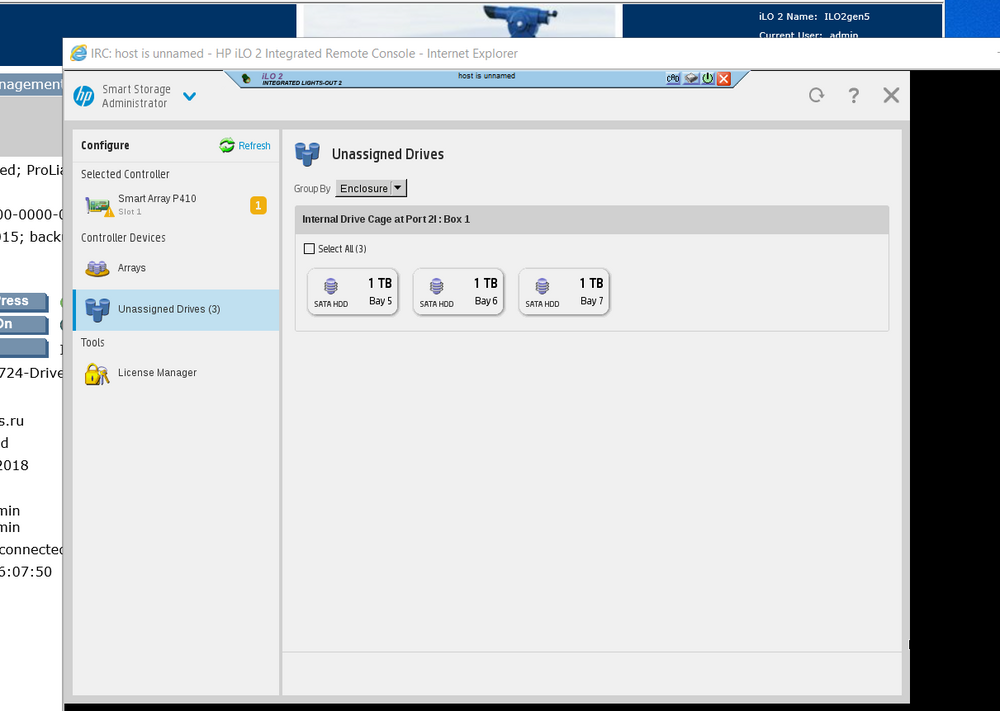
I downloaded the proprietary utility HP Smart Array Assistant. But the problem starts EARLIER than the system loads. That is, the program itself "sees" only 3 disks (bed 6,7,8). In fact, it only sees beds 6,7,8. And my firmware is the latest. I don't know, I'll try to do a clean slate according to the guide
-
You're a cool dude) Maybe in the future it will be possible to buy you this garbage from ebay for $ 10?)) for any tests
-
So, the plugin itself is buggy? And this is NOT a problem with the disks. It feels like the plugin only sees 3 disks bay out of 8. I didn't find out which ones exactly. But it's definitely not a problem with the disks, since other disks will be visible if I swap them (3 pieces)
-
Here's another one. Immediately after the reboot hpsa_update_device_info: inquiry failed, device will be skipped hpsahba olips-nas01-diagnostics-20241004-2044.zip
-
Wow, I'm finally home. Here's my data archive. olips-nas01-diagnostics-20241004-2025_.zip
-
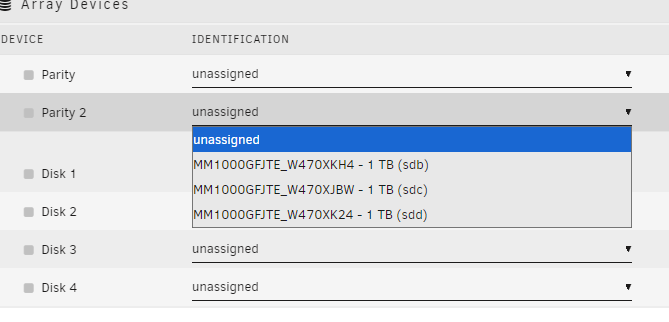
Yes. Only 3 disk after reboot. Problem software (letter disk changes)
-
Apparently those who have "everything works" - just do not thoroughly test what is installed. Until there is a reboot and all the data says "bye"
-
I can't figure out what the problem is
-
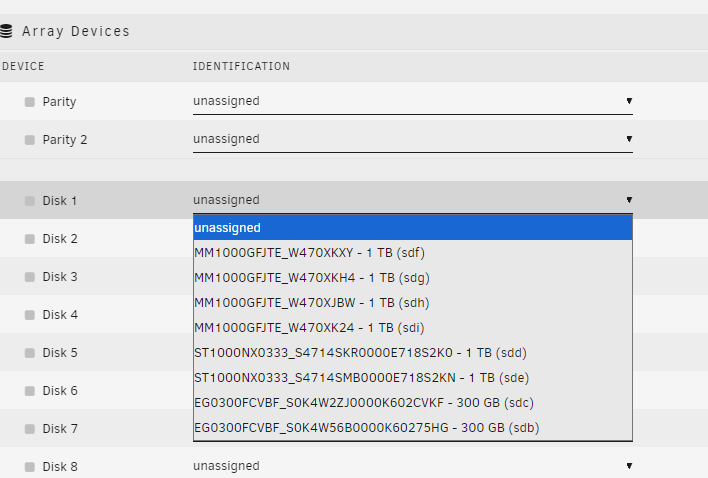
Here I turned off the HBA and rebooted (the controller detected 8 raids RAID0) NAS UnRAID did not boot and gave an error "something there 30 seconds". I did a hard reset and deleted all RAIDs0 (8 pcs). Booted into the system and turned on the HBA. I see all the disks. I reboot - the disks disappear
-
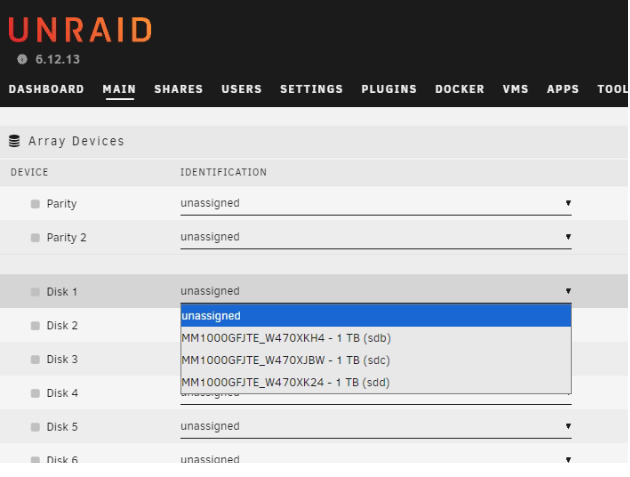
I swapped the disks. The old installation had the same thing. Just rewrote Unraid to the flash drive. Just installed the plugin. Same behavior. Same disk letters. If I turn off HBA now, create an array. Unraid boot, then turn on HBA - I will see all 8 disks. Until reboot. I'll show you now
-
No. I'm lying. After rebooting I see 3 other disks. So the error is "tied" to the disk beds and letters. Maybe install Unraid from scratch? Clean installation
-
I just swapped all the disks in the hot swap bays. It didn't help, I see the same 3 disks. The problem is 100% software. Either a conflict of labels sda sdb sdf etc. or something else
-
Yes, because the HP DL380 G5 comes with p400 (LSI) by default I installed p410 here and it works perfectly. Maybe my "hodgepodge" is to blame, or maybe something has changed in the new versions of Unraid. Or maybe my disks are crap or something is conflicting. But the fact is that at first everything works perfectly. The reboot is to blame (((( The disks are "masked" it seems
-
I don't see any activity from the author. I see only a bunch of open "problems" and no solutions. Just empty "сhatters"
-
Honestly, I can't how do it and no my account there. It's better to have 2 versions of the plugin, because one version will suit someone else, and another will suit someone else. And indicate this in the description. It's a half-hour job for a master (for you). Or tell me an alternative solution
-
In other words, we all need 2 versions of the "hpsahba" plugin. One from "99dimitris", the other from "im-0"
-
Read please last message in topic https://serverfault.com/questions/1142870/hp-smart-array-p812-hba-mode-masked-drives Before the reboot, everything works for me.... But after reboot...
-
No, no, my friend. Look here. This is NOT THE SAME PLUGIN! This is the original (but it seems to have bugs) - https://github.com/im-0/hpsahba from the author: im-0 And there is a modified one from 99dimitris - https://github.com/99dimitris/hpsahba So is there an option to make another plugin from Dimitris? or how can I try it? I really need it!
-
The thing is, the disks work perfectly. All 8 of them. But only BEFORE rebooting. After rebooting, I only see 3 disks out of 8
-
Hello. Sorry for my English. I use Google Translate. My server is HP DL380 gen5 RAID controller - P410 Disks: 2x300GB SAS, 2x1000GB SAS, 4x1000GB SATA (i iuse 3pcs RAID10 - 2 + 2 + 4) I use the plugin - hpsahba. HBA mode is enabled, disks are displayed. But there is a problem, after rebooting I see only 3 disks out of 8. I don't understand what the problem is. I see only 2x300GB SAS and 1x1000GB SAS. The only thing that helps is: 1) turn off HBA mode 2) Reboot the server 3) create a RAID 4) boot into the system and turn on HBA mode again (RAIDs will be automatically deleted and "bare" disks will appear) Yeah, cool, but this solution is not permanent. Constantly jerking the array back and forth or not turning off the system. Maybe it is possible to fix the plugin? There is also such an "update" of the plugin, maybe test it? https://github.com/99dimitris/hpsahba https://github.com/im-0/hpsahba/issues/37 P.S. Other people have similar problems but with a different controller and as I understand it, all disks are not visible there, not just part. https://serverfault.com/questions/1142870/hp-smart-array-p812-hba-mode-masked-drives