TheDR
Members
-
Joined
-
Last visited
Everything posted by TheDR
-
Hmm... I think, now I really need some help.... Yes, the reading / writing from ZFS to the Array was slow, but now nothing works anymore. The Pool was created, with Unraid itself. Then I copied all files from the Array to the Pool and replaced the Old drives. So I had to create a new Configuration. And I'm sure, that I configured the tool to just remove the Array Drives, also the ZFS Pool was gone in the configuration. But It's still there and was working. Now I can't access the Data on the ZFS Pool anymore. Even after the Upgrade to the 7.1 Beta with the new ZFS in the Kernel. The Pool seems to be OK and imported: root@HomeServer:~# zpool status -v pool: z1pool state: ONLINE status: Some supported and requested features are not enabled on the pool. The pool can still be used, but some features are unavailable. action: Enable all features using 'zpool upgrade'. Once this is done, the pool may no longer be accessible by software that does not support the features. See zpool-features(7) for details. config: NAME STATE READ WRITE CKSUM z1pool ONLINE 0 0 0 raidz1-0 ONLINE 0 0 0 sdg1 ONLINE 0 0 0 sdk1 ONLINE 0 0 0 sdh1 ONLINE 0 0 0 sdj1 ONLINE 0 0 0 errors: No known data errors The Filesystem seems also to be OK, but when I try to mount it, the whole System hangs: root@HomeServer:~# zfs list NAME USED AVAIL REFER MOUNTPOINT z1pool 16.4T 12.1T 16.3T /mnt/disks/z1pool root@HomeServer:~# zfs mount z1pool I get a load of about 10-15 with 50% IO Wait: top - 17:20:30 up 21 min, 5 users, load average: 13.32, 13.14, 8.79 Tasks: 409 total, 1 running, 408 sleeping, 0 stopped, 0 zombie %Cpu(s): 0.0 us, 1.8 sy, 0.0 ni, 42.1 id, 56.0 wa, 0.0 hi, 0.0 si, 0.0 st I also tried to scrub the drives. Got just a few Checksum Errors, that were corrected. But still no change. What's going on??
-
Ok, Is at the current state BTRFS better than ZFS? Because ZFS isn't useful for me, if it behaves this way while copying files from ZFS to Array.
-
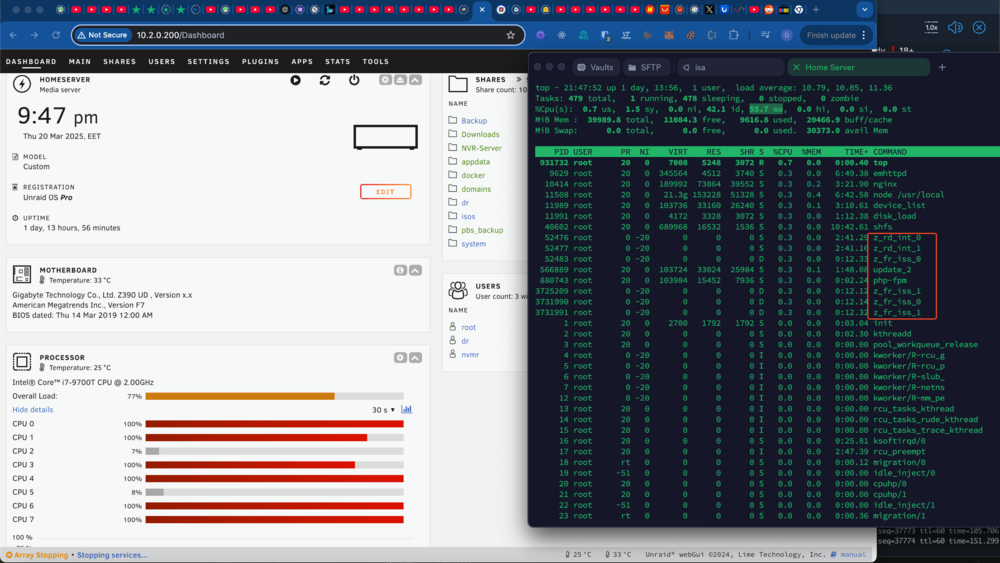
Hi everyone, I'm experiencing some performance issues with my Unraid file server and could use some help diagnosing the problem. I’m running an Intel i7-9700T CPU with 40GB of RAM and several hard drives, some as large as 18TB. Some of the drives are connected to the internal SATA ports, while others are attached to an LSI 9211-8i controller running in IT mode. When resyncing the array, I get speeds of up to 200MB/s, which seems reasonable. However, when writing large files from one HDD to another within the system, the speeds drop to around 30-40MB/s, which feels unusually slow. There also seems to be another issue that might be related to ZFS. Everything was working fine until I tried to stop the array. At that point, the system became almost unresponsive, with extremely high load and high I/O wait times. I have no idea what is causing this behavior. I’ve attached diagnostics from the moment when I attempted to stop the array and everything went haywire. If anyone has insights or suggestions, I’d really appreciate your help. Thanks in advance! homeserver-diagnostics-20250320-2149.zip
-
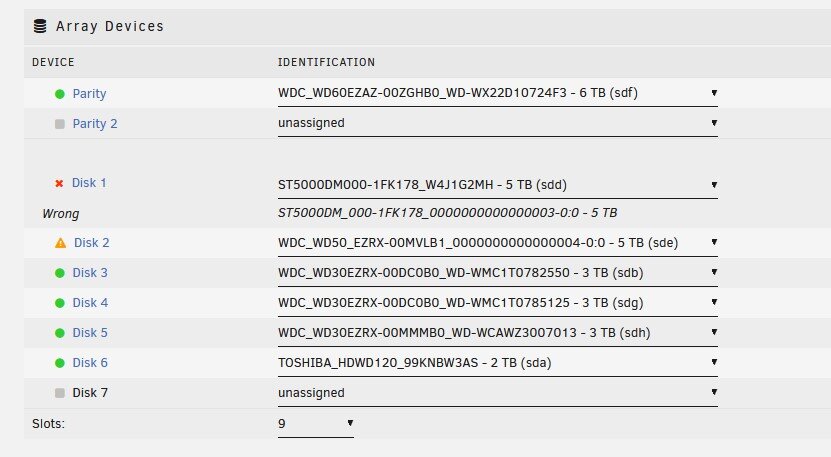
Hi, I have a problem with my Unraid System. Currently I'm running the 7.0.0-beta.3. My Problem is, that my Disk 2 suddenly was "offline". So I took the whole array Offline and re-added the Disk2. And Unraid started the Rebuild Process. But it was slow, like under a Megabyte/s. Then I restarted the whole system and now I get this result. My 5TB Seagate Drive isn't recognized anymore, because the identification of the drive changed somehow. And Unraid says, that this is a wrong drive. On the other hand, I also can't reset the configuration and re-add the drives, because I have no idea of the state of the Disk2 and it's rebuild process. Is it somehow possible just to change the identifier of Disk1?