





jbritt1234
Members
-
Joined
-
Last visited
-
I ended up pulling the physical nvme disk to simulate a failure. After that, the array started ok and I've been successfull getting most of the data. Thank you Jorge. 🍻
-
For the time being, I went back through the same steps and have it back with both disks mounted. I'm going to try to get some of the appdata info FTP'd off the server as the CABackup app stopped working so my backup is nearly 2 years old. I'm a bit worried that that disk will cause issues with corruption, etc. I guess if you can think of a good way to just mount the sdd disk only, that would be good. I can just re-copy again to ensure it is good data. Thanks for your help so far.
-
Ok. That's exactly what I did prior. I stopped it again. I Changed the nvme to No device. I checked the "Yes, I want to do this" box, and started it again. I'm now back to the sdd device showing as unmountable: Unsupported or no file system. So, should we go back through that again, but this time not add the nvme back at all, but keep the cache as a single disk with just the sdd? When this kicked off, I was getting lots of issues with the docker and VM service not running correctly, and seemingly corrupting some files.
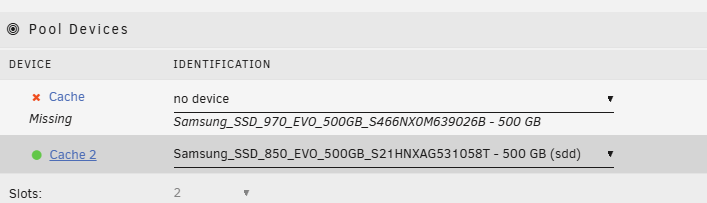

-
Ok, done! I do see the pool started and there is data! I'm attaching the diagnostics. I do wonder the state of the nvme0n1 device. If i need to pull it out to avoid corruption (with docker, etc) again, etc. TY sooo much for your help so far. unraid-diagnostics-20241021-1111.zip
-
Ok, here is the output. root@UNRAID:~# sfdisk /dev/sdd Welcome to sfdisk (util-linux 2.38.1). Changes will remain in memory only, until you decide to write them. Be careful before using the write command. Checking that no-one is using this disk right now ... OK Disk /dev/sdd: 465.76 GiB, 500107862016 bytes, 976773168 sectors Disk model: Samsung SSD 850 Units: sectors of 1 * 512 = 512 bytes Sector size (logical/physical): 512 bytes / 512 bytes I/O size (minimum/optimal): 512 bytes / 512 bytes sfdisk is going to create a new 'dos' disk label. Use 'label: <name>' before you define a first partition to override the default. Type 'help' to get more information. >>> 64 Created a new DOS disklabel with disk identifier 0xd99f4ba1. Created a new partition 1 of type 'Linux' and of size 465.8 GiB. Partition #1 contains a btrfs signature. Do you want to remove the signature? [Y]es/[N]o: no /dev/sdd1 : 64 976773167 (465.8G) Linux /dev/sdd2: write New situation: Disklabel type: dos Disk identifier: 0xd99f4ba1 Device Boot Start End Sectors Size Id Type /dev/sdd1 64 976773167 976773104 465.8G 83 Linux The partition table has been altered. Calling ioctl() to re-read partition table. Syncing disks. root@UNRAID:~# btrfs fi show Label: none uuid: 2aee4e2a-76da-4139-aa9d-a845993c2b52 Total devices 1 FS bytes used 380.00KiB devid 1 size 1.00GiB used 126.38MiB path /dev/loop2 Label: none uuid: 1f4efbb5-4661-41c7-8000-e098054e9447 Total devices 2 FS bytes used 206.96GiB devid 3 size 465.76GiB used 249.03GiB path /dev/sdd1 devid 4 size 465.76GiB used 249.03GiB path /dev/nvme0n1p1 root@UNRAID:~#
-
Well, crap, ok. I didn't realize that. Sorry about that next step, i got a bit wrapped up in the "don't do anythign else" part out of fear hahah. root@UNRAID:~# sfdisk /dev/sdd Welcome to sfdisk (util-linux 2.38.1). Changes will remain in memory only, until you decide to write them. Be careful before using the write command. Checking that no-one is using this disk right now ... OK Disk /dev/sdd: 465.76 GiB, 500107862016 bytes, 976773168 sectors Disk model: Samsung SSD 850 Units: sectors of 1 * 512 = 512 bytes Sector size (logical/physical): 512 bytes / 512 bytes I/O size (minimum/optimal): 512 bytes / 512 bytes sfdisk is going to create a new 'dos' disk label. Use 'label: <name>' before you define a first partition to override the default. Type 'help' to get more information. >>> 64 Created a new DOS disklabel with disk identifier 0x6dce7c90. Created a new partition 1 of type 'Linux' and of size 465.8 GiB. Partition #1 contains a btrfs signature. Do you want to remove the signature? [Y]es/[N]o:
-
It was not wiped, it was a member of the Cache disk pool until removed by just stopping the array, setting the line for that disk to be blank, and starting it again. Here is the output from that command; root@UNRAID:~# sfdisk /dev/sdd Welcome to sfdisk (util-linux 2.38.1). Changes will remain in memory only, until you decide to write them. Be careful before using the write command. Checking that no-one is using this disk right now ... OK Disk /dev/sdd: 465.76 GiB, 500107862016 bytes, 976773168 sectors Disk model: Samsung SSD 850 Units: sectors of 1 * 512 = 512 bytes Sector size (logical/physical): 512 bytes / 512 bytes I/O size (minimum/optimal): 512 bytes / 512 bytes sfdisk is going to create a new 'dos' disk label. Use 'label: <name>' before you define a first partition to override the default. Type 'help' to get more information. >>>
-
Ok, done. The disk added, the gui afterwards says it is unmountable. Diags uploaded. Thank you! unraid-diagnostics-20241019-1317.zip
-
Hi JorgeB, thank you for the reply. Yes, it is still installed in the machine after I removed it from the pool. It currently sits in Unassigned Disk Devices. Prior to my initial post, I did look at pulling out the one you point out with the medium error, and add this other device back, but it states "All existing data on this device will be OVERWRITTEN when array is Started" That's where I stopped. Is there a way to get the array started with just using this second device and keep the data? Just poking around, I was wondering if I could set the slot to 1 and put in just the second devic and start it ok. The gui at least that way does not say it will be erased.




-
I'm spiraling out of control here haha... My server, seemingly from nowhere, started going down hill. Issues with Docker and libvert services not starting, getting corrupted, etc. I see a small number of SMART errors on a few of my disks, low numbers, 1 or 2. I have two m.2 SSD's selected to be used for Cache. I self diagnosed (in my head) that one of the SSD's that had some SMART errors may be going bad. I stopped the array, removed the disk (listed second in order) and started the array again. Now I'm getting an error - Unmountable: Unsupported or no file system Searching around, I found this command on another post, so I see there is still a partition there. I would really appreciate any assistance with getting it re-mounted. root@UNRAID:~# btrfs fi show Label: none uuid: 2aee4e2a-76da-4139-aa9d-a845993c2b52 Total devices 1 FS bytes used 380.00KiB devid 1 size 1.00GiB used 126.38MiB path /dev/loop2 warning, device 3 is missing Label: none uuid: 1f4efbb5-4661-41c7-8000-e098054e9447 Total devices 2 FS bytes used 206.96GiB devid 4 size 465.76GiB used 249.03GiB path /dev/nvme0n1p1 *** Some devices missing root@UNRAID:~# fdisk -l /dev/nvme0n1 Disk /dev/nvme0n1: 465.76 GiB, 500107862016 bytes, 976773168 sectors Disk model: Samsung SSD 970 EVO 500GB Units: sectors of 1 * 512 = 512 bytes Sector size (logical/physical): 512 bytes / 512 bytes I/O size (minimum/optimal): 512 bytes / 512 bytes Disklabel type: dos Disk identifier: 0x00000000 Device Boot Start End Sectors Size Id Type /dev/nvme0n1p1 64 976773167 976773104 465.8G 83 Linux root@UNRAID:~# Diagnostics file attached. I'd certianly appreciate any assistance. If you see anything that points to why i'm having so many issues recently, that would be great. I'm just tyring to get the data off this thing (appdata specifically) so I can migrate. unraid-diagnostics-20241018-1243.zip
-
Hello All, I've researched this quite a bit, and while there are many posts about hardware migration, I'm having difficulty with a more specific scenario: downsizing the hardware that hosts my Unraid setup and changing how I use it. Current Setup: Traditional desktop PC with multiple spinning disks and two M.2 cache disks. Plan: Move to a new small form factor Dell desktop that can only hold: 1 x M.2 (4TB) 1 x 2.5-inch SSD (2TB) I'm not planning to bring over any disks from my old system, which seems to be the biggest complication compared to other migration cases I've seen. The new PC has much better specs and considerably less power draw. Issue #1: Corruption and OS Fresh Start My current Unraid setup is about 7 years old, and I've been facing recurring issues, including: Frequent corruption of the Docker.img file. Two VMs showing corruption, including my Home Assistant VM (which is critical for me). Because of these issues, I don't just want to move my existing Unraid installation; I want to start fresh with a new Unraid OS installation, even if I were to keep the same disks. If I had no plan to change hardware, i'd probably just invest the time to look further into the weird issues. Use Case Changes: Space: I moved recently and in a much smaller space. I want to move away from the Desktop PC that would have to sit by the TV stand, and move to a smaller form factor. Media Library: I've been reducing my media collection and plan to offload it to a separate NAS (likely a Synology). So, I no longer need significant storage on the Unraid server itself; the 6TB capacity should be enough for my needs. Docker Usage: I run about 8 Docker instances for various apps, including *arr apps, Frigate for video recording, and some miscellaneous tools. VM Usage: I run 4 VMs. The only critical one is a 24/7 Home Assistant VM, which has corrupted twice recently. The others are for home lab experiments. What I've Tried So Far: I’ve set up a new Unraid trial using a different thumb drive on the target PC. My goal is to get all my Docker instances running on the new PC and start fresh with a new HAOS VM. I tried copying data from the appdata share on the old system to the appdata share on the new one, hoping that copying over the data would allow me to redeploy the Docker containers, pointing at the copied appdata, and keep settings like my Plex history intact. However, this has not worked—I keep hitting file copy errors, even with the Docker service stopped. Questions: Are there any recommended methods for migrating Docker instances without bringing over the entire old disk array? Any tips on how to fix or avoid the file copy issues I've been encountering when copying appdata between systems? I'm open to other ideas as well, this is just what I felt would be best. Thanks for any suggestions you might have! I appreciate the help.



