





bigggtuna
Members
-
Joined
-
Last visited
-
So I woke up this morning to find 2 failed disks being emulated through dual parity. This is an issue I've dealt with before due to my current setup (upgrades coming very shortly), so I am not worried about the health of the drives. After rebooting, Unraid said they were unmountable, so I followed the steps (https://docs.unraid.net/unraid-os/using-unraid-to/manage-storage/file-systems/#checking-a-file-system) to repair the filesystem. The simplest xfs_repair through the web gui seemed to fix both of them, although I didnt realize at the time that it threw seemingly every file on both disks into the lost+found. The disks were still disabled/emulated, so I proceeded to start with them missing, add back and rebuild them from parity. I got 8.9% (1.77 TB) through before realizing that the files on the repairing disks were missing and I paused the rebuild. Since I have already removed the disks and started the parity build, the contents of the two drives are still being emulated, meaning that I have/will not lose the data in lost+found, correct? So I can safely continue the parity rebuild? The files in lost+found seem to be fine, so what is the next step/correct way to go about restoring them? Thanks
-
Thanks, I've done that and now I'll wait and see. How can I see which container it was if it happens again? I've been looking in the syslogs which didn't appear to show anything like that, at least to me.
-
Bump...anyone?
-
Been experiencing intermittent server crashes and this is really my only clue that something is wrong. Syslog doesn't seem to show anything relevant. I tried putting the hungriest containers on a diet, but it's still happening. Seems to only happen overnight when I have parity check running which is almost every night since the crash triggers another one to start when I boot. Thanks in advance for any help ocean-diagnostics-20251112-0003.zip
-
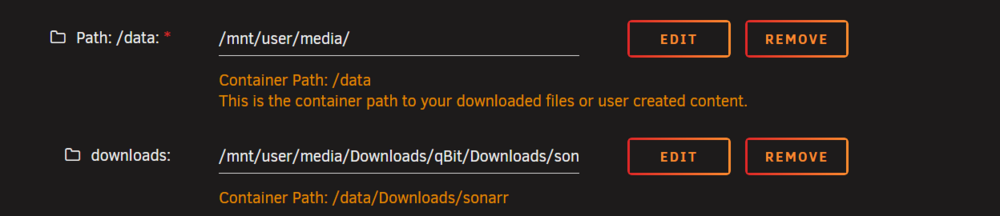
Sonarr is copying all of my episodes instead of hardlinking them. It doesn't seem to be a permissions issue, as all the files and folders are owned by nobody with the same permission and I also paused the sonarr and qbit containers to run a new permissions job on the media share to no avail. The files on unraid: The same files in the sonarr container: Both files are on the same volume in both unraid and the sonarr container. If you are keen you may have noticed that I am using a nested folder mapping structure in order to not have to shift all of my other mappings and file structure around. I don't know how this could be causing the issue because sonarr sees the files like it expects to, but I'm including it just in case I am missing something. The container creates an empty 'sonarr' folder at /mnt/user/media/Downloads/ that I just leave alone. And yes, I have the hardlink setting turned on. The note at the bottom, if I understand it correctly, is saying that it possibly would not be able to rename the hardlinked destination files in the root folder because the iloc is locked by qbit, correct? Even in this case, the files would still hardlink correctly, they would just both have the same name in the case you had file renaming turned on in sonarr? Just making sure I understand that note correctly and that it wouldn't be causing the issue either. The relevant lines in the log file don't appear to show any warnings or errors: 2025-07-05 11:39:51.4|Debug|EpisodeFileMovingService|Attempting to hardlink episode file: /data/Downloads/sonarr/Love.on.the.Spectrum.U.S.S03.1080p.NF.WEB-DL.DDP5.1.H.264-Kitsune/Love.on.the.Spectrum.U.S.S03E01.1080p.NF.WEB-DL.DDP5.1.H.264-Kitsune.mkv to /data/Jellyfin/Shows/Love on the Spectrum (2022)/Season 3/Love on the Spectrum (US) - S03E01 - Episode 1 WEBDL-1080p.mkv 2025-07-05 11:39:51.4|Debug|DiskTransferService|HardLinkOrCopy [/data/Downloads/sonarr/Love.on.the.Spectrum.U.S.S03.1080p.NF.WEB-DL.DDP5.1.H.264-Kitsune/Love.on.the.Spectrum.U.S.S03E01.1080p.NF.WEB-DL.DDP5.1.H.264-Kitsune.mkv] > [/data/Jellyfin/Shows/Love on the Spectrum (2022)/Season 3/Love on the Spectrum (US) - S03E01 - Episode 1 WEBDL-1080p.mkv]The only other log lines referencing this episode were parsing metadata about the video file and there is nothing else about hardlinking for this or any other file, just these two lines about attempting to hardlink, then calling HardLinkOrCopy. Thanks in advance.



-
No, I am still on 6.12.13.
-
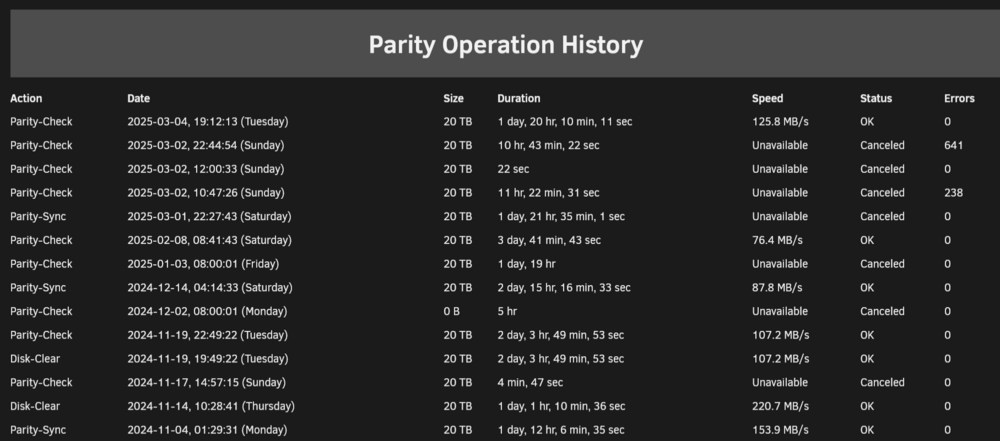
I've been trying to rebuild my second parity and I think the drive I'm trying to write parity to is faulty. It passed an extended SMART test and... that's another thread. For this thread, the important piece is that I've had a few parity builds fail which led to the OS being unresponsive and 2 unclean shutdowns (another question for the other thread). The problem I want to discuss in this thread is this: I decided to go down to 1 parity for now, and due to the unclean shutdowns, I ran a non-correcting parity check on the single parity disk. The 'Parity Operation History' tab shows that the check completed without error. While the 'Archived Notifications' tab shows what looks like the previous cancelled parity check that had 641 errors but with the more recent timestamp of the successful parity check. I'm more confused than worried because it seems like the warning just has the wrong timestamp but should I take any action? Do I need to correct the parity drive?

-
How do I actually make a backup with the default settings? I've followed every issue here and I got to the point where the logs showed the connection from the client was accepted, but the client gives an error that it doesn't have permission to write to '/backup' or '/backup/borg' like kiwijunglist outlines below: I did some digging and found that my authorized_keys file in ~/.ssh/ starts with restrict,command="cd /backup/id_rsa.pub; borg serve --restrict-to-path /backup/id_rsa.pub " which seems to limit the clients access (via the -restrict-to-path argument) to only the id_rsa.pub file. I changed the --restrict-to-path argument to allow access to the entire /backup directory and I was finally able to make a backup. The backup finished with warnings that some cert files changed during the process, however, and the authorized_keys file reverts back to the original on an update or container stop/start. Did I set something up wrong to restrict access to the /backup directory? Am I backing up to the wrong target directory?


