justBri
Members
-
Joined
-
Last visited
-
I updated earlier but once I reboot Docker service wont start. Settings => Docker shows running but going to the Docker tab shows "Docker Service failed to start" Gonna pull some logs after another reboot.
-
Just pushed a massive update — been heads down on this for a while so there's a lot to cover: Full Download Automation: This is the big one. Requests now go from search to download to import automatically. Arrgo searches indexers and kicks off downloads via qBittorrent behind a PIA VPN, and auto-imports perfect matches straight into your library. Multi-season torrents are handled too, and you can manually link a torrent to a request if needed. Subtitles: OpenSubtitles integration is in with rate limiting and automatic backoff so you don't get banned. Also added ffsubsync to automatically time-sync subtitles to your files — no more manually adjusting offsets. Scanning & Renaming: Basically rewrote the scanner. You can stop scans mid-progress now, imports run on 4 parallel workers, and renaming uses ffmpeg probe to tag folders with codec/resolution info. Matching and dedup logic is way stricter than before — fewer phantom duplicates showing up. Metadata: Forced all TMDB/TVDB queries to pull English metadata. This fixes the annoying issue where some titles would come back in the wrong language. Also cleaning up titles before querying so matches are more reliable. Jellyfin Support: Built-in Jellyfin connection now available. UI/UX: Went mobile-first nav lives at the bottom on mobile now. Library views got cleaned up, search results are split by type, images lazy load and cache properly. Search handles & and and interchangeably. Incoming view lives under admin now and shows season info for shows. Under the Hood: Migrated routing to Chi Switched to structured logging Reduced polling frequency Squashed a bunch of nil pointer and concurrency bugs. There's a DB nuke option now too if you need to do a clean re-import. Docker: Simplified the rebuild process. VPN is now a combined PIA+qBittorrent container instead of Gluetun. Relies on byparr (binhex-official-byparr via unraid Apps) for indexer bypass.
-
Just pushed some updates: Media Logic: Improved duplicate detection (Plex Optimized versions) and fixed matching errors for torrents containing mixed Movie/TV content. Admin UI: Added a User List to the admin dashboard for easier member management. Documentation: Fully updated the README with specific guides for Unraid, Docker Compose, and environment setup. Stability: Fixed a critical concurrency bug in the Go background worker and resolved several dependency issues.
-
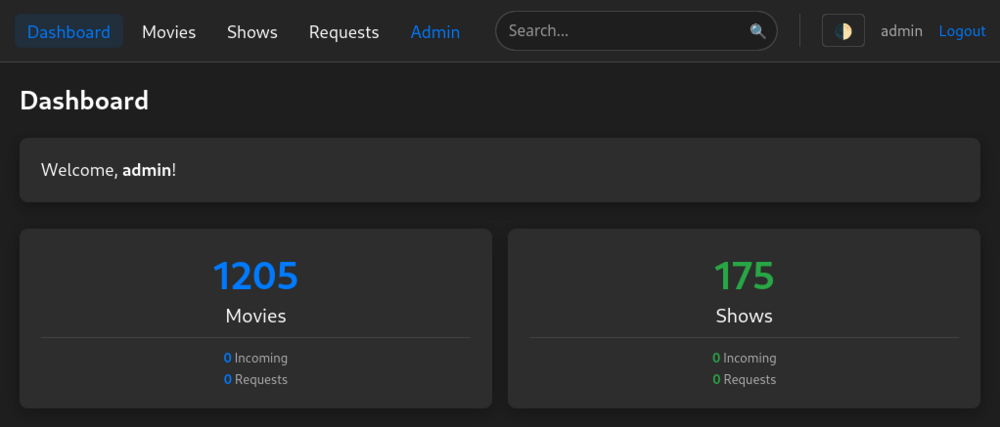
# Arrgo 🏴☠️ *The lightweight, high-performance media management tool for the modern home server.* View Source on GitHub --- ## 🚀 What is Arrgo? Arrgo is a consolidated media management tool designed to provide a modern, fast alternative to the traditional *arr stack. Built specifically with **Unraid** users in mind, it focuses on unified management of Movies and TV Shows without the overhead of multiple applications. ### ✨ Key Features - **Unified Interface**: Manage your entire media library (Movies & TV) in one snappy dashboard. - **Automated Workflows**: Hands-off downloads via qBittorrent, intelligent seeding cleanup, and integrated subtitle fetching. - **Server Ready**: Automatically organizes and renames files to follow Plex and Jellyfin conventions. - **Rich Metadata**: Full integration with TMDB and TVDB for beautiful posters and deep episode data. - **Performance First**: Built with Go and HTMX for minimal resource usage and near-instant load times. - **Native Unraid Support**: Proper PUID/PGID handling right out of the box. --- ## 🛠 Tech Stack - **Backend**: Go (Golang) - **Frontend**: HTMX (No heavy JS frameworks!) - **Database**: PostgreSQL 16 - **Container**: Docker & Docker Compose --- ## ⚡ Quick Start on Unraid ### 1. Deployment Method Since Unraid doesn't support Docker Compose natively in the default Docker tab, we recommend one of the following: - **Dockge (Highly Recommended)**: A beautiful manager for Compose stacks. - **Docker Compose Manager Plugin**: Available in the Community Applications store. ### 2. Configuration (`.env`) Copy the `.env.example` and ensure these core variables are set: ``` TMDB_API_KEY=your_key_here TVDB_API_KEY=your_key_here ADMIN_PASSWORD=your_secure_password SERVER_IP=192.168.1.xxx # Your Unraid IP MEDIA_PATH=/mnt/user/media ``` ### 3. Permission Handling Arrgo uses standard Unraid permissions: - **PUID**: 99 - **PGID**: 100 --- ## 🗺 Roadmap & Status - [x] Basic Login & Authentication - [x] Unified Search (Local + TMDB/TVDB) - [x] Library Scanner & Auto-renaming - [x] Show/Season/Episode Support - [x] Subtitle Management (OpenSubtitles) - [x] qBittorrent Integration & Automation - [ ] Advanced Library Filtering & Bulk Actions - [ ] Customizable indexers, or the ability to connecto Jackett/Prowlarr --- ## 💬 Support & Feedback This project is in active development! If you run into issues or have feature requests, please: - Post here in this thread. - Open an issue on GitHub. *Arrgo is distributed under the MIT License.* Not sure if this is the right order to do things in but 🤷♀️ I've been working on this on and off for a couple months and figured it's stable enough to share with others.