AstroBoy
Members
-
Joined
-
Last visited
Everything posted by AstroBoy
-
Quick update: I installed a new PSU and it solved all my problems!
-
Hi all, I've tried searching for answers for this and troubleshooting myself, but continue to have this issue across any/all versions of Unraid. If I have an unclean shutdown (which Unraid nearly always tells me I did even when I do a fully clean shutdown/reboot), my parity check becomes painfully slow (in the kb/s range). The only fix is to unseat/reseat my sata cables on my mobo. Turning all Dockers and plugins off doesn't solve the issue, nor does starting in maintenance mode. If (after unseating/re-seating the cables) my server is running for days/weeks/months without a shutdown/reboot, parity check will continue to work as expected with reasonable speeds, but as soon as I have a shutdown/reboot for any reason, I'm back to the ultra slow speeds until I re-seat the sata cables. I initially thought it might be an issue with the disks so I tried swapping them out for new ones but the problem persists. I found a short reddit thread where people seem to have the same problem and require the same temporary fix. Does anyone have any advice on how I can permanently fix this? Would it be an issue with my mobo? BIOS? I'm out of ideas at this point. Thanks in advance!
-
Hi @ich777, thank you for making this! I’m planning to build a second, mirrored unraid server as an offsite fallback in case of long term power outages. Will this work? As in, can I have my primary in one state (California) and backup in another state (Texas), and have the backup kick in if the primary goes offline?
-
Hi @trurl, the parity sync completed without issue. Diagnostics attached. If you're still able to help me with the system shares and any other issues you might notice, that would be much appreciated! tower-diagnostics-20250111-2352.zip
-
Unfortunately, I was evacuated the last few days as I'm near the fires in LA. Just got back with power so another couple days left on the parity sync.
-
Quick update – parity sync slowed down a bit, might be a few days before it’s done. I’ll check in then!
-
Ok will do. I'll come back when the parity is synced in a day or so!
-
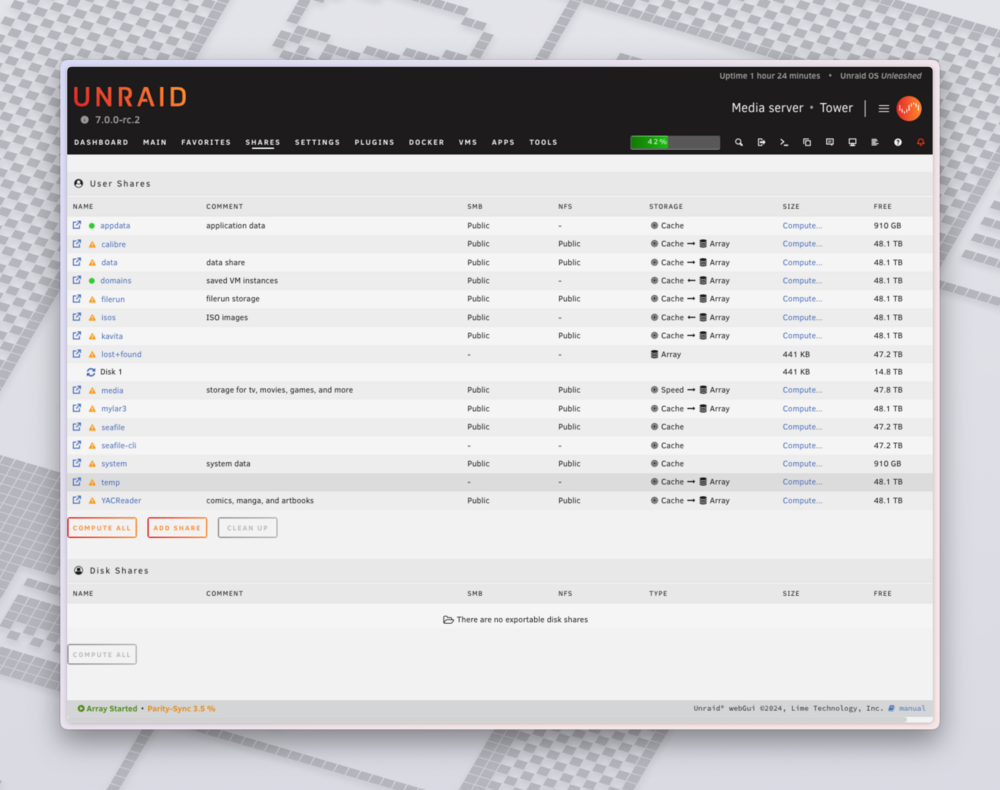
Looks like it's taking up 441kb
-
Oh yes, that would be great.
-
Yeah, I caught that after I posted my last response. Thankfully the check fixed it. New diagnostics attached. tower-diagnostics-20250105-1451.zip
-
I unplugged and re-plugged all SATA data and power cables and that seems to have done the trick! Getting 50 - 100 MB/s on my parity sync now. Thanks so much, trurl! I've attached a new diagnostics here in case it's helpful. tower-diagnostics-20250105-1430.zip
-
Ok so am I simply confirming that everything has a secure connection, or is there something specific I should do to test each connection?
-
Thanks trurl, yes, my mistake re: the filesystem. Diagnostics attached. Let me know if there’s anything else I should send, thanks! tower-diagnostics-20250105-1030.zip
-
Hi all, I'm sure the answer is right in front of me, but I've tried everything and for some reason my Parity Check / Sync won't go much faster than a few hundred kb/s and has an ETA of anywhere from 600 to 5,000 days. It's worked fine in the past, this is a new development. I've run DiskSpeed, nothing looks out of the ordinary. I've tried formatting the parity drive entirely and starting fresh but still running into the same issue. I'm not seeing any major RAM or CPU usage. I'm on 7.0.0-rc.2 and the parity drive is XFS (as are the array drives). Any help would be greatly appreciated!
-
Thank you so much, @bmartino1, this is exactly the guidance I was looking for! If I hold off on moving to zfs for now, what negatives aside from speed come with sticking with xfs + btrfs?
-
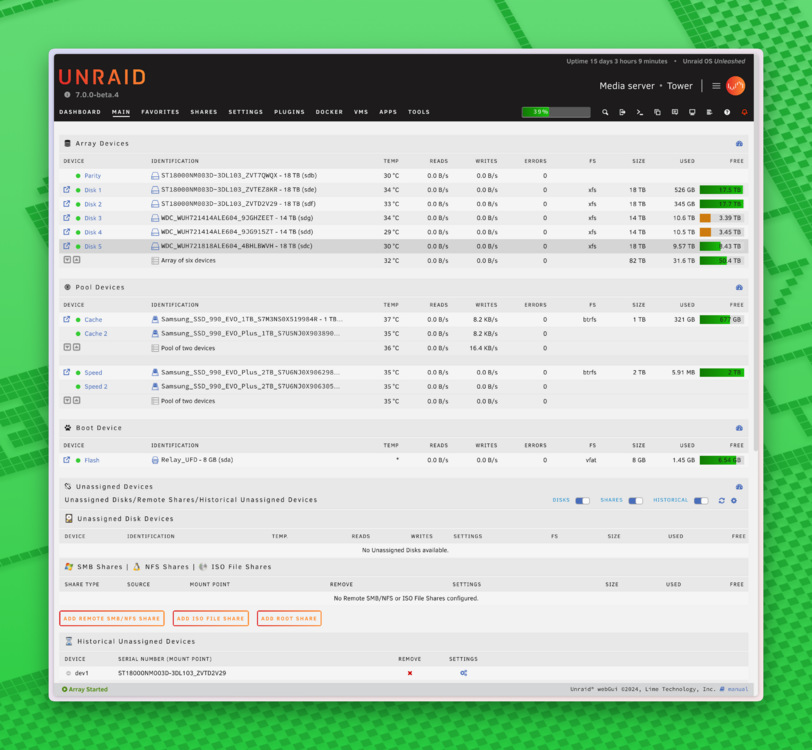
Hi all! I’m trying to optimize my current server and need some advice on how to use everything. My current config: 1x Parity Disk (18TB) 5x Array Disks (18, 18, 14, 14, 18 - xfs) 2x 1TB NVME (pooled, btrfs) 2x 2TB NVME (pooled, btrfs) I primarily use my server for the following: FileRun: self-hosted cloud storage. Multiple users uploading/downloading files regularly BackBlaze: Offsite backup of all files qbittorrent + Plex: Media server (typically remuxes with no transcoding) mylar3 + Kavita: Comic book server homebridge: all things smart home Right now, I use the 1TB NVME pool for my AppData and as a cache for any/all new files across all of the above applications with a Mover scheduled based on % used. I use the full Array (82TB) as one storage for all of the above files. I currently don’t use the 2TB NVME pool for anything. I tried having my Array drives spin down automatically when not in use, but it broke FileRun as when I or someone else would access it, the files that are on the spun down drives would disappear. I had hoped the drive would just spin back up when trying to access a file on it. As a result, I don’t have any drives spinning down anymore (although I did consider trying to assign FileRun storage to a specific Disk rather than the entire array, but that doesn’t really future-proof me). I’m also wondering what I should store on the 2TB pool vs the 1TB pool. Should I move AppData to the 2TB and strictly use the 1TB as a cache? Should I put my docker image on the 2TB? How about keeping everything homebridge related on there? Will that speed homebridge up? Basically, I’m hoping someone can help provide guidance on the best way to optimize my setup. I understand it’s subjective, but I’m a bit in the dark right now, so any advice helps!