





n37w0rk
Members
-
Joined
-
Last visited
-
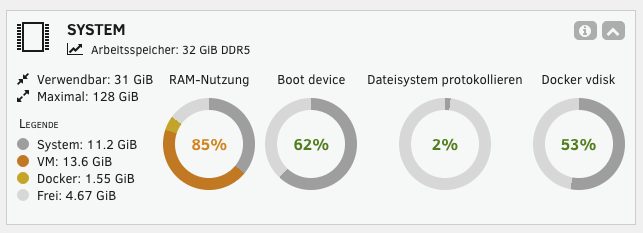
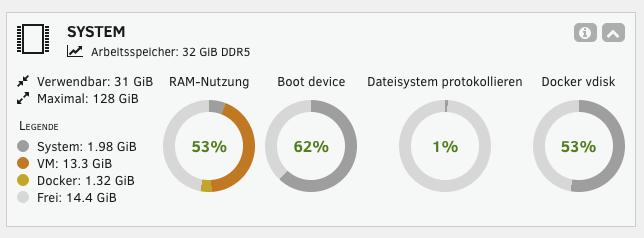
Hallo alle zusammen, ich habe 2 unterschiedliche Unraid Systeme laufen. HomeLab Prozessor: Intel Core i3-12100 Motherboard: Gigabyte B760M DS3H DDR4 Arbeitsspeicher: 32GB DDR4 OS Version: 7.3.2 Virtuelle Maschinen: Oracle Linux Enterprise 10 (2 CPUs und 2GB Ram) Oracle Linux Enterprise 10 (2 CPUs und 2GB Ram) Oracle Linux Enterprise 10 (2 CPUs und 2GB Ram) Home Assistant (1 CPU und 2GB Ram) Docker Container: NginxProxyManager ApacheGuacamole BookStack postgresql17 MySQL MariaDB-Official Paperless-NGX Redis apache-tika-server gotenberg nextcloud-aio-mastercontainer adminer Agent-DVR Duplicacy evcc Gitea hetzner-ddns Plex-Media-Server SFTPgo vaultwarden Prod (Lenovo ThinkStation P3 30GS) Prozessor: Intel Core i7-14700 Motherboard: Lenovo 1064 Arbeitsspeicher: 32GB DDR5 OS Version: 7.3.2 Virtuelle Maschinen: Windows 11 (8 CPUs und 12GB Ram) Oracle Linux Enterprise 10 (4 CPUs und 1GB Ram) Docker Container: Gitea NginxProxyManager postgresql17 Crontab-UI nextcloud-aio-mastercontainer vaultwarden adminer In dem Prod steigt der Verbrauch vom Arbeitsspeicher innerhalb einer Woche von 2GB auf ca. 11GB (pro Tag kommen immer ca. 1,5 - 2GB dazu). Das sorgt dafür, dass z.B. das System generell sehr träge wird, und meine Windows 11 VM (12GB) nicht mehr sauber läuft. Sobald ich dann Unraid einmal komplett neustarte, ist wieder alles in Ordnung und das System verwendet nur noch 2GB. In meinem HomeLab laufen wesentlich mehr Container und viel mehr Automatisierungen, und da kann Unraid ohne Probleme mind. 30 Tage (dann liegt die Speichernutzung von System bei max 4 GB) laufen, ohne einen Neustart durchführen zu müssen. Im Prod muss ich allerdings immer jede Woche Unraid neustarten. Habt ihr eine Idee, woran das liegen könnte und was ich machen kann, dass der Speicher auch ohne Neustart wieder vom System freigegeben wird? Gruß n37w0rk
-
Hab nach dem letzten Update auch das Problem, dass meine evcc.yaml und die evcc.db gelöscht bzw. geleert und nicht mehr erkannt wird. Wäre auch sehr über eine Hilfe dankbar.
-
Hey Floppy, bis eben hatte ich das Problem auch. Nach dem Update auf die 0.131.7 wurde auf einmal die DB fest gespeichert und nicht nach einem Neustart wieder gelöscht, wie es sonst immer war. Vielleicht auch nur Zufall? Ich habe folgende Mounts hinterlegt: Name: Datenbank Container-Pfad: /root/.evcc Host-Pfad: /mnt/user/appdata/evcc/.database Standardwert: /mnt/user/appdata/evcc/.database Zugriffsrechte: Lesen/Schreiben Name: Konfiguration Container-Pfad: /etc/evcc.yaml Host-Pfad: /mnt/user/appdata/evcc/evcc.yaml Standardwert: /mnt/user/appdata/evcc/evcc.yaml Zugriffsrechte: Lesen/Schreiben root@n37lab:/mnt/user/appdata# tree -a evcc/ evcc/ ├── .database │ └── evcc.db └── evcc.yaml 2 directories, 2 files
