mil4N
Members
-
Joined
-
Last visited
Everything posted by mil4N
-
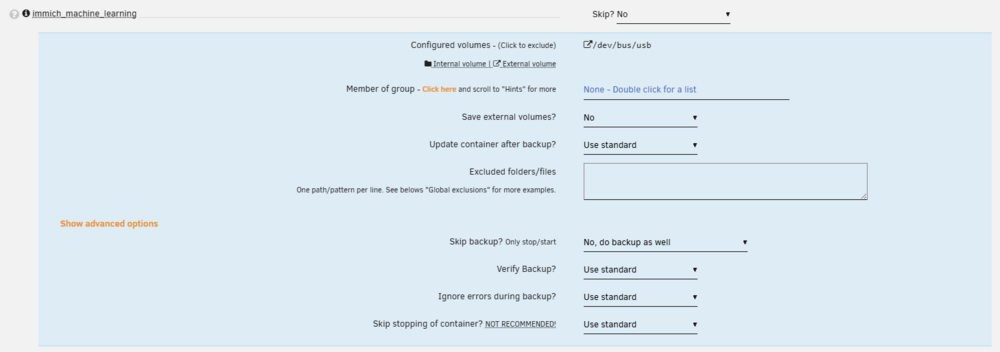
Before, the named volume wasn't even taken into account: [07.05.2025 03:27:37][][immich_machine_learning] Should NOT backup external volumes, sanitizing them... [07.05.2025 03:27:37][][immich_machine_learning] immich_machine_learning does not have any volume to back up! Skipping. Please consider ignoring this container. Nevertheless, how to properly exluce those from backup then? Set the container to Skip backup? Only stop/start => Yes, skip backup and do stop/start only Still, the error was thrown. [13.05.2025 03:24:39][❌][immich_machine_learning] 'immich_model-cache' does NOT exist! Please check your mappings! Skipping it for now. [13.05.2025 03:24:40][ℹ️][immich_machine_learning] Should NOT backup this container at all. Only include it in stop/start. Skipping backup...
-
In the last two days, my Appdata Backups fails with an error message. Before, it was working fine, nothing changed to the immich compose, so I am not really sure where this is coming from? Maybe you guys have any hints? Appdata Backup fails at this point: [10.05.2025 03:25:56][❌][immich_machine_learning] 'immich_model-cache' does NOT exist! Please check your mappings! Skipping it for now. [10.05.2025 03:25:56][ℹ️][immich_machine_learning] Should NOT backup external volumes, sanitizing them... [10.05.2025 03:25:56][⚠️][immich_machine_learning] immich_machine_learning does not have any volume to back up! Skipping. Please consider ignoring this container. My compose has a volume mapping immich-machine-learning: container_name: immich_machine_learning image: ghcr.io/immich-app/immich-machine-learning:${IMMICH_VERSION:-release}-openvino volumes: - /dev/bus/usb:/dev/bus/usb - model-cache:/cache The volume itself is available on the host root@cloud:~# docker volume inspect immich_model-cache [ { "CreatedAt": "2025-01-11T15:26:28+01:00", "Driver": "local", "Labels": { "com.docker.compose.project": "immich", "com.docker.compose.version": "2.29.2", "com.docker.compose.volume": "model-cache" }, "Mountpoint": "/var/lib/docker/volumes/immich_model-cache/_data", "Name": "immich_model-cache", "Options": null, "Scope": "local" } ] root@cloud:~# ls -la "/var/lib/docker/volumes/immich_model-cache/_data" total 4 drwxr-xr-x 4 root root 4 Feb 5 16:36 ./ drwx-----x 3 root root 3 Jan 11 15:26 ../ drwxr-xr-x 3 root root 3 Feb 5 16:36 clip/ drwxr-xr-x 3 root root 3 Feb 5 16:36 facial-recognition/ In the settings, there is no immich_model-cache volume specified nor deselectable