





bannhammer
Members
-
Joined
-
Last visited
-
Cool thanks! We'll try this tonight!
-
Thanks for the help, I rebuilt a plex anew but ran into the same issue again. I wasnt able to figure out how to run the repair commands but I will work with my brother in law on this. We were having issues actually figuring out how to present arguments to docker through unraid. It's really odd this would error out in the same way with 2 different plex installs, I wonder if the drives its hosted on are bad? Plex SHOULD be on some NVME drives my unraid appdata and whatnot is, not the data drives. Very annoying it would do that again like thatPlex Media Server Logs_2025-08-20_11-01-02.zip.
-
Thanks for the reply. In going through your steps I ended up looking through the Plex logs and found it does appear to be a database corruption issue: Jul 01, 2025 10:36:08.555 [23153162644280] ERROR - SQLITE3:0x80000001, 11, database corruption at line 72267 of [a29f994989] Jul 01, 2025 10:36:08.555 [23153162644280] ERROR - SQLITE3:0x80000001, 11, statement aborts at 10: [SELECT (SELECT max(idx) FROM 'main'.'fts4_metadata_titles_icu_segdir' WHERE level = ?) + 1] database disk image is malformed Jul 01, 2025 10:36:08.555 [23153162644280] ERROR - SQLITE3:0x80000001, 11, statement aborts at 186: [update metadata_items set extra_data=? where library_section_id=? and metadata_type=? and metadata_items.extra_data not like '%at^%3Asmart=1%' escape '^' and id not in (183595)] database disk image is malformed Jul 01, 2025 10:36:08.555 [23153162644280] ERROR - Exception inside transaction (inside=1) (/home/runner/_work/plex-media-server/plex-media-server/Library/MetadataCollection.cpp:519): sqlite3_statement_backend::loadOne: database disk image is malformed Jul 01, 2025 10:36:08.555 [23153162644280] WARN - Caught exception while scanning Movies: sqlite3_statement_backend::loadOne: database disk image is malformed Is there a way to save most of the configs if I were to rebuild? What would be the easiest way to go about fixing the db corruption, or easiest way to rebuild? Can I for example keep whats been played already if i rebuild?
-
Greetings, I was running 7.1.2 when I first noticed this problem, but I have just upgraded to 7.1.4 thinking it might be related to the networking issues mentioned in the patch notes. For some reason Plex is no longer adding anything to the library. I have added tens of thousands of movies and haven't changed my naming conventions so its not a format issue. When I scan library it does see the new movie and tv folders with the content, but doesn't add them. For example I can see it scan the folder with the movie or tv show name but Plex doesnt include them in the library. I can access the folders from other PCs, but for some reason there's a disconnect with Plex. I've also noticed some shows lost their movie posters and it allows me to match but does not update, likewise manually adding a movie poster gives me an error. I can still use unraid as a file server and plex works for existing movies, but it wont allow me to add (though I did add one episode from an existing show since I noticed this, which was in an existing folder). Could this be a networking or permissions issue? Any advice is much appreciated!

-
Greetings! I recently upgraded from Unraid 6 to 7 to take advantage of the feature that allows me to move appdata from an old cache drive to a new one with mover. Are there any instructions on how to do that? Is it possible to do this in the GUI, or will I need to run this through the terminal? I also noticed my CPU is running about 10c hotter since the upgrade. I was getting a nice 29c average before, but now its averaging about 35-40. It's not terrible but definitely hotter than before. Has anyone noticed this or have a fix for it? My machine is doing the exact same jobs which is really just running a plex server with HDDs that go to sleep after 30 mins. Thanks!
-
Okay, so that was almost my solution but not quite. The system files I was unable to move were still in use by docker and the VM manager. I thought I could just turn off the docker containers, but I had to disable the whole thing from the settings tab. There are still some mystery appdata files in use on the cache drives that I'm struggling to move over to NVME (and I cant seem to figure out how to xfer straight from cache to nvme without using the array as the middleman) but the array is now spinning down as expected. Huzzah! Appreciate leading me in the right direction. Hopefully this thread can help someone in the future.
-
Perfect! I really appreciate the advice, as you can tell I'm still learning the ins and outs. I expected changing the primary to run a mover action and get all the data over to the primary, rather than storing it and reading it from where it was originally written. This is where I think some of the confusion came from. It is now definitely moving the data, just slower than I was expecting. I think this is my solution, I will update the thread if it isn't with diagnostics as well as update you if this does fix my problem. I am optimistic this is what I was looking for though. Thanks!
-
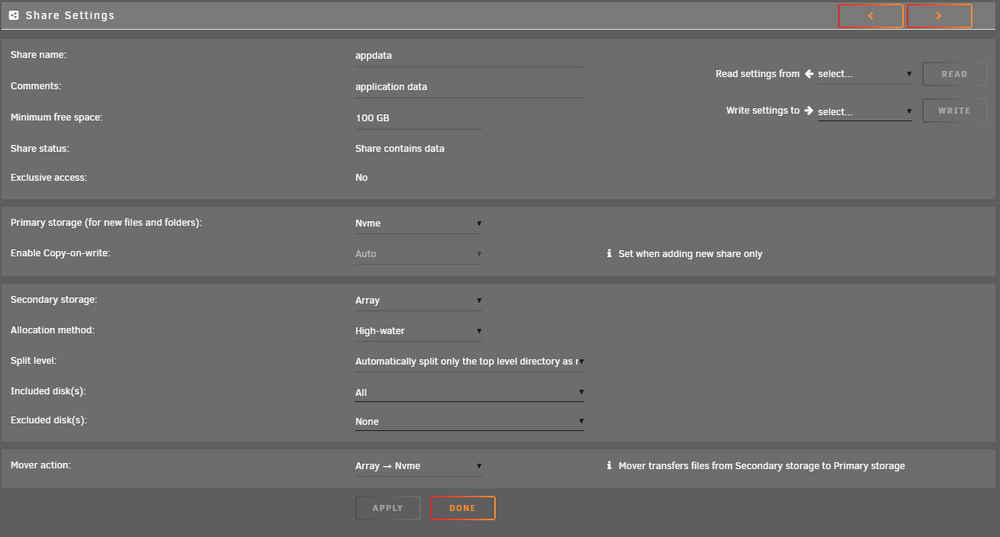
Okay, so if I want to move the data from where it is currently stored (array and cache) and onto nvme, I would need to set the primary to nvme, set the secondary to Array (or wherever the data is stored) then set the mover action to Array -> Nvme, run the mover and my data should move over like the screenshot below? That would make sense to me but I'm doing that now but my nvme pool is still showing 32mb used.
-
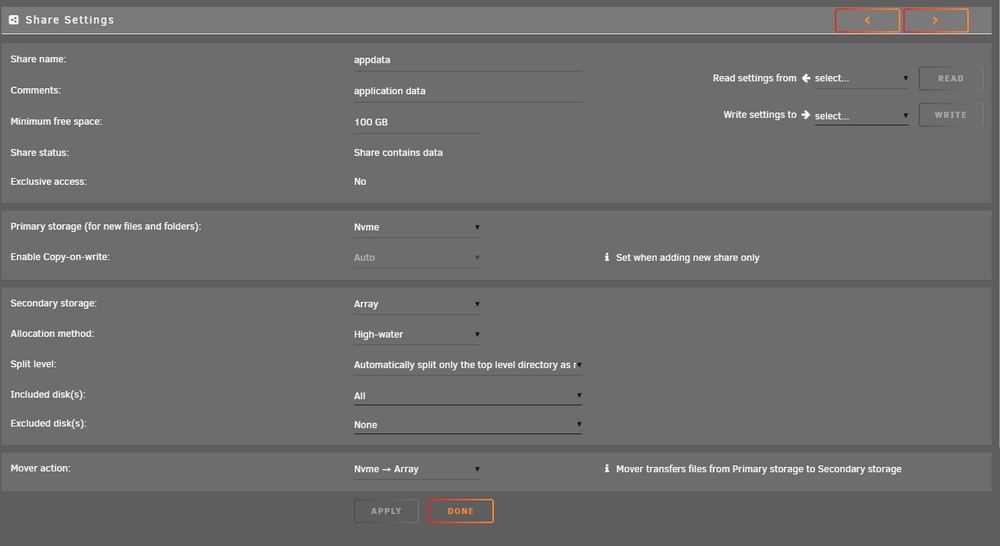
I also noticed my mover action may be wrong, its set NVME -> Array. Will I need to change that to Array -> NVME run the mover and Cache -> NVME run the mover and then change it back to NVME -> Array to have it do an array secondary backup?
-
I just did a compute all and noticed appdata still hasn't migrated off of Disk 1 and its also now on Disk 3 as well. How does one get appdata to move over? I changed storage from Array to Nvme and ran the mover command. Am I missing a step here?

-
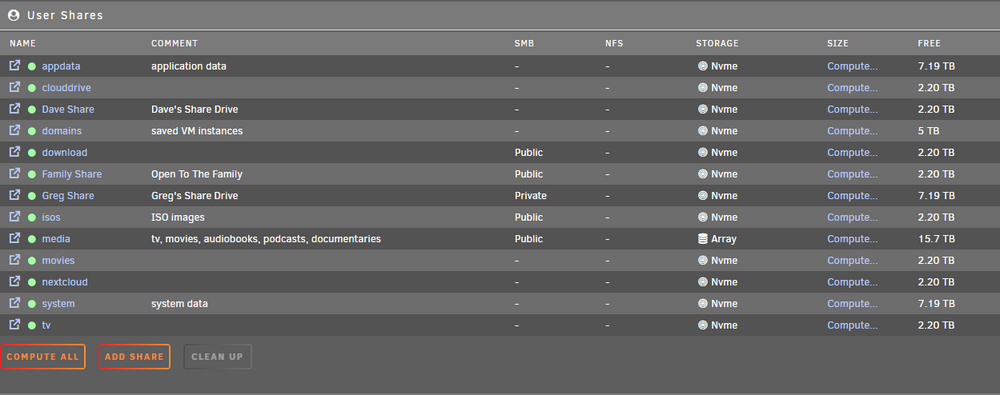
Hi there! I just had a successful upgrade on the hardware, but my spin down problem still doesnt seem to be fixed. I was wondering if there was anyway to see what is using these drives? I moved all the shares that weren't my media share over to the Cache drive (which I now call nvme due to the upgrade) but the platter disks still dont spin down. I'm also wondering why free doesn't reflect that. These are 2 1tb nvme drives in a pool, so this stuff shouldn't have 7.19 Tb free. Maybe that has something to do with my problem?
-
Thanks for that quick reply! 1: I have a SAS controller in a JBOD configuration on both the old and new setup. The current hardware is really old so I'm not running any VMs I can live without, I plan on spinning up new ones. You're probably right about the Docker containers. I have rebooted it a few times since I found the spindown feature and I would have expected everythign to move over since then, but I will review your links as I think you're onto something there. I noticed isos was still on the array, hopefully that's it. Again thanks for the links and advice!
-
Hi there! I have two questions: The first one is up upgrading my hardware. I'd like to use the same disks but not wipe anything, I just want to move my HDDs and thumb drive. I understand that's a simple plug n play type situation from other forum posts, but correct me if I'm wrong. The second point is something I've not been able to figure out on my current setup. When I started this build I didnt have cache drives so everything that wasnt running off the flash drive used Disk 1 for OS files. I later added 2 old 250gb SSDs to run all of the saved OS files, docker containers and apps on. Do parity drives and disk 1 never spin down or do I still have lingering Docker containers, OS components and apps running on them? I run Plex and a couple other things. This new build has 2 NVME drives I'd like to run docker containers and VMs on, while using my platter array for file storage exclusively. I would very much like them all to spin down as there are long periods of unuse, this server is shared between my family so lots of the time it's not doing anything and Id rather save the wear and tear. The things currently on my cache drives are appdata, domains, and system. Is something else running off my platter drives or are disk1 and the parity drives always on? Thanks!


