





kevev
Members
-
Joined
-
Last visited
-
Also to get SMART data from the drives in the TERRAMASTER D6-320 into Unraid, for each drive change "SMART controller type:" from Auto to SAT.
-
I see my data and parity is being rebuilt.
-
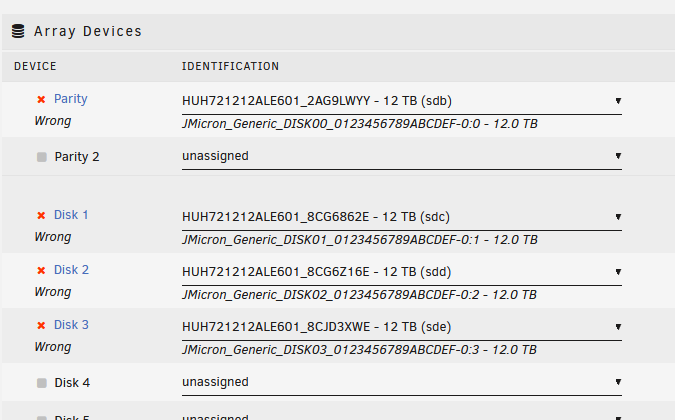
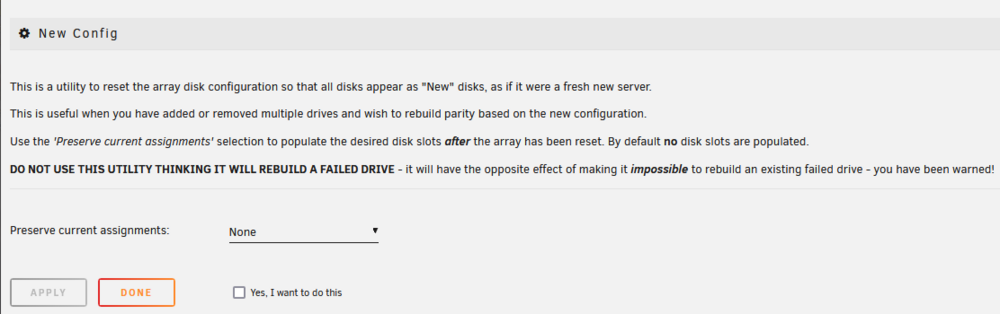
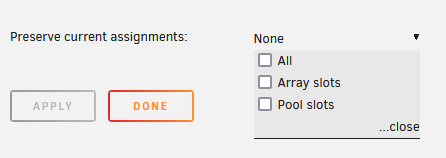
I have the 4 drives in the new array. I have assigned the parity drive to the parity 1 slot, and the other 3 drives to slots 2-4. I am unable to start the array. I do not know what to do on the "New config" screen. What should I do without loosing any data?
-
Thank you. I have grabbed screenshots of the array under the "Main" screen. I have also gathered serial numbers using `hdparm -I /dev/sd# | grep Serial\ Number` . I have a list mapping the array slots to the serial numbers. I now know which drive is Parity. I will have the new drive enclosure this weekend. Wish me luck!
-
Hello everyone. I am new to Unraid and I made some mistakes that I am reading a lot of new users make. I started with this hardware: A mini PC (Beelink Mini PC N5095 8GB 128GB SSD). + A CENMATE 8 Bay Hard Drive Enclosure(USB C 3.0 2x 4 SATA JMicron JMS567 controllers). ***STUPID MOVE ON MY PART*** + 4x HGST WD Ultrastar DC HC520 12TB Refurbished hard drives. 2x WD shucked 12TB My Book 7200 hard drives. Unraid Starter license. I was able to build the unraid array successfully using only the 4x DC HC520 drives(1x parity, 3x data). I then purchased the upgrade from Unraid Starter to Unleashed as I wanted to add more drives. I ran into the issue with Unraid seeing the JMS567 controller port fake serial numbers as duplicated while attempting to add the 2x WD drives. The new drives had the same serial numbers as the current drives. I am sending the CENMATE drive enclosere back for a refund. After reading around the forum I have orderd the TERRAMASTER D6-320 as I see that it does send the actual hard drive serials. Also SMART data does work as long as I change Unraid from "Auto" to "SAT" option for SMART data. Also, I know that USB is not recommended, but I have limited space and I have read that the TERRAMASTER enclosure is stable for users on this forum and on Reddit. My question is, what is the process for migrating these drives to the new enclosure? The drives will show their real serial numbers. Thank You in advance. :)
-
Same issue. A dummy change save did not resolve. This is a brand new install with one Array and the auto-created "appdata" & "system" shares. These 2 shares have the warning. I did create an additional new Share, and this new share does not have the warning.

