





TillallR1in7
Members
-
Joined
-
Last visited
Everything posted by TillallR1in7
-
Turned off Docker and set the shares to use Cache as primary drive with array as secondary storage. Then set move to so it would move everything to Cache. Move did it's thing. Once I verified everything was on Cache, I changed the shares to not use a secondary storage. Once I turned on Docker again everything worked without issue. Only had one Krusader file that did not want to move. It was a cache file inside of Krusader, so I deleted Krusader and reinstalled it to avoid any issues.
-
That was just to get things running. I put in new physical drives and moved everything moved to the new cache drive. As to using New Permissions, multiple docker containers were failing due to files being set as read only that should not have been. My guess is that somehow with me needing to set the bad drive as read only, when I moved the files to the temp location they were set to read only. Thank you for the heads up that New Permissions is not the best idea to use on appdata.
-
I thank you for all your help JorgeB. Just for completeness if anyone else finds this helpful. Using "Erase pool" removed the second drive but not the failed drive. For the failed drive I need to use "Remove Pool" I chose not to set a new "Cache Pool" and redirected the "Docker vDisk location:" to the new location "/mnt/user/system/docker/docker.img" then enabled Docker. Had to run the "New Permissions" tool on all drives to fix any read only issues I was having with some of my docker containers.
-
My issues again seemed to be syntax errors on my part. On the bright side I did get most of the files moved. Some of the appdata files failed to copy and that is ok with me. Mostly Plex metadata. root@Hades:/x# cp -r /x/system /mnt/disk2/restore root@Hades:/x# cp -r /x/appdata /mnt/disk2/restore With the files sitting on array "disk2" in the "restore" share, how do I get the drive to the point of reformatting?
-
At the moment the, thing you had me do did get the 3 shares that were set to cache to show. Those shares are empty. Under "POOL DEVICES" the physical drive is showing "Unmountable: wrong or no file system" Under "ARRAY OPERATION" "Unmountabale disk persent:" listing the physical drive for cache and a check box to Format said disk. If there is a way to access that drive in this current state, I'm at a loss as to how. I truly do appreciate the help.
-
Do you think at this point I would be good to swap out the old drives for the new drives? Then recreate my docker image on the new ones. I don't want to make it worst and I'm lacking in my confidence at the moment to make a good decision. Ignore this as I am still getting the same issues from the top of the post. With the array stopped I can remove the drive but I then see "Start will remove the missing pool disk and then bring the array on-line. Yes, I want to do this" check box. If I click yes I get: "Wrong Pool State cache - too many wrong or missing devices"
-
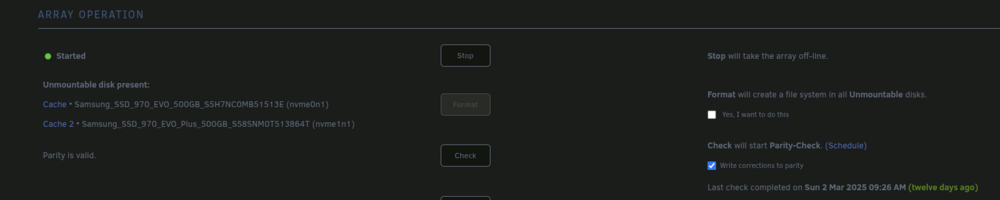
Good news, with the addition of "p1" I did not get an error. With array started, under "USER SHARES" I'm able to see "appdata, domains, and isos" shares that were set to use cache. All three are showing as empty of files. I did adjust them to use Array now. The two images are showing the change since the command worked. The physical drives are now showing as unmountable and is now asking if I want to format them.

-
root@Hades:~# mount -t btrfs -o rescue=all,ro /dev/nvme0n1 /x mount: /x: wrong fs type, bad option, bad superblock on /dev/nvme0n1, missing codepage or helper program, or other error. dmesg(1) may have more information after failed mount system call. Mar 14 12:56:01 Hades nginx: 2025/03/14 12:56:01 [crit] 9344#9344: *73 connect() to unix:/var/run/php-fpm.sock failed (2: No such file or directory) while connecting to upstream, client: 192.168.0.28, server: , request: "POST /webGui/include/ProcessStatus.php HTTP/1.1", subrequest: "/auth-request.php", upstream: "fastcgi://unix:/var/run/php-fpm.sock:", host: "192.168.0.175", referrer: "http://192.168.0.175/webGui/include/Boot.php" Mar 14 12:56:01 Hades nginx: 2025/03/14 12:56:01 [error] 9344#9344: *73 auth request unexpected status: 502 while sending to client, client: 192.168.0.28, server: , request: "POST /webGui/include/ProcessStatus.php HTTP/1.1", host: "192.168.0.175", referrer: "http://192.168.0.175/webGui/include/Boot.php" Mar 14 12:56:01 Hades rc.php-fpm: PHP-fpm daemon... Started. Mar 14 12:56:01 Hades emhttpd: shcmd (44): /etc/rc.d/rc.nginx start Mar 14 12:56:01 Hades rc.nginx: Starting Nginx server daemon... Mar 14 12:56:02 Hades rc.nginx: Nginx server daemon... Already started. Mar 14 12:56:10 Hades sysDrivers: SysDrivers Build Complete Mar 14 12:56:10 Hades webgui: Successful login user root from 192.168.0.28 Mar 14 12:58:22 Hades kernel: squashfs: Unknown parameter 'rescue' Mar 14 12:58:22 Hades kernel: fuseblk: Unknown parameter 'rescue' Mar 14 12:58:22 Hades kernel: UDF-fs: bad mount option "rescue=all" or missing value Mar 14 12:58:22 Hades kernel: xfs: Unknown parameter 'rescue' Mar 14 12:58:22 Hades kernel: ntfs3: Unknown parameter 'rescue' Mar 14 13:00:23 Hades kernel: squashfs: Unknown parameter 'rescue' Mar 14 13:00:23 Hades kernel: fuseblk: Unknown parameter 'rescue' Mar 14 13:00:23 Hades kernel: UDF-fs: bad mount option "rescue=all" or missing value Mar 14 13:00:23 Hades kernel: xfs: Unknown parameter 'rescue' Mar 14 13:00:23 Hades kernel: ntfs3: Unknown parameter 'rescue' Mar 14 13:11:50 Hades kernel: squashfs: Unknown parameter 'rescue' Mar 14 13:11:50 Hades kernel: fuseblk: Unknown parameter 'rescue' Mar 14 13:11:50 Hades kernel: UDF-fs: bad mount option "rescue=all" or missing value Mar 14 13:11:50 Hades kernel: xfs: Unknown parameter 'rescue' Mar 14 13:11:50 Hades kernel: ntfs3: Unknown parameter 'rescue' hades-syslog-20250314-1735.zip
-
Sorry that I left out the step of me doing the "mkdir/temp" in my last post. This is what I get when I rebooted with the array not started. root@Hades:~# mkdir /x root@Hades:~# mount -o rescue=all,ro /dev/nvme0n1 /x mount: /x: wrong fs type, bad option, bad superblock on /dev/nvme0n1, missing codepage or helper program, or other error. dmesg(1) may have more information after failed mount system call. dmesg(1): [ 342.559885] squashfs: Unknown parameter 'rescue' [ 342.560001] fuseblk: Unknown parameter 'rescue' [ 342.560027] UDF-fs: bad mount option "rescue=all" or missing value [ 342.560047] xfs: Unknown parameter 'rescue' [ 342.560192] ntfs3: Unknown parameter 'rescue' [ 463.350373] squashfs: Unknown parameter 'rescue' [ 463.350474] fuseblk: Unknown parameter 'rescue' [ 463.350498] UDF-fs: bad mount option "rescue=all" or missing value [ 463.350517] xfs: Unknown parameter 'rescue' [ 463.350662] ntfs3: Unknown parameter 'rescue'
-
Sadly, no luck with this. 1) Mount filesystem read only (safe to use) root@Hades:~# mount -o rescue=all,ro /dev/nvme0n1 /temp mount: /temp: /dev/nvme0n1 already mounted or mount point busy. dmesg(1) may have more information after failed mount system call. root@Hades:~# mount -o degraded,rescue=all,ro /dev/nvme0n1 /temp mount: /temp: /dev/nvme0n1 already mounted or mount point busy. dmesg(1) may have more information after failed mount system call. dmesg [38412.773565] NFSD: Using UMH upcall client tracking operations. [38412.773569] NFSD: starting 90-second grace period (net f0000000) [38442.687286] squashfs: Unknown parameter 'rescue' [38454.596144] NFSD: Using UMH upcall client tracking operations. [38454.596149] NFSD: starting 90-second grace period (net f0000000) [39623.186853] squashfs: Unknown parameter 'degraded' [39697.927781] squashfs: Unknown parameter 'rescue' [39753.924741] squashfs: Unknown parameter 'rescue' 2) BTRFS restore (safe to use): root@Hades:~# btrfs restore -v /dev/nvme0n1 /mnt/disk2/restore No valid Btrfs found on /dev/nvme0n1 Could not open root, trying backup super No valid Btrfs found on /dev/nvme0n1 Could not open root, trying backup super No valid Btrfs found on /dev/nvme0n1 Could not open root, trying backup super
-
Samsung_SSD_970_EVO_500GB_S5H7NC0MB51513E (nvme0n1) (over 5 years old) Currently visible 169 GB used. Clicking on "Browse /mnt/cache" shows as empty. SMART overall-health: Failed Unable to to run SMART test. With the array stopped I can remove the drive but I then see "Start will remove the missing pool disk and then bring the array on-line. Yes, I want to do this" check box. If I click yes I get: "Wrong Pool State cache - too many wrong or missing devices" I did not have a second cache drive when this failed. I also, did not think to back up the drive before the update. This drive was where docker and it's apt's were. My goal is at this point is to replace the current drive with 2 larger NVME drives. If recovery of the old drive is possible, great I can figure out how to do the drive swap. On the other hand, if recovery of the old drive is not possible then I need help removing it from UNRAID. As well as, fixing Docker once the new drive is in place. Thank you in advance for your help. hades-diagnostics-20250314-0117.zip
-
Thank you for your help with this. The Parity drives are syncing as I type this.
-
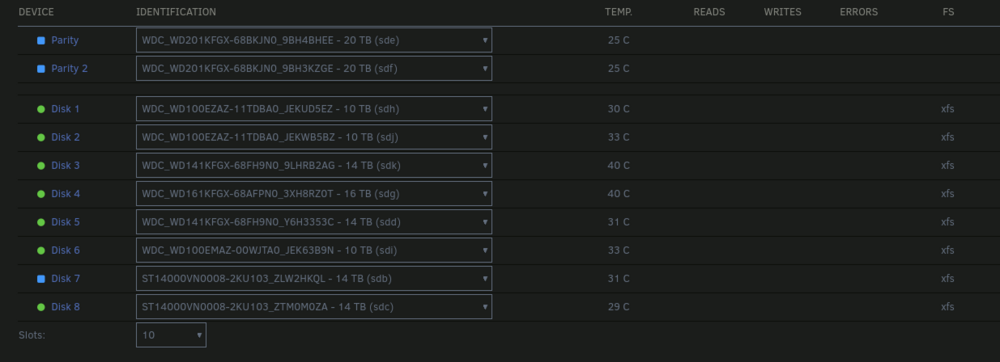
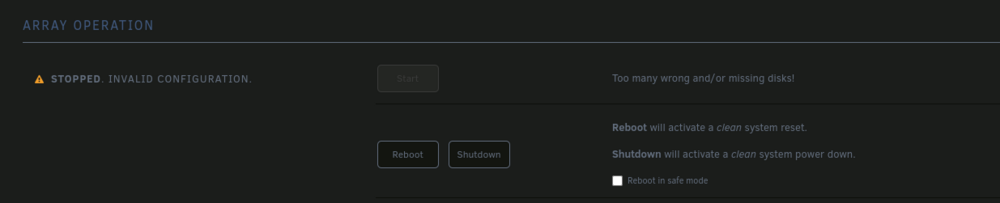
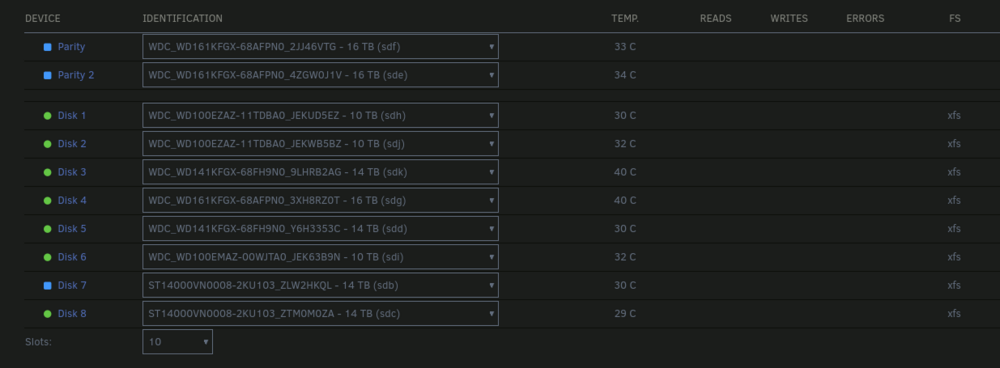
I was able to get a new cable for the Disk 7 and that fixed the CRC issue. The remaining issues is that both Party disks and Disk 7 are being detected as new disks and I am unable to start up the array at all. This image is the New Parity disks. This image is the old Parity disks.
-
I agree about the connection being a issues but at this point Unraid thinks all 3 drives are new. hades-diagnostics-20241208-1027.zip
-
Currently running a 10 drive array. 2 Parity and 8 storage. I was swapping out the 2 current Parity drives for 2 larger drives. My plan was to replace the 2 Parity drives at the same time and then let the Parity rebuild. Once that was done I would swap the 2 smallest drives I have with the former Parity drives. With the old Parity drives sitting on my desk and the new ones in, I was able to boot up fine. Under Array Devices I change the Parity drives to the new ones. The other 8 drives were green, so I hit start array. Right after the array started up and both Parity drives were starting to rebuild, I noticed that Disk 7 had a red "X". I checked Disk 7 to see the issue was "UDMA CRC error count" and stopped the array. I shutdown the server. Then unplugged and reseated the cable from both the drive and motherboard. When I restarted Unraid, this time the drive was flat out missing from the Disk 7. At this point I panicked and tried putting to former Parity drives back in. Only to have Unraid think that they are "New" drives. While Disk 7 showing again with the "UDMA CRC error count" appearing again and also showing as a new drive. Array Operation is stating "Stopped. Invalid configuration. Too many wrong and/or missing disks!" At this point, is there a way to get Unraid to recognize the former Parity drives so I can recover?



