





Enfoxed
Members
-
Joined
-
Last visited
Everything posted by Enfoxed
-
Hi, everything worked fine a couple month but now after updating to Unraid 6.12.14 today, the docker wont start because the Device is no longer found Dec 18 2024 16:53:20.421 pid:7 base_logger.py 59 INFO Logging level: INFO Dec 18 2024 16:53:20.433 pid:7 config.py 49 DEBUG Server config: Dec 18 2024 16:53:20.433 pid:7 config.py 58 DEBUG {'hostname': 'localhost', 'port': 3000, 'communication_timeout': 1} Dec 18 2024 16:53:20.433 pid:7 config.py 60 DEBUG Hardware config: Dec 18 2024 16:53:20.433 pid:7 config.py 69 DEBUG {'port': None} Dec 18 2024 16:53:20.433 pid:7 config.py 71 DEBUG Fan profile config: Dec 18 2024 16:53:20.433 pid:7 config.py 80 DEBUG {'1000 RPM': {'type': 'rpm', 'values': [1000, 1000, 1000, 1000, 1000, 1000, 1000, 1000, 1000, 1000], 'name': '1000 RPM'}, 'MadMax': {'type': 'PWM', 'values': [100, 100, 100, 100, 100, 100, 100, 100, 100, 100], 'name': 'MadMax'}, '1200RPM': {'type': 'RPM', 'values': [1200, 1200, 1200, 1200, 1200, 1200, 1200, 1200, 1200, 1200], 'name': '1200RPM'}} Dec 18 2024 16:53:20.433 pid:7 config.py 83 DEBUG Fan aliases: Dec 18 2024 16:53:20.433 pid:7 config.py 92 DEBUG {0: 'Fan #1', 1: 'Fan #2', 2: 'Fan #3', 3: 'Fan #4', 4: 'Fan #5', 5: 'Fan #6', 6: 'Fan #7', 7: 'Fan #8', 8: 'Fan #9', 9: 'Fan #10'} Dec 18 2024 16:53:20.433 pid:7 webserver.py 295 INFO Using COM port `/dev/ttyACM0` (specified in `OPENFANCOMPORT` env variable). Dec 18 2024 16:53:20.433 pid:7 webserver.py 304 INFO Fan Controller port: /dev/ttyACM0 Dec 18 2024 16:53:20.436 pid:7 serial_driver.py 87 DEBUG Searching for COM port `/dev/ttyACM0` Dec 18 2024 16:53:20.436 pid:7 serial_driver.py 89 DEBUG /dev/ttyS0 Dec 18 2024 16:53:20.436 pid:7 serial_driver.py 90 DEBUG Product: None Dec 18 2024 16:53:20.436 pid:7 serial_driver.py 91 DEBUG Desc: ttyS0 Dec 18 2024 16:53:20.436 pid:7 serial_driver.py 92 DEBUG SN: None Dec 18 2024 16:53:20.436 pid:7 serial_driver.py 93 DEBUG VID:None PID:None Dec 18 2024 16:53:20.436 pid:7 serial_driver.py 94 DEBUG Location: None Dec 18 2024 16:53:20.436 pid:7 serial_driver.py 95 DEBUG Interface: None Dec 18 2024 16:53:20.436 pid:7 webserver.py 373 ERROR OpenFan API service crashed during setup. Traceback (most recent call last): File "/mnt/OpenFan/webserver.py", line 371, in main FAN_API_Service().run_forever() File "/mnt/OpenFan/webserver.py", line 305, in __init__ self.fan_commander = FanCommander(self.serialPort) File "/mnt/OpenFan/FanCommander.py", line 10, in __init__ super(FanCommander, self).__init__(port_info, timeout=2) File "/mnt/OpenFan/serial_driver.py", line 28, in __init__ raise TypeError("The port_info must be of type {} (given: {})".format(self.__class__, _lpc.ListPortInfo)) TypeError: The port_info must be of type <class 'FanCommander.FanCommander'> (given: <class 'serial.tools.list_ports_common.ListPortInfo'>) Dec 18 2024 16:53:29.828 pid:7 base_logger.py 59 INFO Logging level: INFO Dec 18 2024 16:53:29.839 pid:7 config.py 49 DEBUG Server config: Dec 18 2024 16:53:29.839 pid:7 config.py 58 DEBUG {'hostname': 'localhost', 'port': 3000, 'communication_timeout': 1} Dec 18 2024 16:53:29.840 pid:7 config.py 60 DEBUG Hardware config: Dec 18 2024 16:53:29.840 pid:7 config.py 69 DEBUG {'port': None} Dec 18 2024 16:53:29.840 pid:7 config.py 71 DEBUG Fan profile config: Dec 18 2024 16:53:29.840 pid:7 config.py 80 DEBUG {'1000 RPM': {'type': 'rpm', 'values': [1000, 1000, 1000, 1000, 1000, 1000, 1000, 1000, 1000, 1000], 'name': '1000 RPM'}, 'MadMax': {'type': 'PWM', 'values': [100, 100, 100, 100, 100, 100, 100, 100, 100, 100], 'name': 'MadMax'}, '1200RPM': {'type': 'RPM', 'values': [1200, 1200, 1200, 1200, 1200, 1200, 1200, 1200, 1200, 1200], 'name': '1200RPM'}} Dec 18 2024 16:53:29.840 pid:7 config.py 83 DEBUG Fan aliases: Dec 18 2024 16:53:29.840 pid:7 config.py 92 DEBUG {0: 'Fan #1', 1: 'Fan #2', 2: 'Fan #3', 3: 'Fan #4', 4: 'Fan #5', 5: 'Fan #6', 6: 'Fan #7', 7: 'Fan #8', 8: 'Fan #9', 9: 'Fan #10'} Dec 18 2024 16:53:29.840 pid:7 webserver.py 295 INFO Using COM port `/dev/ttyACM0` (specified in `OPENFANCOMPORT` env variable). Dec 18 2024 16:53:29.840 pid:7 webserver.py 304 INFO Fan Controller port: /dev/ttyACM0 Dec 18 2024 16:53:29.843 pid:7 serial_driver.py 87 DEBUG Searching for COM port `/dev/ttyACM0` Dec 18 2024 16:53:29.843 pid:7 serial_driver.py 89 DEBUG /dev/ttyS0 Dec 18 2024 16:53:29.843 pid:7 serial_driver.py 90 DEBUG Product: None Dec 18 2024 16:53:29.843 pid:7 serial_driver.py 91 DEBUG Desc: ttyS0 Dec 18 2024 16:53:29.843 pid:7 serial_driver.py 92 DEBUG SN: None Dec 18 2024 16:53:29.843 pid:7 serial_driver.py 93 DEBUG VID:None PID:None Dec 18 2024 16:53:29.843 pid:7 serial_driver.py 94 DEBUG Location: None Dec 18 2024 16:53:29.843 pid:7 serial_driver.py 95 DEBUG Interface: None Dec 18 2024 16:53:29.843 pid:7 webserver.py 373 ERROR OpenFan API service crashed during setup. Traceback (most recent call last): File "/mnt/OpenFan/webserver.py", line 371, in main FAN_API_Service().run_forever() File "/mnt/OpenFan/webserver.py", line 305, in __init__ self.fan_commander = FanCommander(self.serialPort) File "/mnt/OpenFan/FanCommander.py", line 10, in __init__ super(FanCommander, self).__init__(port_info, timeout=2) File "/mnt/OpenFan/serial_driver.py", line 28, in __init__ raise TypeError("The port_info must be of type {} (given: {})".format(self.__class__, _lpc.ListPortInfo)) TypeError: The port_info must be of type <class 'FanCommander.FanCommander'> (given: <class 'serial.tools.list_ports_common.ListPortInfo'>)
-
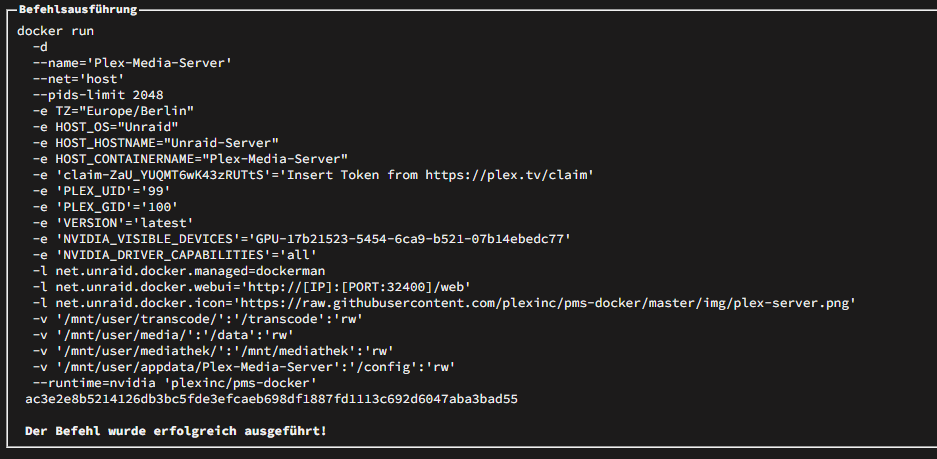
Hier der Docker Run im Anhang: Die Nvidia gt710 habe ich eigentlich nur für die Visualisierung des Servers selbst eingebaut, sie ist momentan als Graka für Plex hinterlegt aber nur um zu testen ob es damit besser wird. Der CPU Langweilt sich scheinbar bei plex wiedergabe, kein Core kommt über 10% laut Unraid Dashboard. Danke schonmal für die Hilfe
-
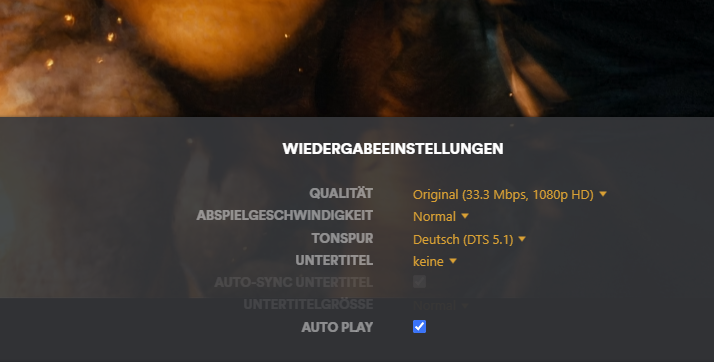
Hallo Community, ich habe einen Unraid-Server selbstbau vor einiger Zeit aufgesetzt. Unraid OS Pro Lifetime Hardware: Netzteil: ASUS ROG THOR 850w Mainboard: Kllisre X99 Dual ZX-DU99D4 CPU1: Intel® Xeon® CPU E5-2698 v3 CPU2: Intel® Xeon® CPU E5-2698 v3 RAM: 8x Samsung RDIMM 16GB, DDR4-2133, CL15-15-15, reg ECC HBA: LSI SAS3008 PCI-Express Fusion-MPT SAS-3 (rev 02) HDD: 4x Ironwolf Pro 4TB (und ein paar kleine alte HDDs) PARITY: Ironwolf Pro 4TB CACHE: WD Red SN700 1000GB GPU: NVIDIA GK208B [GeForce GT 710] ETHERNET: Realtek Semiconductor Co., Ltd. RTL8125 2.5GbE Controller (rev 04) CASE: PHANTEKS Enthoo Pro 2 Server Big-Tower⠀ FAN CONTROLLER: Karanovic Research OpenFan Darauf läuft nun Plex Pro mit Zugriff auf die im Array abgelegten Medien. Bei der Wiedergabe auf den Windows Clients (Win11, Chrome) gibt es oft komplett bunte artefakte die das ganze Bild bunt einfärben (Diese sind aber nicht zufällig sondern wiederholbar an den selben stellen in den Filmen) , schwierig zu erklären, Bild ist angehängt. Auf dem nVdidia Shield Pro habe ich das noch nicht bemerkt. Die original MKV per vlc direkt vom Storage abgespielt hat diese Fehler auch nicht. Vielen Dank schonmal vorab Florian
