john_petrucci
Members
-
Joined
-
Last visited
-
I would like to update the discussion to thank @JorgeB so much. With UFS Explorer, I recovered all my data. After this adventure, I will always have a backup disk in addition to Unraid.
-
Should I start the array in normal mode or maintenance mode while trying to mount disk3? Thank you very much for your help. I hope to be able to recover the most important things from the other disks.
-
No RAID controllers, only standard SATA. However, right after the disaster, I put the disks back into the previous server where everything used to work... How can I recover the only disk (Disk3) that the array sees and mounts?
-
😔 What if I tried to force import (-f) the individual disks? What if I tried mounting the individual disks on another Unraid server to see if they would mount? Does UFS Explorer recognize the ZFS file system?
-
Nothing else to do, this is the result. root@SERVER2012:~# zpool import disk2 cannot import 'disk2': I/O error Destroy and re-create the pool from a backup source. root@SERVER2012:~# zpool import disk4 cannot import 'disk4': I/O error Destroy and re-create the pool from a backup source.
-
Hello, Unraid Started - Maintenance Mode: root@SERVER2012:~# zpool import pool: disk4 id: 16366680502675623599 state: ONLINE action: The pool can be imported using its name or numeric identifier. config: disk4 ONLINE md4p1 ONLINE pool: disk3 id: 9366551740632413894 state: ONLINE action: The pool can be imported using its name or numeric identifier. config: disk3 ONLINE md3p1 ONLINE pool: disk2 id: 10281060940874546620 state: ONLINE action: The pool can be imported using its name or numeric identifier. config: disk2 ONLINE md2p1 ONLINE pool: disk1 id: 18162261385565336200 state: FAULTED status: One or more devices contains corrupted data. action: The pool cannot be imported due to damaged devices or data. see: https://openzfs.github.io/openzfs-docs/msg/ZFS-8000-5E config: disk1 FAULTED corrupted data md1p1 FAULTED corrupted data
-
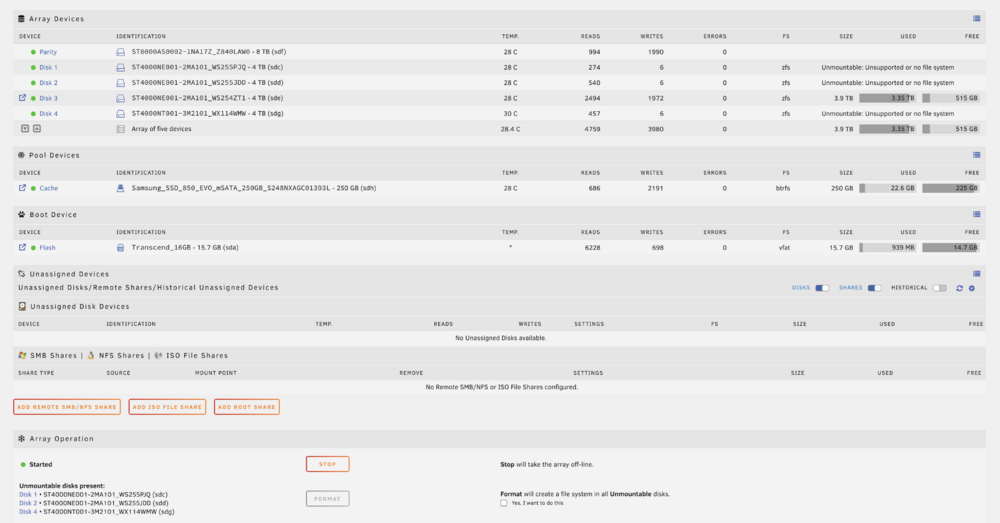
Hello guys, I have a serious problem with my Unraid server consisting of 5 disks, 4 data and 1 parity. I changed the server and moved the disks, but most likely the data or power cables were faulty... After a correct startup, the server started failing after I turned it off and on several times in a short period. At first, one disk wouldn't mount, then another, and now only one data disk remains mountable... I'm sure the disks aren't defective because they always worked well in the old server. However, the new server with a different motherboard and cables caused the issue... I put the disks back into the old server and restarted Unraid, but the current situation is as shown in the attached image. Is there a way to repair the partitions or mount them to recover the data??? Please help me, all my personal data, photos, files, etc., from the past 20 years are on those disks. I'm desperate. File System is ZFS. Thanks I’m attaching photos and diagnostics. server2012-diagnostics-20241218-1855.zip
-
Salve ragazzi, ho un serio problema sul mio server Unraid composto da 5 dischi, 4 dati ed 1 parita', ho cambiato server quindi spostato i dischi, ma molto probabilmente i cavi dati o alimentazione erano difettosi... E dopo un avvio corretto, ha iniziato dopo che ho spento e riacceso alcune volte in breve tempo il server, a non montare prima un disco poi un altro alla fine i dischi dati solo 1 rimane montabile... Sono sicuro che i dischi non siano difettosi perche'nel vecchio server hanno funzionanto sempre bene, ma il nuovo server con scheda madre e cavi differenti hanno creato il problema... C'e' un modo per riparare le partizione oppure montare la partizione per recuperare i dati??? Aiutatemi in quei dischi ho tutti i miei dati personali foto,file ecc... da qui a 20 anni, sono disperato. Allego foto e diagnostics. server2012-diagnostics-20241218-1855.zip