





Houghton19
Members
-
Joined
-
Last visited
-
thanks @JorgeB, just standard SSD ok rather than a NVME?
-
Hello fellow Unraiders. Im still a n00b with all things unraid but I am getting there slowly. So at the moment Im running my server with a 8TB parity drive with further 6 drives of 1 x 4TB then 5 x 2TB. I have just ordered 2 x 16TB drives as I want to upgrade before I get desperate for room. I also have a 512gb NVME that I use for downloading. I found that I had alot of I/O issues when downloading from usenet directly to the mechanical HDD as I am lucky enough to have a 1 gig download connection. I run all my arrs from usenet and very happy with the way it runs, However I also have a few private torrent sites where i like to help out seeding linux isos. With the seeding requirements I dont have a lot of wiggleroom to keep the isos on my NVME. Downloading from torrents behind a VPN going via GlutenVPN I am getting about 50MB/s downloads, because I'm relying on torrents as my main goto for getting data im not as bothered about speed. Soooo sorry about the drivvel........ 1) What/ How is the best way for me to swap the 8TB parity for one of the 16TB when I get it....... plus would you add any of the other smaller drives to parity also? 2) For downloads can I just take the bottom 2TB Samsung out of my array and would it be ok for a torrent download seeder drive..... it is only a 5400rpm drive with SATA 2.6, 3.0 Gb/s. further question to that, is If i was to buy a cheap second hand 1-2TB SSD would i get the I/O wait issues using a bigger SSD instead of the smaller NVME. thanks.
-
Argh, thanks for the reply, I was under the impression that USB-C had faster transfer speeds.
-
Hello Unraiders!!!! I had a quick search using the search function, so apologies if I missed anything. I have just ordered a new motherboard for my Unraid servers, this comes with two USB-C ports in the back. I have read that people advise on using USB 2 appose to USB 3 due to reliability and heat issues, I was wondering does that go the same for USB-C? Would there be any advantage running the flash drive on a -C stick? Thanks.
-
I am running Unraid 7.1.2 on a HP small form factor, i7, 16gb RAM, with an added 2.5gb NIC and added SATA and just have all the SATA and power cables hanging out the back with my HDD on top Of the machine (I was going to get a 3D printed mount but have not as of yet). The last few weeks have been warm and I had a few warning about HDD temps, I found a cheap USB fan that actually worked, and even as the weather got hotter I had no heat warnings. I was looking to move my CPU into a new motherboard, recycling the RAM and popping everything into a Rack mounted case, with actual pc fans. I was wanting it to run like it would as a windows PC, fans kick in when needed, then when no longer required the fans turn off automatically. From reading a few (older posts) around here and Reddit this doesn’t seem achievable? Has this changed in Unraid 7? Pictures of Frankenstein NAS and cheap upgrade parts for ref. Thanks.
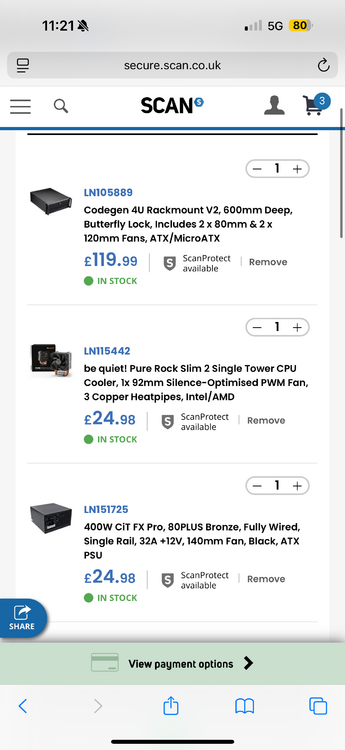
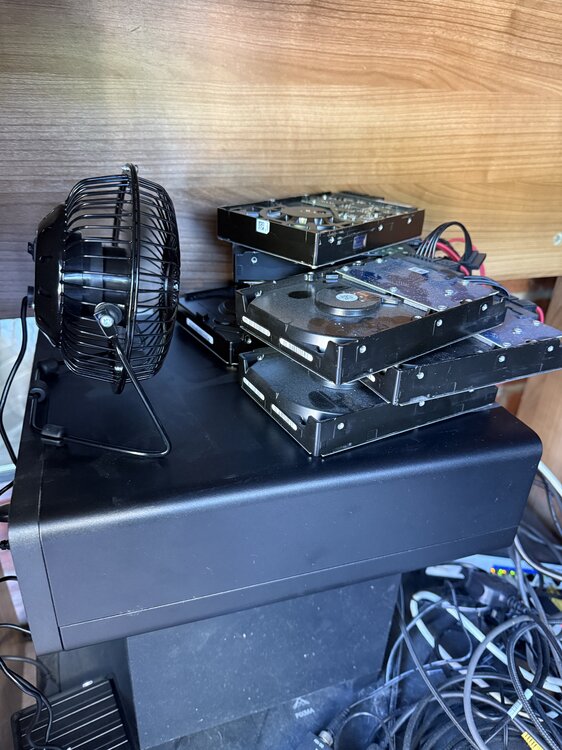
-
THANK YOU SO MUCH YOU LEGEND!!!!!!! Im only new to Unraid but its bloody fantastic....... what I cant figure out myself......... people in here can....... So I couldnt find exactly what you suggested in the above post..... but I changed two settings, one was Configure storage controller for RAID, the other was Configure storage controller for Intel so I disabled both. Whilst googling how to RAID to AHCI on the HP Bios I also managed to update my bios (the HP has two options F9 and ESC) F9 always says no network adaptor but Via ESC it somehow sees the network connection so updated...... also via google it shows people changing RAID in windows. I took my Unraid usb out and it booted into windows..... I then managed to find a setting in my BIOS that said M.2 Secure erase so I wiped it, USB back in and boom its there!!!! Thanks.

-
Sorry JorgeB tower-diagnostics-20250130-1833.zip
-
As title says, Im a newby around these parts so may need things explained really really easy. So I have a HP ProDesk 400 G7, this has a onboard M.2 drive (500gb) but I cannot find it in Unraid. When i got the machine I loaded windows onto it so I know that its not faulty, however before putting Unraid onto my G7 I used the teo PCIE slots, one for a 2.5gb NIC and the other for a SATA card to add my extra disks. I'm not sure if the M.2 now isn't visible due to it sharing lanes as I cant find much info about the machine. BIOS can see the drive also. any ideas on how to see it? thanks.
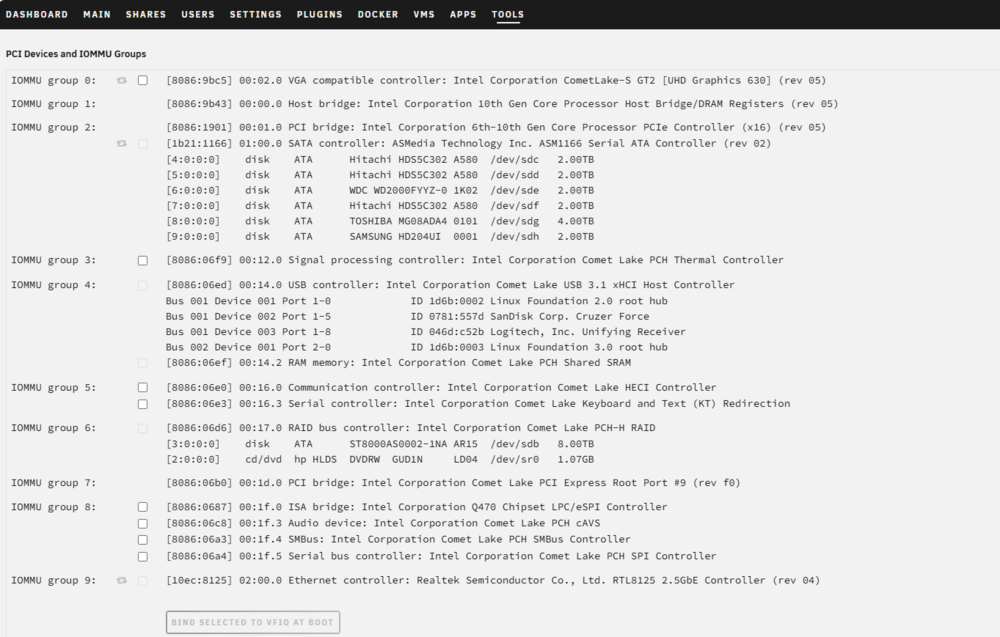
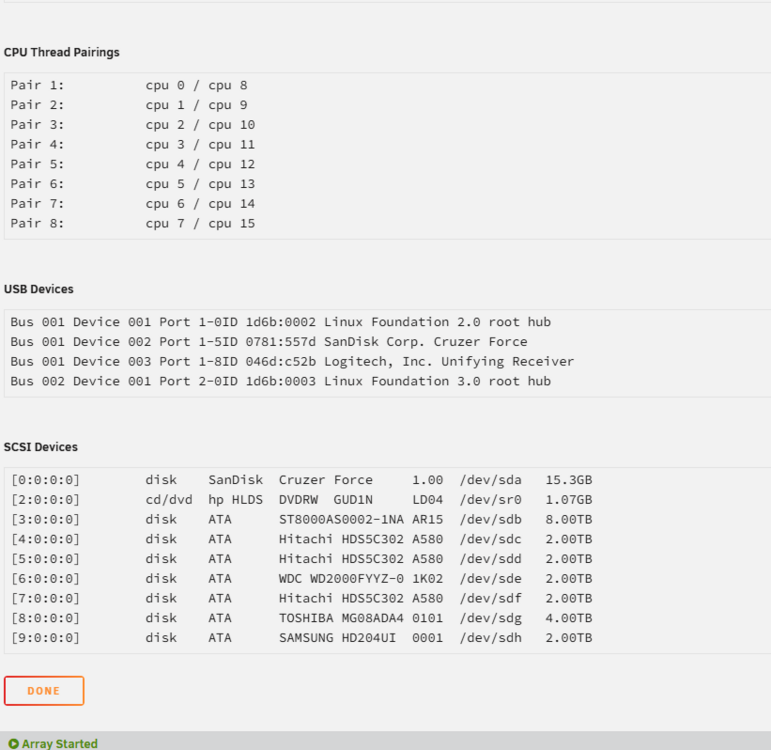
-
Thanks for this @twistable_deer this has just helped me, nothing in my SABNZB would open, I could get into my complete folder, but any sub folder from there wouldnt open, exact same error, same on iphone too...... it would let me move things via the unraid GUI but then I had to move it to another directory I did have windows access too..... thanks very much!!!!!
-
Thanks for all your efforts @bmartino1. I think I have semi sorted this....... it seems that the curl command on the containers is just sending it somewhere else, using you curl ifconfig.me works a treat and points it in the correct ip address. I already have a wireguard running on my router, this is for all my internal devices, The wireguard is controlled by my ASUS router, I have a No-IP account setup for DDNS for if my WAN ip address changes so i do always have access to my internal devices, all I have to do is open the wireguard app, turn on that config and then i can connect to any of my devices in the house..... (only have two, my pc that is 192.168.10.64 and my Unraid NAS is 192.168.10.22.... I suppose 3 as i can also connect to the router). I am only running a handfull of docker containers, all I want to do is have some VPN on my NAS that I can conseal a little bit of usage/ help stop blocks..... I have SABNZB...... I dont feel I need a vpn as it has a "ssl" option so I should be safe with that... QBit Torrent.... obvious reasons..... NextPVR is a IPTV app that I use to record F1 content in 4k and then it saves to a folder I have on my NAS called Recordings, then I can view that from my jellyfin. I have found that due to ISP blocks in the UK I have less issues behind a VPN. I have tried installing a wireguard app and also uploading the wg0.conf to the built in vpn under settings. these obviously then stop me being able to access the dockers WebUI as it blocks the inbound traffic. I have installed a wireguard docker container installed the wg0.conf and cound see in the docker terminal that its pointing to the vpn ip address, I then tried running the other dockers through this one via the drop down "container" option and also by adding it via the extra perameters option.
-
thanks for all the help, I was looking at the wrong part where to log out. thanks again.
-
thanks for your help @JorgeB, took two attempts but it work. just before this can be closed can you answer if the cache drives count towards the drive count? thanks
-
thanks for your reply @JorgeB, I have just tried to log out, it presented me with a message that reads "unregister your server" i clicked on confirm unregistration and now i am presented with a new error "Error attempting to Unregister your server from Unraid Connect" what are the sugested steps from here please? thanks.
-
My trial just ran out yesterday, due to other commitments of work and blah blah im still playing around. Im in a bit of a confusion what to do as looking at the lifetime version as all my drives are small, 8Tb, 4Tb then 4 2xTB, IM running in a limited unit (SFF) that i cant add much too and looking to go lifetime, but its also a January the longest month of the year as we got paid early and had to cover xtra bills with wifey buying all the kids stuff. So im torn.......with the amount of drives ive got I cant get the starter...... or do i drop a drive (is that possible) but ive also been looking at dropping a drive for now, get the starter and that would hopfully cover me until a sale is on to upgrade to lifetime. Im nowhere near my data being full on my drives either. so ive tried to extend my trial today afer 30 days but i get "Error: Trial extend" is this because i have started my trial on V6 and upgraded to V7? now i cant get my array started and use anything. also I have 2 M2 drives handy (one in a m2 slot on my motherboard that unuraid doesnt detect) 500gb and a 128Gb one (or similar) if i was to get a SATA to M.2 dual converter would i be able to use these as cache drives and do cache drives count towards the overall total of drives? Sorry im trying to NAS on a budget but the two dont seem to go hand in hand ha ha thanks.
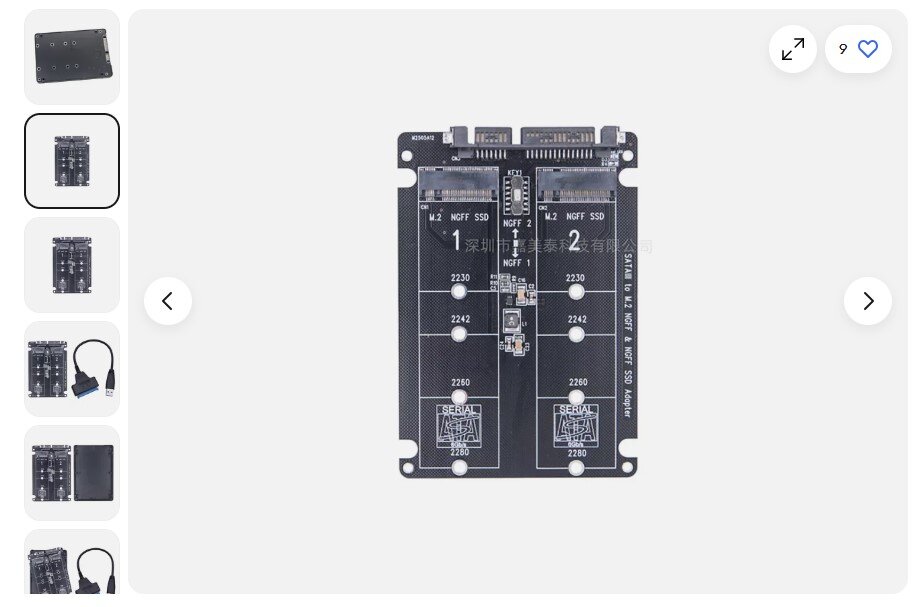
-
OK, so ive had a bit more of a look this morning, I have installed a WG client again, placed a WG file into the folder. Before starting WG i have run Ifconfig.me and i got my home WAN address, then started WG and ran the curl ifconfig.me and got the same IP that i am getting from the wireguard docker after pushing NextPVR through the WG container with extra parameter of --net=container:Wireguard-Client. This now wont let me log into the program via my web browser but im guessing thats because the vpn has no open ports. I think im going to put off a fresh reinstall at the moment (just if i was to now would be the best time due to days off) but i cant find any WG.conf file remaining on system (other than the new one i just installed this morning). using the ifconfig.me on my other docker containers reviels my home WAN ip so guess the other command is something different.





