Maximo101
Members
-
Joined
-
Last visited
-
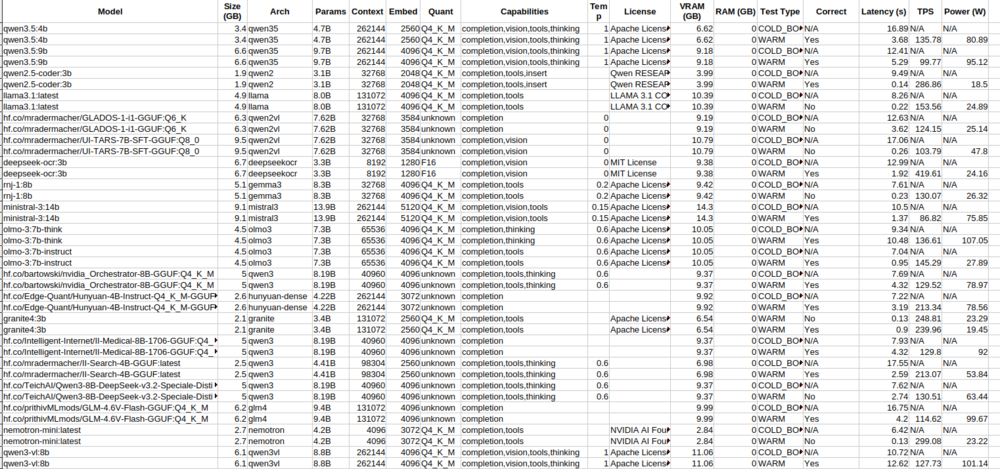
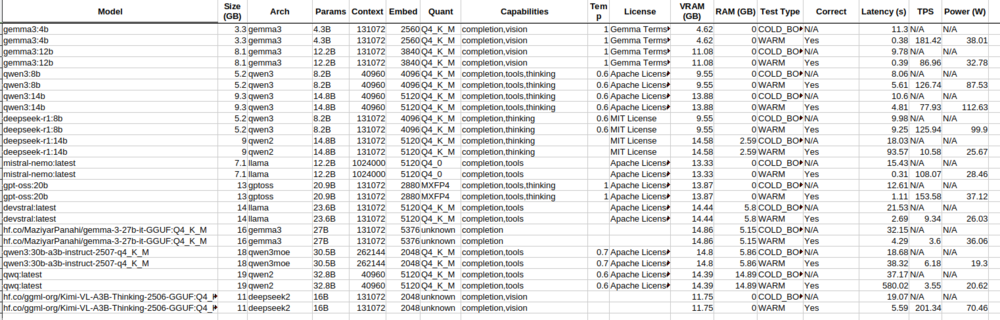
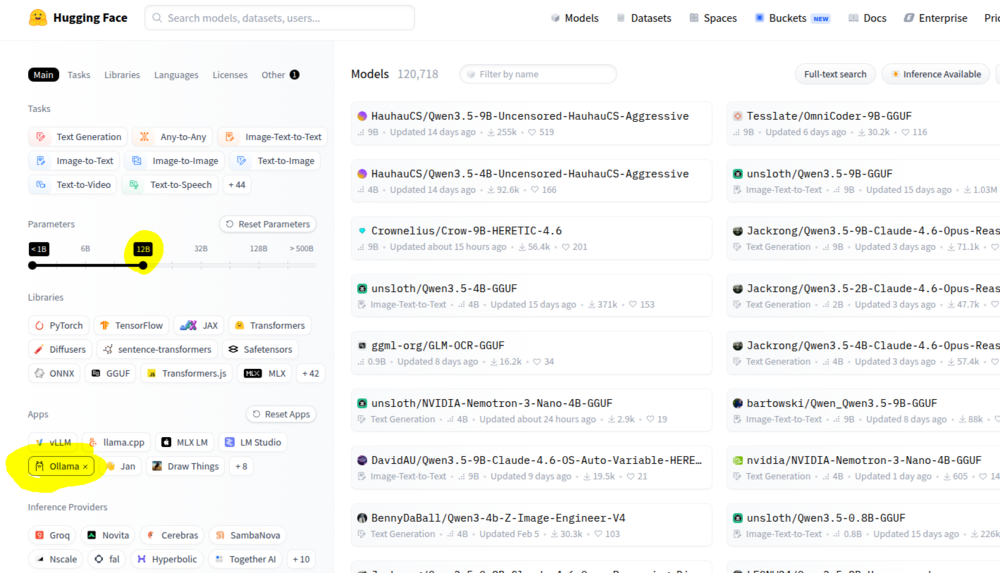
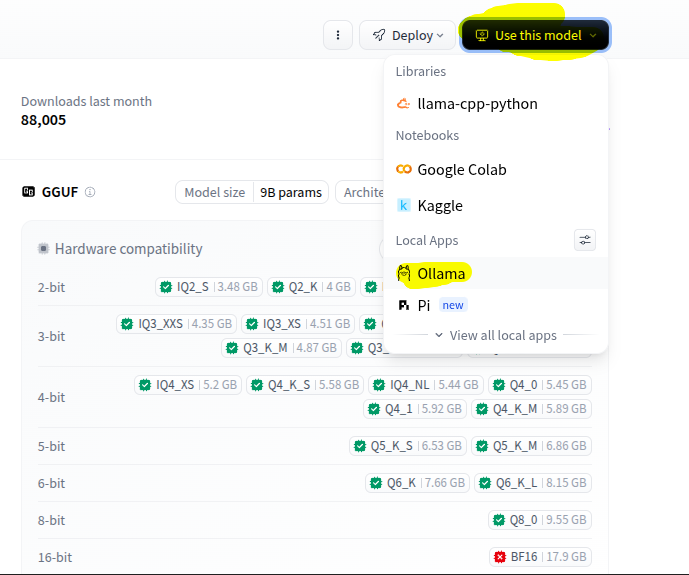
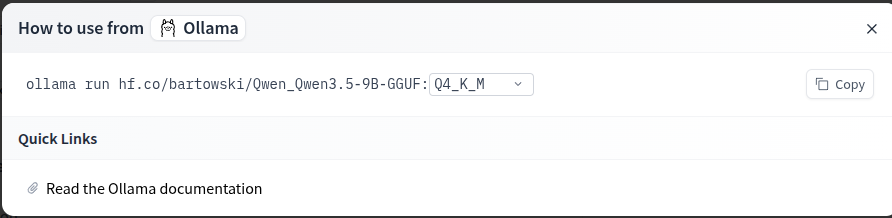
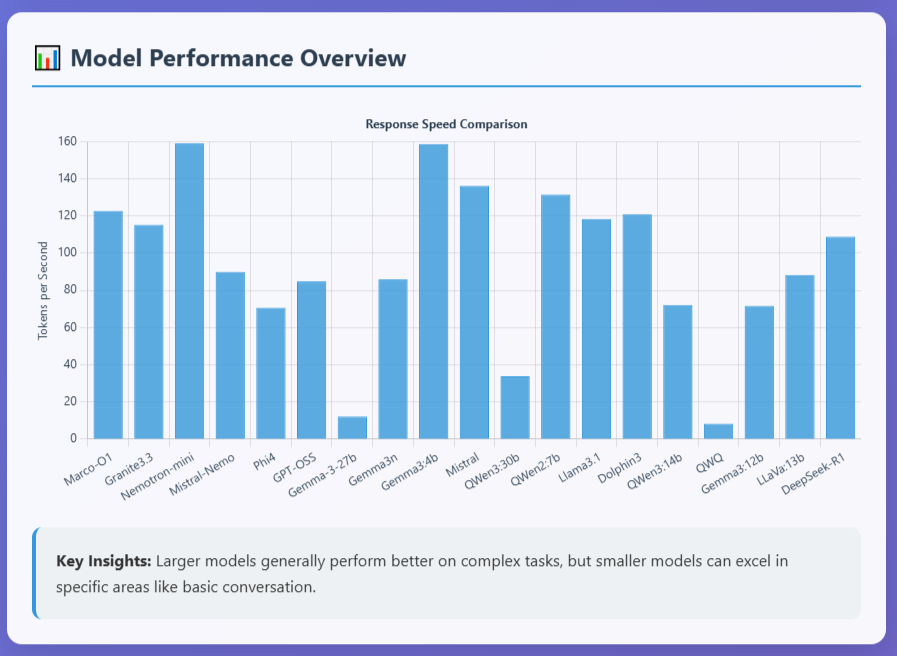
With local ollama models, i find its best to use a model which fully fits within your vram. It will give you the highest tokens per second, compared to models which offload part into the RAM. Eg my 16gb VRAM, anything roughly 12B parameters or less will fully fit and produce 80 - 200 tokens per second. (gpt-oss:20b is an exception as its actual size is 13GB and fully fits in vram) Anything over will spill over from the gpu into the ram and produce 3 - 20 tokens per second. Also look at the capabilities of the model for what you are wanting to use it for. eg. vision if you want it to read images. Thinking if you want it for better reasoning. Tools if you want it for Agentic use. I am hoping they update ollama (docker version) to better use MoE models which can have a higher Parameters (B) total as only a smaller amount is actively used. Eg. 120B models which use 12B active parameters. Feel free to try the benchmark script i added to github in the link above to see what latency and tokens per second you get with models you downloaded on your gpu. I also have a script to auto update the ollama models, and i use it with User Scripts Plugin to auto run once a week. You can grab them here: https://github.com/Maximo101/ollama-benchmark-suite Also note that you can download models not only direct from the ollama libaray, but from https://huggingface.co/ if you get the GGUF file (if the architecture is MoE might not work), otherwise just sort by ones that have the ollama link. You can make an account, add your gpu and it will show Green which quantisation will fit on your gpu Hope thats helpful!
-
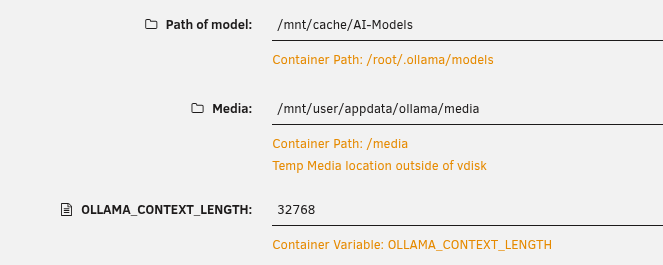
Add this Extra Parameter as MrSir has said, I suggest also increasing the default context length from 4096 to 32768. (this is crucial if you want to use ollama for OpenClaw) I also have my AI models stored on the cache, to reduce disk read/writes to the array, and increase inference speed from the ssd cache.
-
I’ve been running Ollama in a Docker container on my UnRaid server for a while now and put together a couple of bash scripts to make managing and testing local models a bit easier. I put them up on GitHub and figured I'd share them here in case anyone else finds them useful for their own setups. There are two main scripts in the repository: ollama_benchmark_v1.sh: Tests your installed models against a few standard prompts and outputs a CSV with your tokens/second, latency, and a VRAM/RAM split. It specifically does a hard VRAM purge and an OS cache drop between runs so you get accurate "cold boot" metrics rather than testing from the cache. update_ollama_models.sh: Just a handy maintenance script that iterates through your library, pulls the latest layers for all your models, and generates a status report CSV. You can grab them here: https://github.com/Maximo101/ollama-benchmark-suite Hopefully, someone finds these helpful for tracking performance or keeping things updated.
-
Corsair 64GB (2x32GB) Vengeance 6000MHz DDR5 RAM I run Plex (rarely used lately since i have stremio), Home Assistant, Immich photo server, Ollama/OpenClaw.
-
Looks like Peter (creator of OpenClaw) just signed up with OpenAI, not sure what that means for openclaw and its open source status.
-
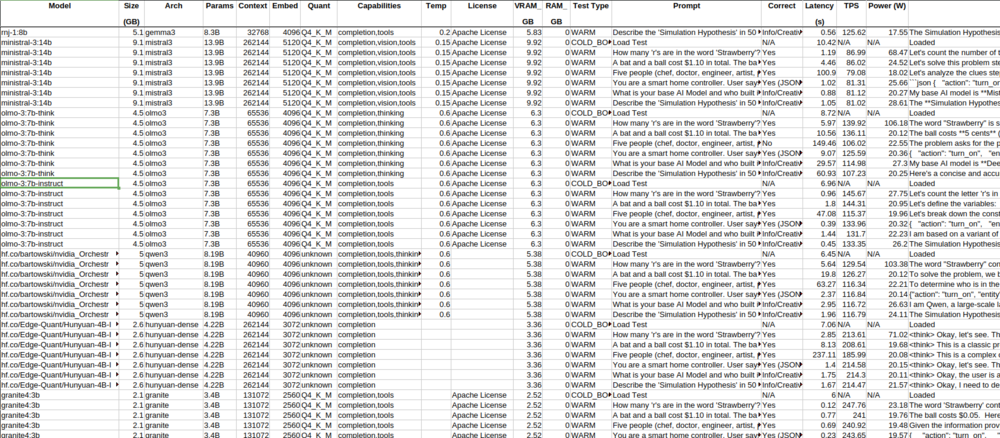
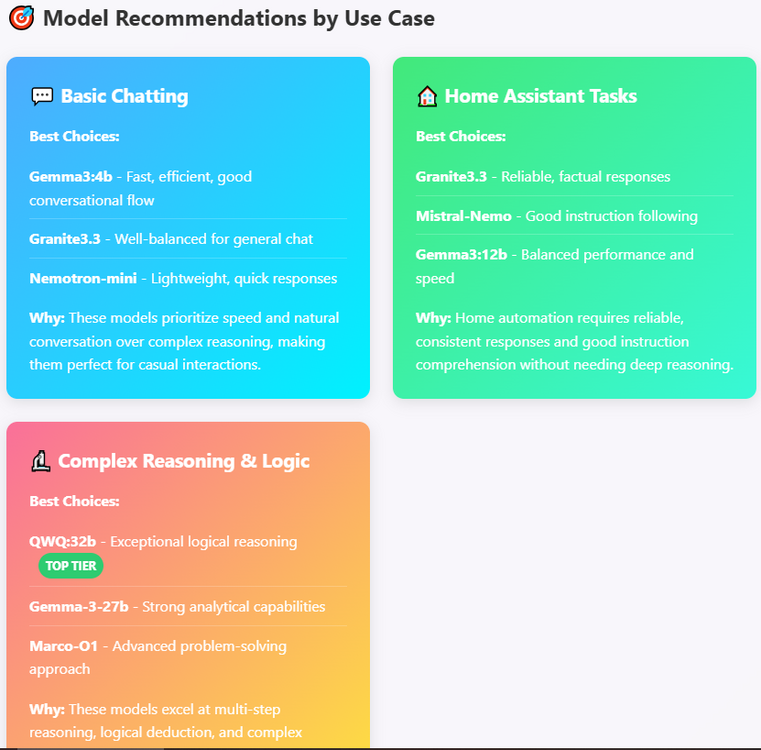
What local AI models (ollama), are you guys using? I just mine configured and am starting off testing: olmo-3:7b-instruct I also connected Telegram and the agent was confused by the metadata from the telegram prompt, maybe since its only a 7b model, i added some info in the soul.md file to not respond about the metadata, just the message. (Not openclaw) Some bench marking analysis i did on my local models for a 16gb gpu using claude: (note claude misprinted some model names in the artifact from the spreadsheet, eg qwen2.5 is qwen3, gemma2 is gemma3 etc. https://claude.ai/public/artifacts/21b88a74-5087-402f-8a93-a833218a6529 I'm testing olmo3 since it had the highest tokens per second and full accuracy of my test questions, as well as cabability: Tools. But i'm not sure if i want to use a model with vision, or thinking also? Something that can fully fit in vram, so for a 16gb gpu, anything less than 12-14gb to allow context, so roughly 12-20B parameters roughly, or 7-8B to allow more context. I mainly want to connect this to Home Assistant, and not yet looking to have it to anything too major until i can be sure i have the security locked down.
-
Some new benchmarks if anyone is interested https://claude.ai/public/artifacts/21b88a74-5087-402f-8a93-a833218a6529 Also rumours that Gemma4 will be out if not end of feb, in the next month or so. (looking at when each gemma model was released in relation to each gemini model).
-
Hi, thanks for this, I managed to install the docker and the status is connected. When i have some time I just need to connect ollama (locally) to get the agent working. First attempt and the config json kept saying invalid and wouldn't save. Any suggestions for Ollama setup?
-
I just installed kubuntu on a new pc and am looking at using UI-TARS-DESKTOP or OpenIntepreter on that system still using Ollama local AI models. (these both can control your desktop and local files with TARS being better with gui and Interpreter better for terminal) But (clawdbot) Moltbot should be in a docker on a server as an 'always on brain'. I havent got back around to trying to install Clawdbot (moltbot) again, hopefully ill get some time to try again.
-
https://openclaw.ai/ Clears your inbox, sends emails, manages your calendar, checks you in for flights. All from WhatsApp, Telegram, or any chat app you already use What is OpenClaw? OpenClaw is an open-source, "local-first" AI agent gateway. Unlike a standard chatbot, it is designed to run 24/7 on a local server or PC. It acts as a bridge between Large Language Models (like Claude, GPT-4, or local Ollama models) and the user's personal environment. Key Features: Messaging Integration: It allows you to control your server and interact with the AI via Telegram, WhatsApp, Discord, or Signal. System Access: It has "skills" that allow it to execute shell commands, manage files, and run scripts on the host (or inside its container). Proactive Automation: It can send proactive messages (e.g., morning briefings, server status alerts, or UPS power notifications). Persistent Memory: It stores conversation context and "memories" locally as Markdown files. Edit 1:Moltbot was formerly known as Clawdbot. Independent project, not affiliated with Anthropic. Edit 2: Name changed again to OpenClaw https://github.com/openclaw/openclaw Has anyone been able to run Clawdbot (OpenClaw) in a docker container on UnRaid? I tried making it with add container and add stack but no luck as yet. I have tried pulling standard images from Docker Hub, but I am having trouble finding a verified, working repository for an Unraid-friendly Docker build. Does anyone have a working Docker Compose or a custom XML template for this?
-
I did the upgrade using the Tools, Update OS, and clicked the latest 7.2.3. Worked flawlessly. I had updated the Realtek and nvidia driver plugin's as new ones where available. Glad to see the NIC remained and everything just carried over perfect.
-
Is there any advice for when i decide to upgrade? i know my NIC will loose connection again after the upgrade, whats going to be the best way to ugprade, then re do my network settings without much hassle?
-
Hi, Is there is any update on these updates? I am still sitting on version 7.0.0 since I dont want to have to try and reconfigure everything from backups like i did the last two times i tried to update. The main issue i had was my NIC becomes unusable even though i have the R8125 plugin installed.
-
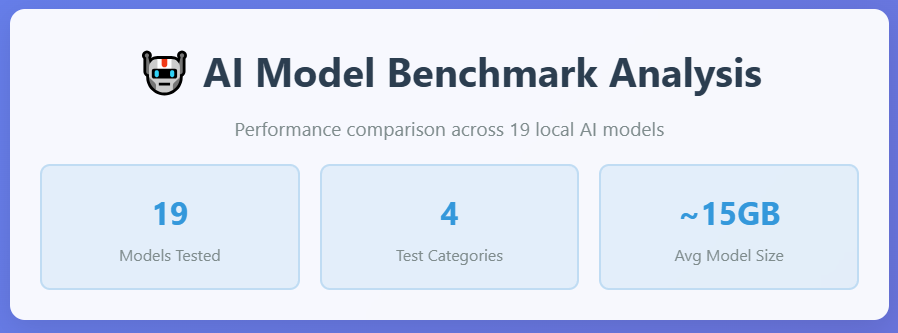
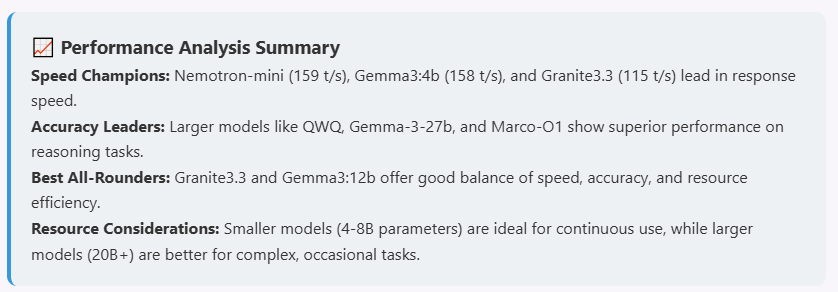
I ran some benchmark questions across these open source models in ollama via script created by Gemini/Grok/Claude AI's run on my Unraid OS v7 home server. My server specs in my signature. You can see the results here Claude AI made it into a webpage to view.
-
Openai just released their open source models which can be downloaded via ollama(upgrade to latest version required). https://openai.com/open-models/ We’re releasing two flavors of the open models: gpt-oss-120b — for production, general purpose, high reasoning use cases that fits into a single H100 GPU (117B parameters with 5.1B active parameters) gpt-oss-20b — for lower latency, and local or specialized use cases (21B parameters with 3.6B active parameters) While the 120b version needs some decent hardware to run locally, the smaller 20b works great with laptops and moderate configs. They are compared to being close to Openai's o3 models and on par with Ali Baba's qwen3. There is a playground to test the models too, no account required; https://gpt-oss.com/ Just added to my AI models on my server.