





darwinsbeard
Members
-
Joined
-
Last visited
Everything posted by darwinsbeard
-
That just takes me to the jellyfin github page? (and on my unraid there is no "Support" link, just "project page"? Not sure why some containers have "support" and other not? Is there something specific on that page that discusses hardware acceleration on unraid docker?
-
Pretty much this....I have the "official" jellyfin container that is supposed to help with hardware transcoding but when i play a video in JF that transcodes, it just pins the CPU in unraid. I have an nvidia t400 and the nvida drivers and gpu statistics plugin installed. not sure what I'm doing wrong.... Also, according to JF docs: "Hardware acceleration options can be found in the Admin Dashboard under the Transcoding section of the Playback tab." I don't even see this in the official JF container/??
-
I have successfully setup Nextcloud (using postgres backend) and everything works ok, but now I would like Serve this docker container to Tailscale. I'm followe SpaceInvaders tutorial for this from the link below (up until the https part, which i figured Tailscale would take care of) and the Tailscale video from Spaceinvader (which was excellent) where he publishes Jellyfin. However, when I enable Tailscale on the container (see settings below) and start the machine the container logs start spamming: nginx: [emerg] bind() to [::]:443 failed (98: Address in use) nginx: [emerg] bind() to 0.0.0.0:443 failed (98: Address in use) nginx: [emerg] bind() to [::]:443 failed (98: Address in use) nginx: [emerg] bind() to 0.0.0.0:443 failed (98: Address in use) endlessly and I can't get to the WebUI. Again, if i disable TS it works. What am I doing wrong? by my read of the settings I set the port to 444 I also tried following this to modify the config.php to add the TS IP but it didn't seem to work. Is it something to do I guess with TS advanced settings:
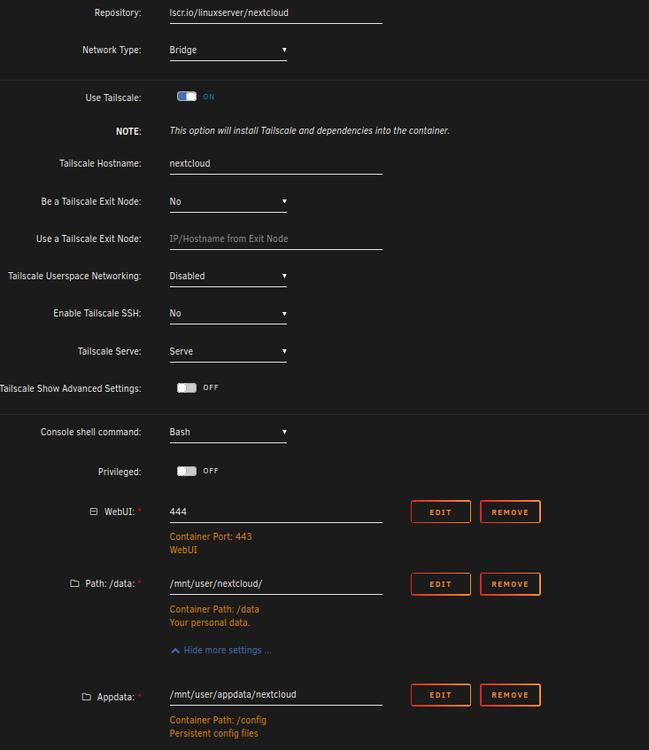
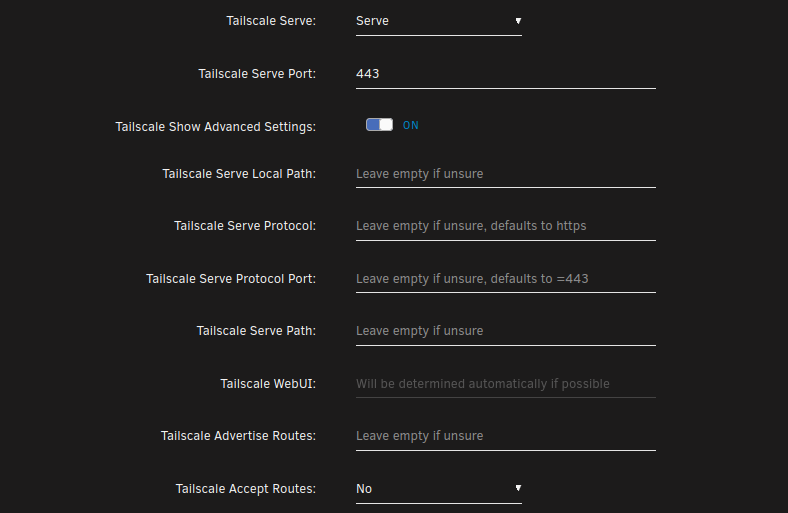
-
Hello, I built my first unraid box (loving it!) and just completed migrating all my data & drives over. I'm still learning all the ins and outs as far as dockers and how unraid does things but getting there...however:, my only issue now is how to setup a remote backup. In short, I have 2 shares (pictures & home videos) that are "irreplaceable" so I want to ensure these are backed up to a cloud provider (I currently have Amazon Drive, Google Drive (100 GB each) and I do have a free-tier backblaze). I have tried the following apps but not much success: Rclone-GUI (I'mtheNachoMans docker): I have the gui running, but when I try to connect to google drive I always get Status Code 500 errors Duplicity: This one actually connected to gdrive very easily, but failed mysteriously after writing to it with an "out of space error" (despite plenty of space). Plus I've heard duplicity is kinda clunky (and I agree) Kopia: Couldn't get the auth working right Others I've studied but haven't tried due to either not-free etc: Crashplan, Borgserver, Restic, Duplicacy... I feel like this must be a "simple" thing but with so many options I'm a bit confused where to start. Note: I actually would prefer doing simple rsync-like copies (perhaps tar.gz'd) rather than complex packaging formats as those make me nervous on how to restore. Also, while I'm comfortable creating scripts/cron jobs I would definitely prefer some nicer GUI to just make life easier PS>: As a future plan/alternative since I just discovered Tailscale might be to build a second unraid box at a remote location to rsync to, however issue there is if power goes out how to ensure it boots back up (i won't have easy access to it), anyone who has success with this method? In a similar manner, has anyone just created a cloud-instance of unraid? THanks! PPS: My main PC is now Windows 11, which I've realized seems to want to (annoyingly) put EVERYTHING on OneDrive. I was considering therefore just doing the reverse and pulling the data from my unraid share to my windows11 pc and then just let OneDrive do it's thing, but this seems unsatisfactory b/c I'd like to keep all of that at unraid level
-
Thanks @bmartino1 rebuilding the docker image seems to have fixed the problem (for now at least). No more of those errors in the log. @JorgeB Noted on the memtest, next reboot I will try that
-
no it's an AMD Ryzen and was working perfectly fine as my main windows machine for about 5 years so I don't see why it would suddenly start dying now. Also, these errors were not showing up at all until I installed docker/plex on my machine so I suspect its something with unraid (as otherwise I would suspect this to be regularly occurring in the logs but it hasn't ) I'm also seeing these in the logs now, which makes me suspect there is something going on with my cache pool (which i've suspected in another post here
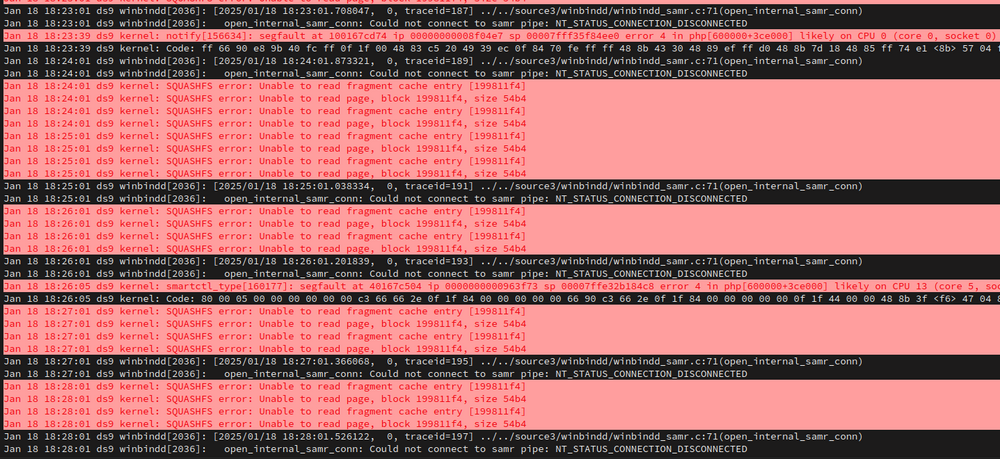
-
whelp...spoke to soon, tried playing something and after about 5 mins I'm getting a ton of these in my System Log: Jan 18 17:55:46 ds9 kernel: Plex Media Serv[108897]: segfault at 14b257fcb758 ip 000014ae580590c6 sp 00007ffdd9bb5268 error 4 in ld-musl-x86_64.so.1[14ae5800b000+53000] likely on CPU 10 (core 2, socket 0) The CPU and core # change with each entry. Sigh....2 steps forward, 1 step back.... Some more of the System Log below, and from the Plex Log: Plex Log: Error relocating libc.so: free: symbol not found Error relocating libc.so: calloc: symbol not found Error relocating libc.so: realloc: symbol not found Error relocating libc.so: memalign: symbol not found Error relocating libc.so: aligned_alloc: symbol not found Error relocating libc.so: _dl_debug_state: symbol not found Error relocating libc.so: malloc: symbol not found Error relocating libc.so: free: symbol not found Error relocating libc.so: calloc: symbol not found Error relocating libc.so: realloc: symbol not found Error relocating libc.so: memalign: symbol not found Error relocating libc.so: aligned_alloc: symbol not found Error relocating libc.so: _dl_debug_state: symbol not found

-
Thanks! messing around with it more I noticed that it was saying that "Docker wasn't running" when trying to install apps, but on the System Settings Docker it did say it was running. I ended up rebooting the machine and now it seems to be working...for now.
-
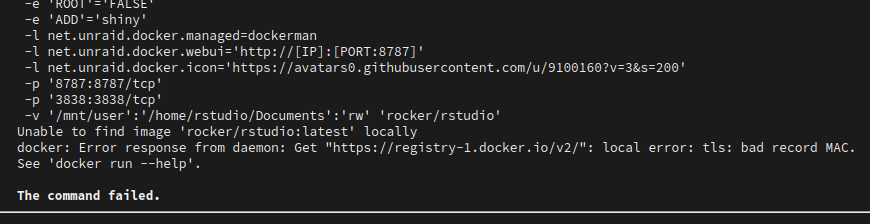
I am trying to install a few docker containers for the first time but seem to be having issues pulling some images down. I do have pihole running but I disabled it and I also changed my Network Settings to use 2 static DNS servers per the post below which seemed to have a similar issue but this didn't work. Network works fine otherwise so not sure what is going on. I tried both this rstudio docker and the plex docker from linuxserver and both have the same issues... Am I missing something?
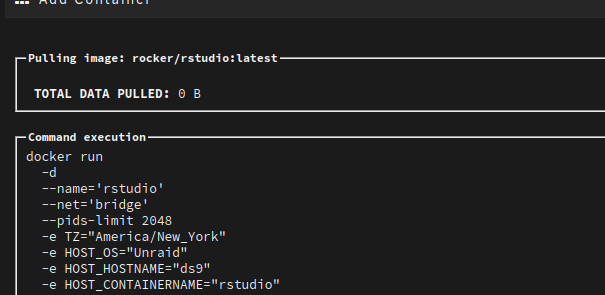
-
Ha...well that was easy (and stupid of me). I saw those warnings and thought that they would need to be resolved *first* so didn't even bother trying to start it. Seems to work now
-
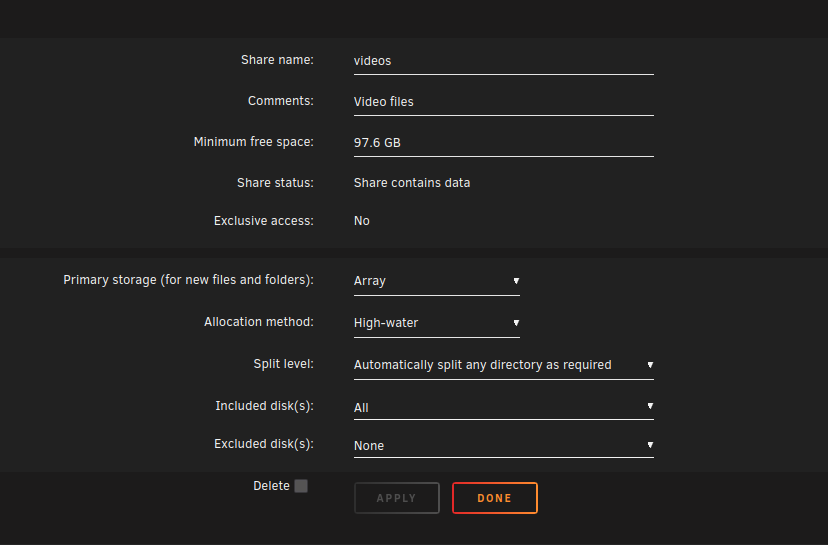
The share is "videos", see screenshot below for it's current setting (primary = array), however to clarify my OP, this share was originally set as cache->array, and I had moved some files over, but I suspect something happened when an unclean shutdown occurred. I have hence changed the share to primary=array while I continue the migration. Should I set the share back to primary=cache and then run mover again? The larger issue though is that none of the Docker/VM shares seem to be present (see second sreenshot) and I'm not sure why or how to fix (as I gather these should've been created at pool creation but doesn't seem like it) Thanks!
-
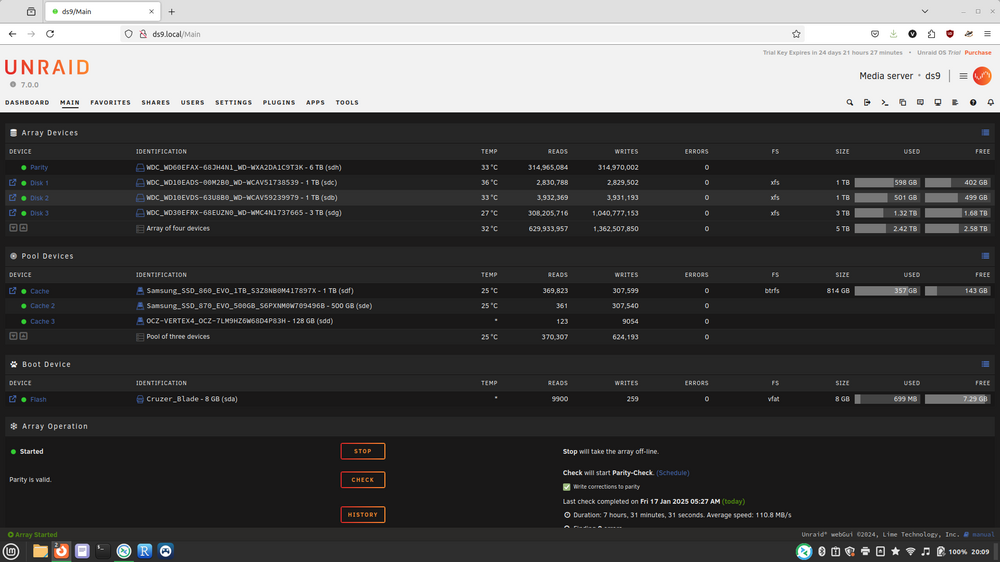
Hello, I think there is something generally wrong with my cache pool. For a general timeline: I started my build with a few drives in the array and a 1 TB and 500 GB SSD in a pool. I set all my shares to Primary cache and Cache->Array move action (though i have hence switched to Array as primary for the share i'm moving to bypass the cache due to the issues below) I began (and still am) in the process of migrating files from my old server to the unraid machine. While that was ongoing I had a few hardware issues with PCIe bus spamming my log that caused the unraid machine to halt with 100% log usage. I found the issue was my SATA expansion card and the PCI slot it was in; moved to a different slot and now works fine. However, I did have to do a few hard reboots in the interim which I suspect stranded some of my files on the cache disk (and i can see them there) All my data seem to be there, but the cache has files on it and when I run mover, nothing happens. MOreover, when I go to VM/Docker config, since as early as I can remember it always says "share not present" (for /appdata etc), at first I thought I needed to manually create these so I put it off, but now as I search through docs and videos etc. they all seem to assume that those shares are auto-created when unraid is installed (and I was getting frustrated!) but i gather those shares should be there when a pool is made I've also added a new 128 GB SSD to my cache pool hoping that might "fix" it but that didn't do anything other than add it to the pool (which is fine) Finally, I never understood what unraid is reporting as far as my cache pool size is, from what i understand, a 1TB + 500 GB + 128 GB pool should have a capacity of 500+128=628GB but it doesn't seem to report that. I am running unraid trial 7.0.0. Below is a screenshot of Main. When I run mover (or schedule runs) it won't move those 357 GB off the cache. Ive also attached diagnostics. My question: How do I get those files off the cache (to the array) and then rebuild/fix the cache to get all shares needed for Docker/VMs to work? THANKS! ds9-diagnostics-20250117-2007.zip
-
Thanks both! Very helpful links and responses. Reading through those links and with respect to: What happens when a transfer 'fails' due to out of disk space (i.e. will not fit)? For example, say I am moving (not copying) a 10 GB file from my Windows desktop to a cache-enabled share. The cache only has 9 GB free space, based on the above the transfer will fail due to out of disk, but: Will the file disappear? or will it automatically just start writing to the array instead, or will it just fail but the move aborts and the file still resides on my desktop? The latter 2 options being preferable obviously to the first which would be bad! In a related scenario, if I'm moving 10 files, each 1 GB, would 9 of the files transfer and the last one is subject to the above? (I assume that's the case, each file is independently transferred)
-
I'm in the process of building and migrating my first Unraid install and so far everything is working great. However, I did have a few noob questions on the use of the cache pool. Currently I'm moving my HDD's over one at at time and I have a 2 SSD drives (one at 1TB, the other at 500GM, see second point below) that I set as a cache pool. My question is mostly a clarification of the doc below, specifically the last bullet: https://docs.unraid.net/unraid-os/manual/storage-management/#using-a-cache-drive 1) Does this mean that if the amount of data that is being written to a share (set to use Cache -> Array) exceeds the cache size it will automatically start writing directly to the array? This makes sense and is what I'd like to confirm b/c I'm currently migrating en masse all of the data so I want to make sure that if I exceed the cache size I won't lose any data in the migration. (even though I'm being careful to only transfer in smaller-chunks to try and stay below the cache size) 2) Re the 1 TB + 500GB pool, for some reason Unraid reports the total size as "750 GB" but the available space (i.e. used + remaining) at 500 GB, and based on my understanding 500 should be correct for a RAID1-like capacity. Any thoughts why this is? Thanks!
-
Thanks @_cjd_ Yes this is for the Windows machine, and your approach sounds interesting, the only downside I can potentially see by moving the existing OS drive to the new machine is that I wanted to install the OS to the new machines m.2 ssd drive (which is much larger than my existing OS SSD) drive rather than moving the old SSD (which I plan to put in the unraid box eventually as a cache pool) I had actually planned to try and use the method below which is basically just de-activating my current license, install a fresh OS on the m.2 drive, then re-activate it. Of course, not sure if this will actually work and might then be stuck in license limbo. Hopefully all the cloud/phone-home stuff should alleviate this...
-
Thanks Conner & cjd I never realized that plex always CPU transcodes when using subtitles, I almost always have subtitles on, so does that mean having a GPU is pointless than (for plex at least). I still plan on going T400 for the same reasons you mentioned Conner being a newer arch. @_cjd_ Do you have any guides/links or elaborate on how to do this 'right'? I assume it's some kind of sequencing thing and based on my research basically de-licensing the old machine and then re-licensing the new. Is it basically: Delicense my current Win10 Pro Retail machine (which is eligibale for win11 upgrade as MS reminds me 50x per day...) Build new machine and install Win11 on it Reactivate license on Win 11 machine? Somehow this too simple and won't work correctly considering it will be on all-new hardware (as IIRC, the license is tied to the mobo id or some such?)
-
Thanks cjd, how is the Roku 4+? Comparing the $25 Roku express 4+ to the $150 Shield I don't see many compelling reasons to get the Shield, considering all I want to do is one stream at a time and don't have any sophisticated audio setup etc. Also, to your's and Connor's point, I'm going to go with the Quadro P400 for the NAS and keep my existing 2070 for a completely new main PC build. THank you both, here are my current builds, total comes out to ~$1200 but that's fine. Thoughts? Existing PC to Unraid. Bold items are added/swapped, using existing PC and just adding more mem and swapping video card and new case CPU: AMD Ryzen 7 2700 3.2 GHz 8-Core Processor ($176.00 @ Amazon) Motherboard: Asus ROG STRIX B450-F GAMING ATX AM4 Motherboard Memory: Corsair Vengeance LPX 16 GB (2 x 8 GB) DDR4-3200 CL16 Memory ($39.37 @ Newegg) Memory: Corsair Vengeance LPX 16 GB (2 x 8 GB) DDR4-3200 CL16 Memory ($39.37 @ Newegg) Video Card: PNY T-Series T400 4GB 4 GB Video Card ($149.99 @ Newegg) Case: Fractal Design Define R5 ATX Mid Tower Case ($124.99 @ B&H) Power Supply: Thermaltake Smart 600 W 80+ Certified ATX Power Supply ($44.99 @ Amazon) New PC Build. Bold items are swapped from existing PC CPU: Intel Core i5-12600K 3.7 GHz 10-Core Processor ($174.83 @ Amazon) CPU Cooler: Thermalright Peerless Assassin 120 SE 66.17 CFM CPU Cooler ($34.90 @ Amazon) Motherboard: Gigabyte Z790 AORUS ELITE AX ATX LGA1700 Motherboard ($219.99 @ Best Buy) Memory: Corsair Vengeance 32 GB (2 x 16 GB) DDR5-6000 CL30 Memory ($119.99 @ Amazon) Storage: Western Digital WD_Black SN850X 2 TB M.2-2280 PCIe 4.0 X4 NVME Solid State Drive ($139.99 @ B&H) Video Card: EVGA BLACK GAMING GeForce RTX 2070 SUPER 8 GB Video Card Case: Corsair Carbide Series 200R ATX Mid Tower Case Power Supply: *Thermaltake Toughpower GX2 600 W 80+ Gold Certified ATX Power Supply ($49.99 @ Amazon) Operating System: Microsoft Windows 11 Pro OEM - DVD 64-bit ($146.18 @ B&H) Total: $885.87
-
Great point and I should clarify: I will almost always be transcoding only 1 stream and always inside my LAN. So are you saying that Ryzen 7 with the Geoforce 2070 will be able to transcode inside Unraid? That would be ideal, as I will then use money to just build a new main PC. PS: This brings up another potentially related issue, my current plex client is my crappy TCL TV! (mostly as it's wife-friendly) and occasionally now when I play high-res 4k video it will just choke on it, but I strongly suspect that's due to the bottleneck at the client (TV) and not my server's ability to transcode. One 'solution' i'm considering for this is to just buy an Nvidia Shield and see how that works (and hope it passes the wife-test)
-
Thanks ConnerVT, noted on the SATA controller and already added to my cart the JMB585. (Also, initially I may just stick with the 6 onboard ports and do either a 5+1 or 4+2 setup for array:parity drives and just buy bigger drives as I don't have THAT much stuff (yet). I just wanted to ensure future expandability if needed.
-
Alternatively, here is my current main PC build (5 years old) that I could try and repurpose as the NAS (and the build above would become the main PC) However, I'm not sure if the combination of the AMD Ryzen 7 2700 + nvidia RTX 2070 would be able to transcode in plex? Currently this machine is my plex server and it will do hardware transcoding when I inspect a stream, but Plex's documentation seems to indicate this might not be possible inside a Docker container as it would if run in Unraid. So, I hate to build an entirely new machine only for this not to work for hardware plex transcoding! CPU: AMD Ryzen 7 2700 3.2 GHz 8-Core Processor ($176.00 @ Amazon) Motherboard: Asus ROG STRIX B450-F GAMING ATX AM4 Motherboard Memory: Corsair Vengeance LPX 16 GB (2 x 8 GB) DDR4-3200 CL16 Memory ($39.37 @ Newegg) Video Card: EVGA BLACK GAMING GeForce RTX 2070 SUPER 8 GB Video Card Case: Corsair Carbide Series 200R ATX Mid Tower Case Power Supply: Thermaltake Smart 600 W 80+ Certified ATX Power Supply ($44.99 @ Amazon)
-
I was just going to use a SATA expansion board (either PCIe or M2, not sure what is "better"), but PC part picker doesn't seem to have a place where those can be added (?) Something like this: PCI-E X1 to SATA 3.0 Controller Card, 4-Port SATA III 6Gbps Expansion Cards, Supports PCI-Express (1X 4X 8X 16X) Slot, Support SSD and HDD, for Windows10/7/8/XP/Vista/linux
-
Hello all, first time unraid user (or will be soon 😉). I'm looking for any thoughts/advice on the build below for an unraid machine. I'm migrating from a 8 year old windows 10 machine with Stablebit, a handful of VMs, Docker desktop, plex/*arr etc. My goals for this new build: Budget of around $1000 Main purpose will be to store media and host plex (or emby/jellyfin) and other file server needs (backups) Occasional other VMs and docker apps (pi-hole, home assistant, database/python/R testing machines etc.), fairly lightweight uses Needs to be able to 4k transcode for plex (focusing on using QuickSync, no dedicated GPU) other than the NVME drives which will be for SSD cache pool (and for VMs/Docker), all of the storage drives I will be moving over from the old machine (and consist mostly of a hodgepodge of WD Reds 5400 drives). Total number of HDD drives will be around 8: 6-7 data, 1-2 parity. Plus the 2 cache drives. I usually only build a machine every 5-10 years now b/c I don't game as much anymore, so I don't really follow latest tech. below is what I came up with on PCpartpicker. I'm guessing this might be slightly over-powered for a simple plex host, but I do want this to last for at least 7-10 years (aside from just adding/replacing drives as media library goes. Note: I currently have 3 CPU coolers listed b/c I can't decide! Generally leaning towards the NJ-U9S though Any advice/comments are much appreciated! Cheers PCPartPicker Part List: https://pcpartpicker.com/list/NJPGJn CPU: Intel Core i5-12600K 3.7 GHz 10-Core Processor ($175.02 @ Amazon) CPU Cooler: Noctua NH-U9S 46.44 CFM CPU Cooler ($59.95 @ Amazon) CPU Cooler: Noctua NH-D12L 60.09 CFM CPU Cooler ($89.95 @ Amazon) CPU Cooler: Thermalright Phantom Spirit 120 SE ARGB 66.17 CFM CPU Cooler ($37.90 @ Amazon) Motherboard: Gigabyte Z790 AORUS ELITE AX ATX LGA1700 Motherboard ($219.99 @ Best Buy) Memory: G.Skill Trident Z5 Neo RGB 32 GB (2 x 16 GB) DDR5-6000 CL30 Memory ($109.99 @ Amazon) Storage: Western Digital WD_Black SN850X 2 TB M.2-2280 PCIe 4.0 X4 NVME Solid State Drive ($139.99 @ B&H) Storage: Western Digital WD_Black SN850X 2 TB M.2-2280 PCIe 4.0 X4 NVME Solid State Drive ($139.99 @ B&H) Case: Fractal Design Define R5 ATX Mid Tower Case ($124.99 @ B&H) Power Supply: Corsair CX650M (2021) 650 W 80+ Bronze Certified Semi-modular ATX Power Supply ($79.98 @ Amazon) Total: $1177.75 Prices include shipping, taxes, and discounts when available Generated by PCPartPicker 2025-01-04 13:49 EST-0500




