





optid
Members
-
Joined
-
Last visited
-
Hi All, I just installed a Intel X550-T2 into my Unraid machine, all is working well but I noticed some PCI errors in syslog and wasn't sure how to proceed? I have tried switching to a different PCIE port and the same error occurs. Specs: MSI Z790 Gaming Plus WiFi Intel 12900K 64GB DDR5 GSKILL LSI 9300-8i in PCIE slot PCI_E1 Intel X550-T2 in PCIE slot PCI_E3 3 NVME Drives Syslog: Apr 11 19:21:23 Tower kernel: pci 0000:06:00.0: BAR 7: failed to assign [mem size 0x00100000 64bit] Apr 11 19:21:23 Tower kernel: pci 0000:06:00.0: BAR 10: failed to assign [mem size 0x00100000 64bit] Apr 11 19:21:23 Tower kernel: pci 0000:06:00.1: BAR 7: failed to assign [mem size 0x00100000 64bit] Apr 11 19:21:23 Tower kernel: pci 0000:06:00.1: BAR 10: failed to assign [mem size 0x00100000 64bit] Device: IOMMU group 18: [8086:1563] 06:00.0 Ethernet controller: Intel Corporation Ethernet Controller X550 (rev 01) IOMMU group 19: [8086:1563] 06:00.1 Ethernet controller: Intel Corporation Ethernet Controller X550 (rev 01) tower-diagnostics-20250411-2225.zip
-
Got so fed up with it just went to Micro Center and picked up a new MB and the 12900K. Running another read check, will post back with results.
-
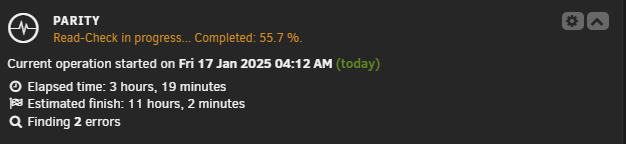
I went to BestBuy last night picked up some new RAM, running a read check now and it has discovered 2 errors. No crash! I feel as if the RAM was unstable even though it was clearing an extended memtest. The 14900K is brand new and never ran on the tainted bios with voltage issues. I don't currently have a parity disk, waiting on 2 more HDDs to arrive. Is there anything I should do to correct the 2 errors that it has detected? Sorry if these seem like silly questions, still learning everything. tower-diagnostics-20250117-0732.zip
-
Hi All, I'm experiencing issues with the unraid driver crashing when performing a parity check / array read check. The driver crashes right after a read error is detected. This started on 6.12.14 after I removed an empty data disk and ran tools > new config. I updated to version 7 stable, performed a 24 hour memtest, and stress tested my cpu and ran tools > new config again. The memtest and CPU stress test completed without error and I am still having the same issue. Read check finds an error and the driver crashes immediately after. I am brand new to unraid and am at a loss as what to try next to fix this issue. Any help would be greatly appreciated. Jan 16 16:36:58 Tower kernel: md: recovery thread: multiple disk errors, sector=8570075568 Jan 16 16:36:58 Tower kernel: ------------[ cut here ]------------ Jan 16 16:36:58 Tower kernel: kernel BUG at drivers/md/unraid.c:1617! Jan 16 16:36:58 Tower kernel: invalid opcode: 0000 [#1] PREEMPT SMP NOPTI Jan 16 16:36:58 Tower kernel: CPU: 25 PID: 12438 Comm: unraidd0 Tainted: P W O 6.6.68-Unraid #1 tower-diagnostics-20250114-1636.zip tower-diagnostics-20250116-1717.zip
-
So glad I found this thread, new UD user here with a Gigabyte z790 motherboard using RTL8125. This driver has completely resolved all of the speed / crashing issues I was experiencing.
