





Lmnsour
Members
-
Joined
-
Last visited
-
Worked! Thanks!
-
I got SMB to work in Safe Mode. I think it might be the autotweak or tipsandtweaks app trying to apply a network configuration that's not compatible with the current NIC? How do I remove a plugin manually from the thumbdrive?
-
Syslog attached. syslog-previous
-
Gotcha. Will jump into this in a week; I'm going on travel. Thanks for the help!
-
The issue is when the array is started. Its fine with the array down or in Safe Mode. I think a Docker has a conflict with the new NIC or configuration? I swapped the NIC's so the 10Gig is now Eth0 and I'm using the same IP config...?
-
I got the full one and was able to post in in Post 3 by booting in Safe Mode. Is it not complete?
-
I appreciate the help but this isn't the issue. I'm having a configuration issue with UNRAID GUI not working and Windows not being able to connect with the Array mounted. With the array unmouted, or in safe mode, I have no issues at all. NIC is doing fine.
-
Its the Minisforum MS-01 so the Intel 10gig chip is soldered. It runs at 10gig speeds and I have no issues when the array isn't mounted; I think its a Docker that's not liking the new NIC. I made sure the new 10Gig NIC was added as Eth0 but that didn't help.
-
Ok, rebooted in safe mode, diagnostic attached. diagnostics-20250502-2147.zip
-
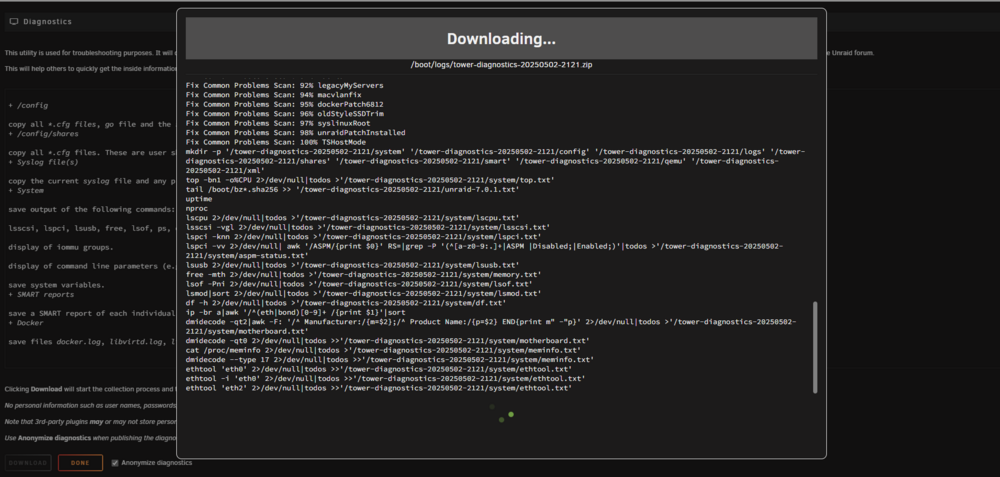
Can't download diagnostic. Get stuck here:
-
I just swapped my connection from the intel i226v (2.5Gbe) adaptor to the Intel X710 10Gig adapter and now I have a network access issue. I can log into the GUI and see the Array but when I try to navigate to a setting or Dashboard it won't access. It just loops and loops without timing out. I can see my UNRAID on my network but when I try to access it or any of my mapped shares, it times out and give an error in Windows. However, if I remove the external parity drives (connected via USB), the array won't boot and I have full access to the UNRAID GUI and all settings with no issues. I'm stumped.
-
So when I configure it, I lose internet connectivity on the 2.5g nic. I think I'm doing something wrong...
-
No difference. I can still connect to the UI but can't map a network drive. 2.5G nic on subset 24 10G nic on subset 23 Just set the IPs and no joy.
-
My desktop uses a Marvell AQtion 10GbE NIC and I'm using a Minisforum MS-01 with the intel X710 10gig NIC for UNRAID / NAS. The Minisforum is connected to the network using the Intel 2.5g NIC and I want to connect my desktop via the 10Gig NIC's. I setup static IP's for both NIC's and I can connect and access the UNRAID web UI but I can't get the SMB shares to work. Trying to access the folders gives an error (forgive me, I don't remember the error but can get a screen shot later today / this week).
-
Thanks, I scoured the internet for this answer, how did I miss this? Beer incoming!

