





white-orb
Members
-
Joined
-
Last visited
-
@pOpYRaid, a couple of months ago I ordered some Chinese i226-V cards from Amazon to test them out. They are not the same as Intel i226-T1 card although sellers advertise them like that. The most significant difference between Intel’s and Chinese cards: chips and firmwares. Chinese cards can’t get firmware updates through Intel’s NVM updater. These cards simply aren’t recognized. They also use custom/different version naming, not compatible with what Intel is using. What firmwares are used in these Chinese cards and how old they are we can only guess. I tried to cross-flash them (I had a successful cross-flashing experience with X710 card in past), but I didn’t succeed this time. Just for a note, i226-V controllers are often used in consumer mobos and they do have the same problem: motherboard vendors use some unknown/custom firmware that isn’t recognized by Intel’s NVM updater as well. Also, Intel denies to provide any support for such controllers asking to reach out a mobo’s vendor. I read somewhere that stubborn guys did a cross-flashing for some mobo’s and controllers just stopped being recognized by motherboards, so there is a risk. The second difference is that Intel I226-T1 card is based on i226-LM chip, not i226-V one like Chinese cards. According to datasheets the LM chip is a “commercial and server version with long life supply” and it supports AMT (Active Management Technology). The V version is described as a “non-commercial version”, without AMT. The rest looks the same (features, power consumption, etc.) Basically, Intel’s card could be a totally different thing due to a differences in chips and firmwares, especially considering how Intel is constantly improving it. Personally, I would bet on Intel’s card.
-
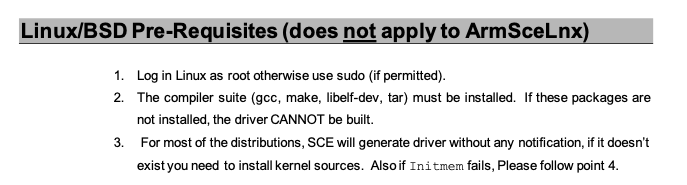
Hi @elgatobavaria, according to the AMISCE documentation you need to have some additional tools installed like a compiler: In my case it seems they were already there, so I didn't notice they are required. If you want more details, just google for "amisce user guide pdf".
-
It won't work in any sort of a VM as changing hidden settings requires direct access to BIOS. VMs are isolated from real hardware. This only can be done from a system that runs on a bare metal. To do what you want using Unraid, you need to follow steps like these: In BIOS you shall enable password protection and disable Secure Boot. Login to Unraid using local terminal or SSH. Download SCELNX_64 app (can be found on GitHub). Read all BIOS settings into a file: sudo ./SCELNX_64 /o /s nvram.txt /sd nvram_dups.txt Edit nvram.txt Write settings back: sudo ./SCELNX_64 /i /s nvram.txt /cpwd <YOUR_BIOS_PASSWORD> Reboot I don't use Unraid, so I can't advise on detailed steps.
-
@wavrunnr yep, it's exclusive to Raptor Lake CPUs. It doesn't affect Adler Lake, and it is supported by intel_idle. Regarding similarities, yes, they are very similar, but not identical. Here is a direct quote of Intel's engineer from the mailing list "the latency of each c-state are still different on different platforms". Thus, Raptor Lake requires its own c-state table of latencies in the intel_idle driver to correctly support them. From what I saw in a driver's code, all other Intel CPUs are supported. They also didn't share why they concluded to not support Raptor Lake. Yeah, it makes no difference in efficiency compared to ACPI, but besides that, these ACPI C-states reported by powertop are confusing as they do hide real CPU states.
-
I have not the exact board, but Mini-ITX version Asus B760-I STRIX Gaming WiFi with Intel 13900K and i226-V. I experience similar issues. I have the same BIOS version and I tried all things you did, including every BIOS option related to ASPM/C-states in all possible combinations as I learned from this forum. Also, I tried to tune hidden BIOS options related to PCIe power settings like ASPM, S0xi, and Multi-VC. No luck. Whenever I connect an Ethernet cable, a bare and headless system stuck at C3 and 12W (as per a power meter at the wall). Without an Ethernet cable, the system goes up to C10 and 5W. I've tried this both on Fedora Server 41 and Windows Server 2025, and both systems behave equally (same C-states and same power consumption). It's not about drivers or OS, it's about the board. I can only assume that whenever Asus puts a 'gaming' label on a board, they also do some tweaking for gaming, incompatible with power efficiency. I have no proofs in my hands, only results of my (and yours) experiments, and I saw many posts on Reddit complaining how enabled ASPM/C-states are making games heavily lagging on different motherboards. I guess Asus doesn't want to be mentioned in these posts, so they tweak their gaming boards for smooth gaming. Here on this forum I saw a couple of recommendations about Asus boards as power efficient (the reason I chose my one), but this seemingly doesn't apply to gaming ones.
-
When I was experimenting with Minisforum MS-01 (it also has i226-V) running Ubuntu 24.04 (kernel v6.8) I also faced the same weird behavior: every time I did `powertop --auto-tune` a system hanged entirely. Initially, I blamed a Chinese hardware, but later I stumbled across a powertop's bug-tracker with a report on the i226-V bug, (also Odroid). It seems it was fixed in later kernel versions as I didn't experience it on Fedora 41 (kernel 6.11) and Asus B760-I STRIX Gaming WiFi which also has i226-V. You should try some other system with a latest kernel.
-
white-orb changed their profile photo
-
Just for the record. After enabling the hidden "Lower Power S0 Idle Capability" option an idle power consumption dropped from 20W to 14W (a headless system with no display/usb/pcie attachments or onboard devices). Yet the system didn't go beyond C6 package states and C10 package state was never reached. Considering other reports about 6-7W in idle, mine is far from perfect. Then, I decided to try whether proposed RaptorLake patch from kernel mailing list gives any advantage over a BIOS ACPI that is used as a fallback for unsupported platforms. I downloaded and patched the Linux 6.12.10 kernel on my Ubuntu Server 24.04 but I didn't get any observable advantage neither in package C-states nor wattage. Basically, this proved Intel's engineer statement from the mailing list: This means RaptorLake CPUs won't get direct c-state control from Linux intel_idle driver and ACPI fallback will be always used. Now I learned enough from this and other forums about ASRock motherboards and how they are a bad choice for low power setups. Time to get rid of it.
-
After a couple of days into the topic, I learned that the current Linux kernel doesn't have proper idle optimizations for Intel 13 Gen and later CPUs. At the moment, it relies on ACPI C-states through the BIOS. This should be enough, but it seems that dependency on BIOS might not be as efficient as a native support when BIOS has suboptimal hidden settings. Discussions on Unraid, on LevelOneTechs, in the Linux kernel mailing list (started exactly 2 years ago).
-
Thanks for sharing. It's good to know there's another person beside the one from reddit, who reached C10 on the ASRock board. Personally, I'm stuck at C3 on my ASRock Z690m-ITX with 13900k. Despite all possible ASPM/Cstate/undervolt tunings in the BIOS, I get minimum 20W in idle from the wall with the headless setup identical to yours (just two NVMEs without mouse/kb/monitor/HDDs) on Ubuntu Server. I have to try this hidden "S0 low power" BIOS setting. I really hope to achieve 5-6W like Reddit's poster, since even 12W, in my opinion, is still a lot. My other machine, a Lenovo m720q + i7-9700, runs at a whopping 4W in idle in a similar headless setup (nvme only + eth cable). This is my best baseline so far. Perhaps a month later you got some progress or improvements on the matter?

