




Skip to content
View in the app

A better way to browse. Learn more.

Unraid

A full-screen app on your home screen with push notifications, badges and more.

To install this app on iOS and iPadOS
  1. Tap the Share icon in Safari
  2. Scroll the menu and tap Add to Home Screen.
  3. Tap Add in the top-right corner.
To install this app on Android
  1. Tap the 3-dot menu (⋮) in the top-right corner of the browser.
  2. Tap Add to Home screen or Install app.
  3. Confirm by tapping Install.

Flow_Grisu

Members
  • Joined

  • Last visited

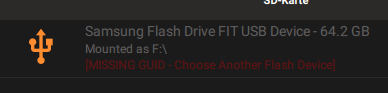
  1. I have the same problem. When I first opened the creator tool, the usb stick was shown with GUID and everything was fine. I didn't flash it and restarted the program later. Then the same stick, without disconnecting it between the two program starts, was shown with MISSING GUID. From there on, I never got the Stick to work again with the creator tool. Changing USB-Port, restarting the PC, reinstalling the software, nothing helped. It's a shame, that they can not make it work correctly.
Account

Navigation

Search

Search

Configure browser push notifications

Chrome (Android)
  1. Tap the lock icon next to the address bar.
  2. Tap Permissions → Notifications.
  3. Adjust your preference.
Chrome (Desktop)
  1. Click the padlock icon in the address bar.
  2. Select Site settings.
  3. Find Notifications and adjust your preference.