





tslamars
Members
-
Joined
-
Last visited
Everything posted by tslamars
-
Hmm....I didn't think about that - very good point. I will keep that in mind for next time - to create the backup when the array is stopped. And also, if the drive goes bad and I use the flash backup from Unraid connect, to create a new config, and indicate parity is valid first. Either way, it seems the only way to indicate the parity is valid is to start with a new config, at least from what I've experienced. Thanks
-
I'll start by mentioning I did read https://docs.unraid.net/unraid-os/manual/changing-the-flash-device/, however I was under the impression since I used the Unraid USB Creator tool to restore from my USB backup, I would not have to deal with a parity rebuild as my array and pool configs carried over. The only mention of parity was if you are uncertain of your drive slot assignments or if you used New Config. Since I did not see an option next to the Start button for me to indicate the parity was already valid, I'm not sure why a parity sync started again. I've booted from my USB with my license key intact. There was no option next to the Start button to start the array and indicate parity was already valid. My question is - since parity sync is running again, if I were to cancel it, create a new config, and indicate parity is valid, would it in fact be valid? I would assume no considering the parity disks were probably wiped after I started the array and the parity sync process started, right? Should I have done this instead? Restore usb boot drive from backup created a new config preserving array and pool slots ticked checkbox that parity was valid start array
-
Thought so. Thank you for your time.
-
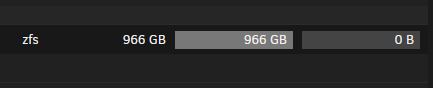
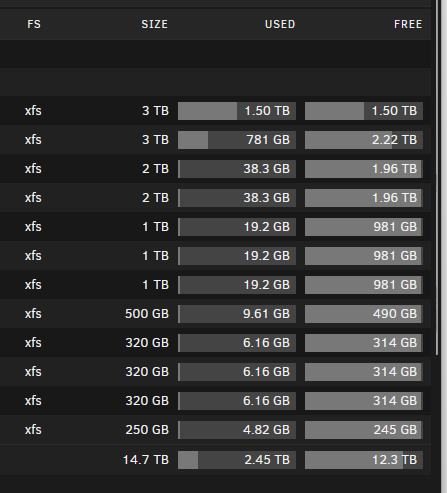
Good morning all, In the past, I used to backup my main PC workstation with Veeam Agent for Windows. Been using this solution for years now, however I was previously backing up to a QNAP with a RAID5 array. The file system had 8TB usable, and was a single large filesystem. My backup job is backing up 2 nvme's on my main PC, so each .vbk full backup file can grow to upwards of 1TB. Last night's test, anticipating it would start writing to the array after the minimum free space hit, however the .vbk file is a single file on disk that was almost 1TB: Context: "backups" share minimum free space = 80 GB Backup to "backups" share, with my "sharecache" as primary storage, and array as secondary This filled up my SSD cache, and mover has been running, but showing no progress as far as freeing up used space on the "sharecache" ^^^ Result of this test ^^ Free disk space in xfs array If I was to simply eliminate the sharecache as the primary storage and backup directly to the array, how exactly would this work with .vbk files that are almost as large as the individual disks in the array? I suspect I'd have to have drives that are large enough, and have enough available space to fit a single .vbk before it can utilize high water to write to an additional disk. Just trying to figure out the best way to do this - but I'm thinking I may be better off backing up with Veeam to my UNAS Pro as that's raid 10 currently. But, I love UnRAID and would rather use that to backup to. Thanks in advance
-
Yes I have already ran the command, however if / when the server reboots it has to be manually sent again. I was previously using a docker container that sends the command, but now I have switched to using this plugin instead. ipmitool -I lanplus -H 10.69.xx.xx -U root -P calvin raw 0x30 0xce 0x00 0x16 0x05 0x00 0x00 0x00 0x05 0x00 0x01 0x00 0x00 Everything is running normally now.
-
Inlet temp is 18c down here in the basement where I have the rack. Yes, low profile heat sinks because I have the midplane installed with 4 drives internally, in addition to the 12 3.5's in the front, and 2 2.5's in the rear. CPU's idle anywhere between 53-60c.
-
Thanks for your help on this one. All good now.
-
Thanks! This makes sense. This would all be great to know, I have not seen any documentation. Appreciate your time.
-
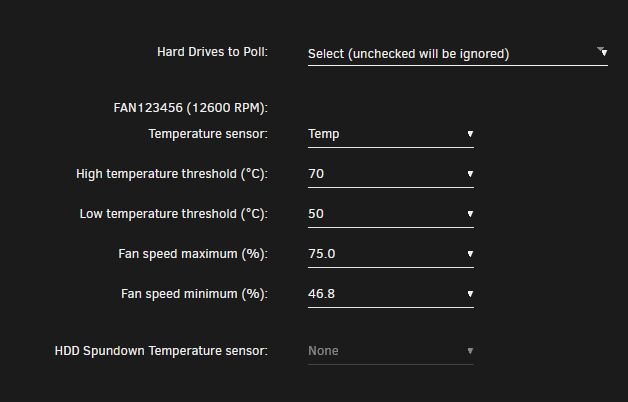
OK - I changed it to the following, and now I'm seeing it poll every 30 seconds:
-
I understand - but I have a GPU and my fans go crazy unless I have my settings this way. These are dual Xeon 2680v4's, and they're currently idling at 53. I want the fans running at 46.8 constantly unless temps rise. Everything was working fine earlier during our earlier chat, and saw the poller every 30 seconds in the log. Now, it only polled once upon initial start. I appreciate your suggestions and will make some changes - but I still don't understand why there's no more additional polling.
-
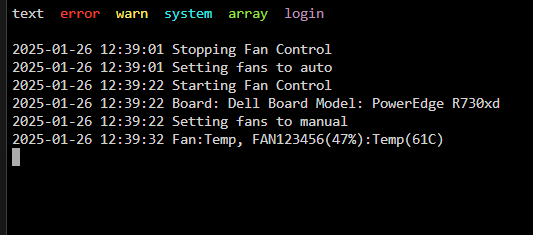
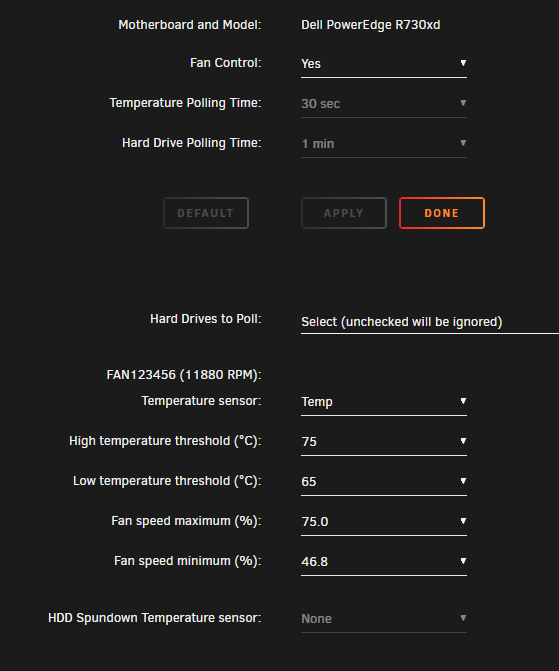
Any idea why it's not polling every 30 seconds all of a sudden? Temps are rising (doing a large zfs file transfer) and the fans should be increasing in speed. I noticed in the logs, there's no messages indicating it's polling anymore. It polls once upon initial start, then nothing after that, it's been more than 30 seconds:
-
A cool feature to have would be to poll on either the CPU or a GPU if you have one installed. For instance: In my R730XD, I have an Nvidia Tesla P4. Since the GPU is doing work transcoding and temps can rise quickly, the CPU temps are generally unaffected during a transcode. It would be nice to be able to poll the GPU and control fan speeds based on that in addition to CPU. Cheers
-
Your plugin is officially wife approved. THANK YOU.
-
GOT IT! Thank you all.
-
Thank you - I don't see this anywhere. Appreciate the visibility.
-
There's no helptext for any of those items, unfortunately.
-
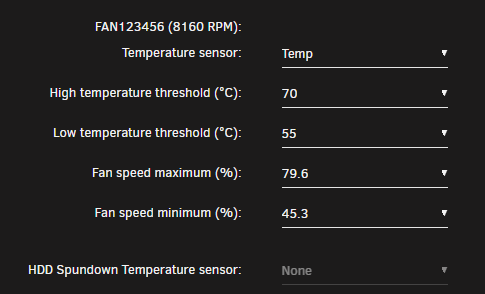
@SimonF Do you have a readme that explains what these settings mean? I'm currently experimenting with my R730XD, just want to be sure I understand what happens if temps rise above say 70. Do the fans kick on at 100% at that point if it's above the high temp threshold? Is the low temp threshold essentially what sets the minimum fan speed?
-
Thank you!!!! Excellent work here.
-
Hey all - I'm unable to install the update, which I think broke my Dell IDRAC fan controller docker container as it's complaining about not being able to send RAW command. Error when trying to update / install this plugin: plugin: installing: ipmi.plg Executing hook script: pre_plugin_checks plugin: downloading: ipmi.plg ... done plugin: downloading: freeipmi-1.6.6-x86_64-1.txz ... done plugin: bad file MD5: /boot/config/plugins/ipmi/freeipmi-1.6.15-x86_64-1_SBo.tgz Executing hook script: post_plugin_checks

