Timvxx
Members
-
Joined
-
Last visited
-
Hmm but i have a mini pc (GEEKOM Mini Air12) so i guess i have to use USB
-
Yeah. One last question. What are the alternatives to the USB array? So what should i do?
-
Yes, that could actually be the case now that I think about it. I use Brave and have often had issues or display errors. I will try, thanks! By the way my Unraid shuts down at night because when I wake up, it's not running. I suspect this might be due to the Dynamix S3 Sleep plugin (sleep mode), but I'm not entirely sure.
-
But you need a USB stick because Unraid runs on it right? I dont use it for anything except unraid... Or do you mean this specific USB stick?
-
Like this?tsserver-diagnostics-20250128-2245.zip
-
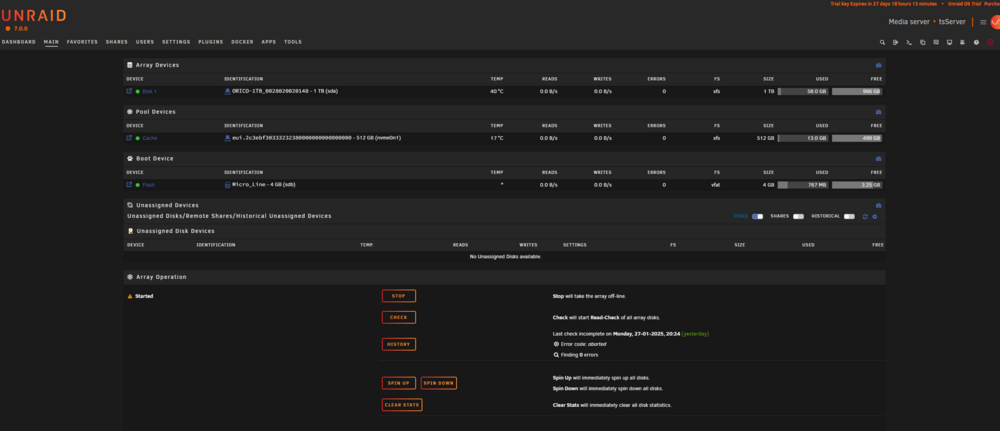
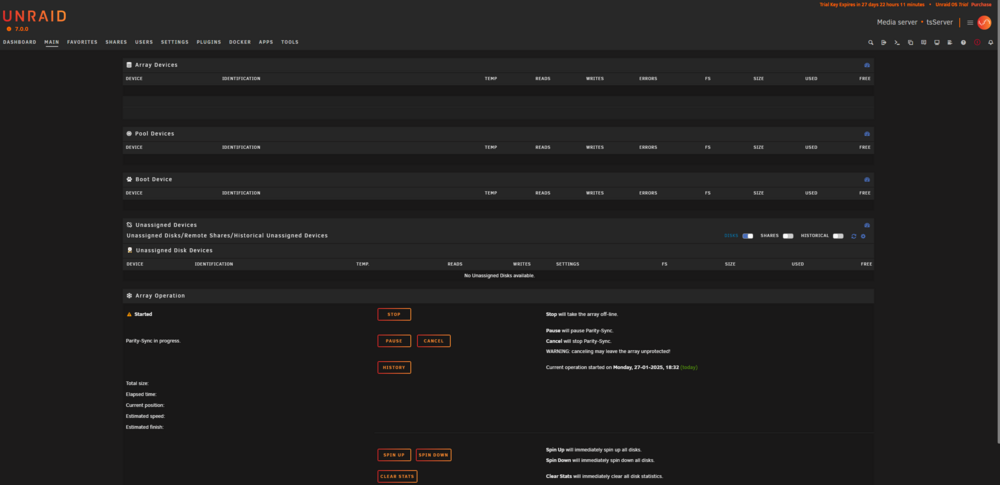
Hi everyone, I’ve been having a really frustrating issue with my Unraid setup, and I’m hoping someone here can help me out. After running for some time, all my disks suddenly become invisible, and I’m no longer able to use Unraid properly. Even the “Fix Common Problems” plugin can’t scan anymore. However, I’m still able to stop and start the array, but it doesn’t solve the issue. The only way to get things working again is to restart Unraid. But after restarting, the system only works for 1–2 hours before the problem happens again. At first, I thought it might be related to using both an HDD and an SSD in the system, so I temporarily removed the HDD, but unfortunately, that didn’t fix the issue either. I’d really appreciate any help or advice on how to solve this problem. Just to mention, I’m completely new to Unraid and server technology, so I’d be grateful if any explanations could be kept as simple as possible. Thanks in advance! here normal: here with bug: