jk31
Members
-
Joined
-
Last visited
Everything posted by jk31
-
Hello, currently trying to setup nextcloud with nginx and duckdns. in principle the access to nextcloud works. i have port forwarding from external port 8443 to 443 on the nginx IP and in nginx xxx.duckdns.org:8443 leads to nextcloud (*ip*:8666). I also added my xxx.duckdns.org to the trusted domains in the config. what happens now is, that nextcloud loads and redirects from https://xxx.duckdns.org:8443 to https://xxx.duckdns.org/login. and this of course doesnt work as it would in principle be port 443 and not 8443. if I manually add :8443 to the url (https://xxx.duckdns.org:8443/login) it works. if I navigate to the next site, :8443 gets erased again from the url and so on.... how can I fix this behavior? I mean obviously I could just change the port forwarding from 8443->443 to 443->443, that solves the problem, but what if I want to use a different port?
-
Sorry, but I found the "solution" myself (and feel really stupid now). I had changed the port Unraid uses because another device (where I use portforwarding so it can be reached from outside) uses the same port. I didn't know first that the ip without any port seems to always point to *ip*:80, even when I change the port. When I enter the new portnumber, I can reach it... Sorry for the thread, really stupid by me...
-
Hello, I am trying to enable remote access to some containers (e.g. paperless-ngx, lightweight music server) from outside my home network. Please help me understand if this is possible at all with my current setup and let me learn how to do it. My internet is provided via cable. The cable router I got from my provider is connected to a FritzBox 4060 which all other devices are connected to. In my FritzBox I can enable remote access via a "myfritz-domain", which looks like this *long combination of numbers and letter*.myfritz.net. For testing purposes, I set up port forwarding for my Unraid-Server so that the WebUI can be reached via xxx.myfritz.net:*port*. While I am connected to my home network, I can access the WebUI with this adress. As soon as I try to connect to it outside my home network, it's not working anymore. What is the problem here? Is the setup with the 2 routers blocking the access? On a sidenote: This situation is only temporary, as I will switch to glass fibre in the middle of the year, then connection the FritzBox directly to my glass fibre modem. So if this is indeed the problem, I will just wait a few months and then try to set the access up again.
-
Hello, I just setup my NAS with Unraid two days ago and everything was working fine. Yesterday I set up a few containers (Jellyfin, LMS, paperless-ngx). When I went to bed, I was able to access the WebUI. When I tried to do so this morning, suddenly I cannot access it anymore. The server seems to be running, I can ping it from my windows PC and I can access the WebUI of all the containers. I am also able to access the network shares form my windows PC and transfer files to it. Just the Unraid WebUI itself is not reachable. I read that I should connect via SSH but this is not possible (I think because I might need to activate it in the WebUI first?). Any ideas?
-
thank you. this method worked!
-
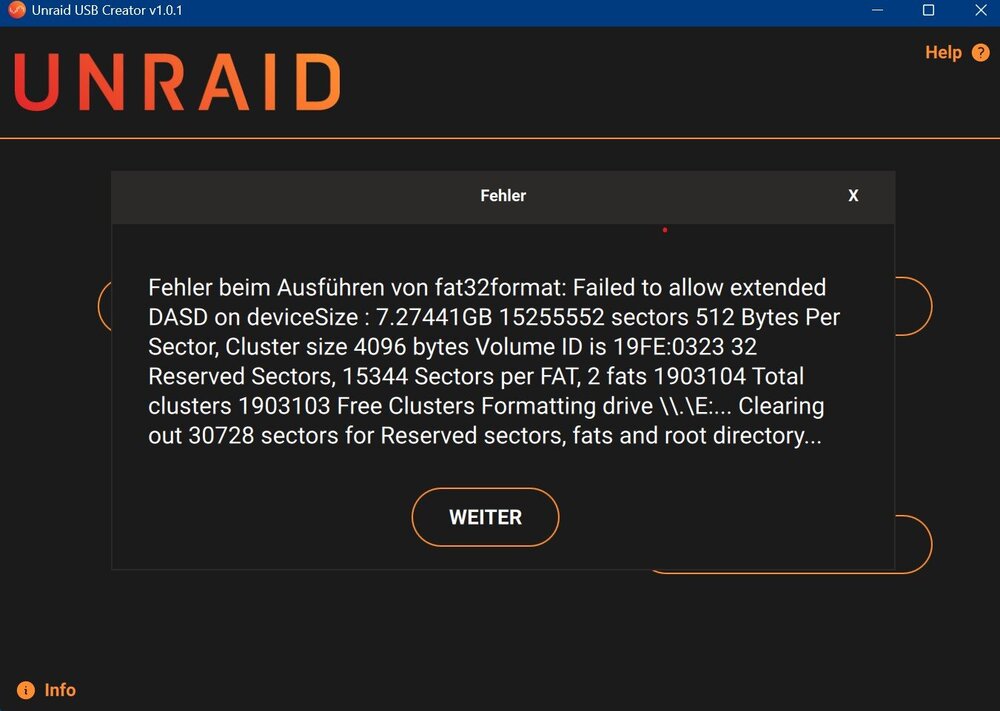
Hello, I am currently trying to setup Unraid for my newly build NAS. I tried three different USB-Sticks (one which I specifically bought) and with none of them I can create the USB installer. Neither with the Unraid USB creator, nor with manual installation. The error from the installer I attached as screenshot. And this is the error code I get when I try to do the manual installation. Make Bootable v1.5 Datenträger in Laufwerk H: ist UNRAID Volumeseriennummer: F2FF-F561 Ready to make disk bootable! Drücken Sie eine beliebige Taste . . . H:\syslinux\syslinux.exe -maf H: Writing MBR: Zugriff verweigert Did not successfully update the MBR; continuing... Completed Drücken Sie eine beliebige Taste . . . I also tried formatting the sticks using Rufus selecting FAT32 and MBR partitioning, still not working. USB Sticks I used: - No Name USB Stick - Kingston DataTraveler 2 GB - Intenso Rainbow Line 8 GB Can anybody recommend an USB Stick that is actually working? I am from germany, so something that is available here would be great.