pooley182
Members
-
Joined
-
Last visited
Everything posted by pooley182
-
Thanks for getting back to me, I've just checked each of those files you suggested, and everthing looks fine in terms of config. Just a quick question, I realised I had mover set to run at 11:00 and increment pause time also at 11:00, with "Pause array operations while mover running" also set to "Yes". Could that have caused my issue? with maybe the Pause array operations getting in first, pausing the parity check at 11:00 before the pause cron ran, and then restarting at 11:06 not knowing it should be in a paused state? I run a partiy check every 3 months, so I'll set myself a reminder to turn on test logging and see if it occurs next time. I've been using the plugin for a while, and this is the first time I've ever had the issue, so hopefully it was just a one off.
-
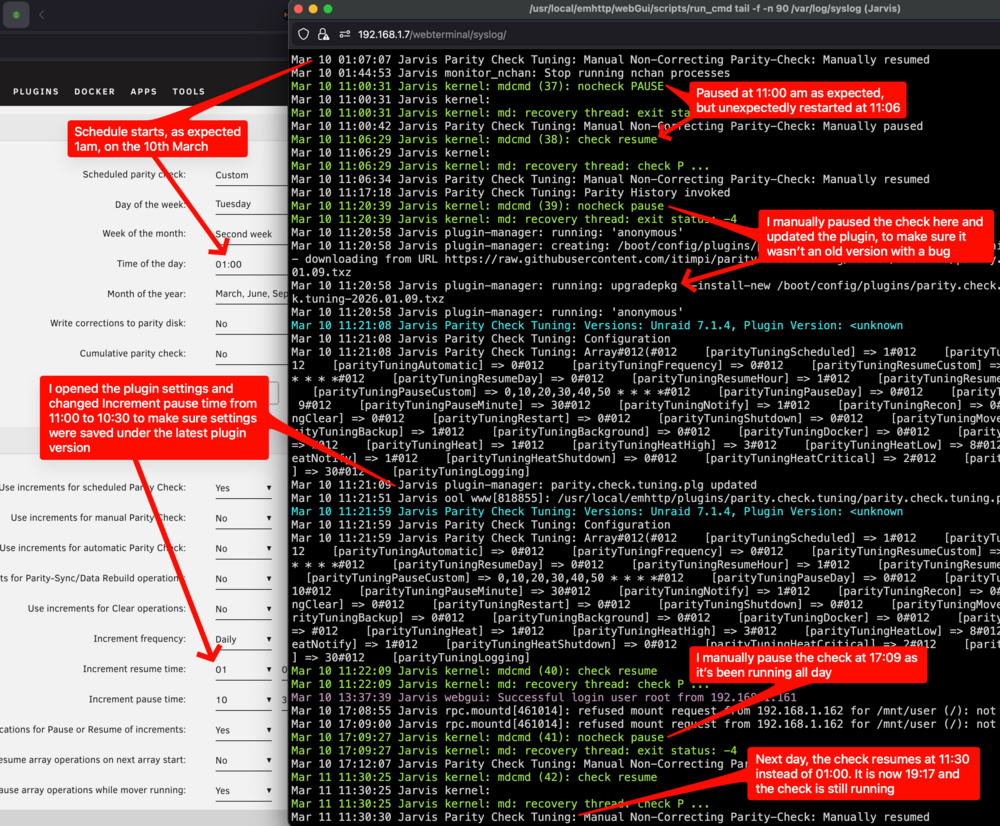
Parity check doesn't appear to be resuming/stopping for me at the expected times that are set in the settings. The scheduled check started at the correct time yesterday (1am); however, it paused briefly at the scheduled stop time of 11am, but then resumed 6 minutes later by itself. I, updated the plugin, as I was on the previous version, I checked the settings, adjusted the pause time to 10:30 and then waited until today, the parity check did not resume until 11:30 (an hour after the scheduled stop time), and at time of me writing this post is still running. I've tried to get a screenshot of both the settings page with the syslog from the server, and I've annotated it as best as I could with the actions I took. Please let me know if I can provide anything else to help troubleshoot.