Bro.Daniel
Members
-
Joined
-
Last visited
Everything posted by Bro.Daniel
-
1. Yes, I had set up a VM. Sorry if for some reason you're not understanding what I am saying. 2. I assume yes. I went to the Apps tab and downloaded the 7DTD App that is listed under Game Servers on the left pane. 3. Okay, so it's wrong. I've done it both ways and the server still didn't work. 4. Good to know, I guess?
-
Good day, everyone! I am hoping to get some help here, as I am a little lost. I downloaded the 7DTD Docker and when I used it for the first time, I had absolutely no issues. After that, I became ballsy and downloaded a VM and tried to set that up, only for my server (My entire server, not necessarily the 7DTD server) to bork entirely and not even start up to the log in screen. Rather than reinstall the OS like I should have done, I ignorantly deleted all of the data from my hard drives THEN did an OS reinstall on my USB. I am new to servers so I am chalking all this up to a learning experience. My issue is that my 7DTD server, after I redownloaded the docker from the website, no longer is operational. When I boot into the game, I am told it cannot retrieve my server information. Below is a list of steps I have tried. 1. I went into the storage of my original 7DTD server files and deleted any folders that may have been remaining to prevent any old data from interfering with the new. 2. I made sure that my Static IP on my router (192.168.50.251) is set up correctly with the right MAC address for my server. 3. Port Forwarding is enabled and all of my Ports (26900, 26901, and 26902) are set up correctly. 4. For Networking on my server, I have set the mode to Host and also tried setting it to br0 with the Static IP. Neither work 5. I have tracert my server IP on my windows machine and am able to connect, but when I try to telnet to the port, it will not connect. 6. I edited the systemconfig.xml with the server IP, but that did not work. I had to add it in as there was no spot for it previously. If it helps, I previously had this set up on Unraid 7.0.0, but when I reinstalled the OS, I installed Unraid 7.0.1. I am using an HP Proliant DL380G6 server. If I can provide any more information, please let me know. guardian-syslog-20250428-0336.zip
-
Sorry, do I have this in the wrong spot?
-
Good day, everyone! I am hoping to get some help here, as I am a little lost. I downloaded the 7DTD Docker and when I used it for the first time, I had absolutely no issues. After that, I became ballsy and downloaded a VM and tried to set that up, only for my server (My entire server, not necessarily the 7DTD server) to bork entirely and not even start up to the log in screen. Rather than reinstall the OS like I should have done, I ignorantly deleted all of the data from my hard drives THEN did an OS reinstall on my USB. I am new to servers so I am chalking all this up to a learning experience. My issue is that my 7DTD server, after I redownloaded the docker from the website, no longer is operational. When I boot into the game, I am told it cannot retrieve my server information. Below is a list of steps I have tried. 1. I went into the storage of my original 7DTD server files and deleted any folders that may have been remaining to prevent any old data from interfering with the new. 2. I made sure that my Static IP on my router (192.168.50.251) is set up correctly with the right MAC address for my server. 3. Port Forwarding is enabled and all of my Ports (26900, 26901, and 26902) are set up correctly. 4. For Networking on my server, I have set the mode to Host and also tried setting it to br0 with the Static IP. Neither work 5. I have tracert my server IP on my windows machine and am able to connect, but when I try to telnet to the port, it will not connect. 6. I edited the systemconfig.xml with the server IP, but that did not work. I had to add it in as there was no spot for it previously. If it helps, I previously had this set up on Unraid 7.0.0, but when I reinstalled the OS, I installed Unraid 7.0.1. I am using an HP Proliant DL380G6 server. If I can provide any more information, please let me know. guardian-syslog-20250428-0336.zip
-
Thanks for that information. I'm currently looking into my BIOS right now and I did a Disable of the P480i, but I saw a post on here previously about someone using that to switch the drives all to Raid0 for them to be picked up on by Unraid. I'm currently looking into how to do that, but so far all I am finding in the various troubleshooting is "Do this thing." EDIT: Also, F8 took me into Integrated Lights-Out 2 on my server. Exiting that, however, too me into ORCA, go figure. While in here, of my 8 possible drives, it's showing two of them only are selectable as Physical Drives, which makes me think suddenly I have a much larger problem on my hands. EDIT 2: Scratch that. I figure out the drives are being used as Logical Drives. I had to delete the Logical Drives before I could utilize the physical.
-
It was said in red on the right side of the USB when I sat it as a drive. You said it wouldn't. I say it did. Wishing no offense to you, I trust my own eyes.
-
And that's kinda the crux of what I'm running into. My issue and the resolutions I have looked up are so specific that no one seems to know the issue. I plugged my USB into the server and Unraid popped up a message that said it was going to wipe the USB to make it a disk which needed to happen so I can use it to run the SUM for my HP server that is 13 years old, and wiped the drive clean. At this point, this OS is doing me no good, because the only thing I am being told is "Unraid hates Raid Controllers" and "Should've tried the trial." I'm chalking this up as a $50 lesson and switching to Ubuntu tonight.
-
That's an option I don't even see on my server, which is why I am guessing I need the SUM. I tried that last night and when I used the USB, Unraid just wiped the USB
-
I tried to disable the card in the BIOS. It didn't help.
-
That can be done with SUM, but SUM requires a GUI to utilize if I did my reading correctly, and I don't see how to access the USB with the SUM through Unraid WebGUI
-
A buddy at work went on an on about how great it is, and couldn't recommend it enough. The Unraid site said it works with most servers so I didn't think too much about needing a Free Trial. I'll just probably end up eating the $50. I'm very new to servers, as in this is my first server and my first attempt setting one up, so I'll chalk it up to an expensive lesson.
-
Does Unraid give refunds for licenses?
-
Sadly, I don't have a fix for this. I tried disabling the RAID controller in the BIOS to no avail. I don't have the money for another server as I got this one for free. I didn't really have the money for this license and my logical drives keep going down. I think I'm just going to switch to Ubuntu. This was a waste of money.
-
So does this mean that even if I disable the RAID Controller in the BIOS, even having the hardware installed can cause issues?
-
I'm wondering if that's something I can turn off in the BIOS or is it hardware I can remove.
-
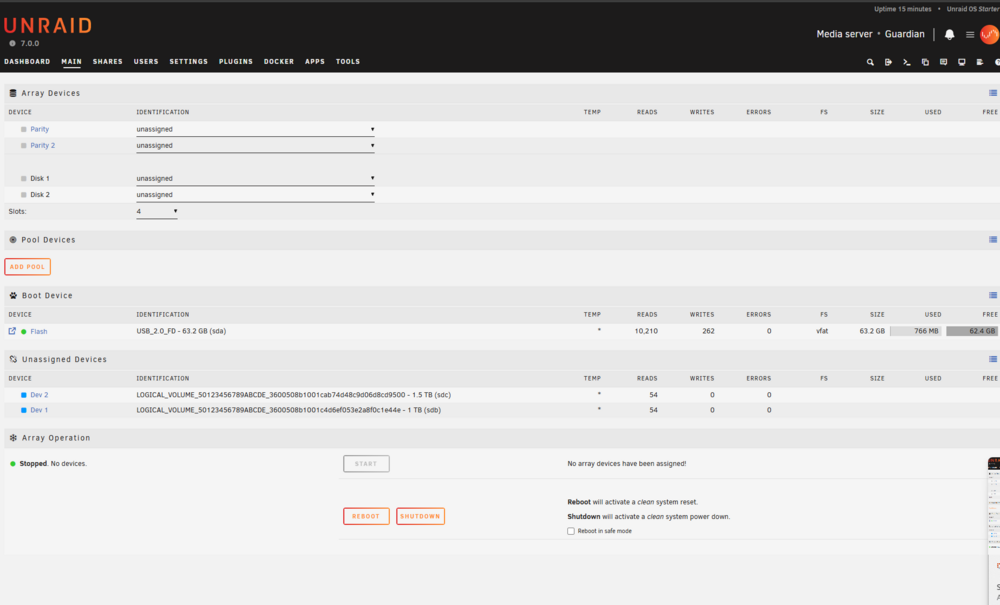
Hello everyone! I am very new to Unraid and I am having some issues. My current set up is displaying 2 Logical Drives. I have 8 HDDs set up in my server (An HP Proliant DL380G6. Old, I know, but I got it for free), and when I am looking within my WebGUI, I only see 2 Logical Drives, one at 1TB and one at 1.5TB. None of my physical drives are showing up. I have restarted the server multiple times but nothing is showing up. I have checked the LEDs on my HDDs and they are showing that all of them are recognized as plugged in and functioning. I attached my DIagnostics if that helps. I'm relatively new to servers and setting them up so any help would be greatly appreciated. guardian-diagnostics-20250224-2051.zip