




Skip to content
View in the app

A better way to browse. Learn more.

Unraid

A full-screen app on your home screen with push notifications, badges and more.

To install this app on iOS and iPadOS
  1. Tap the Share icon in Safari
  2. Scroll the menu and tap Add to Home Screen.
  3. Tap Add in the top-right corner.
To install this app on Android
  1. Tap the 3-dot menu (⋮) in the top-right corner of the browser.
  2. Tap Add to Home screen or Install app.
  3. Confirm by tapping Install.

laund

Members
  • Joined

  • Last visited

Everything posted by laund

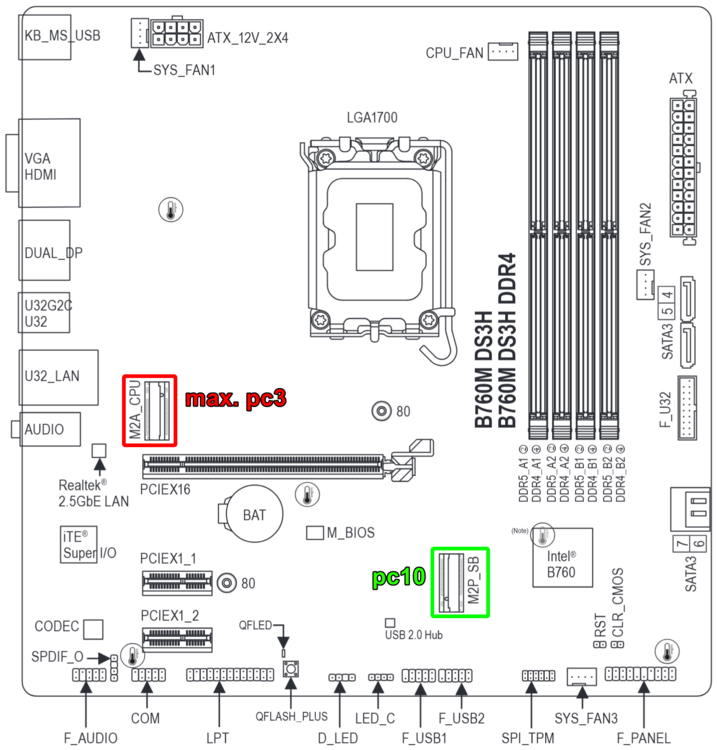
  1. Hi, i wanted to mention this here, as even though i don't use Unraid, this thread is one of the biggest resources about C-state issues and powertop. I recently built a homelab server with a B760M DS3H DDR4 mobo, and was unable to reach package C-states higher than pc3. The solution turned out switching M.2 slots to the non-CPU one. Note: This MOBO also has the problematic Realtek 2.5 Gb port, for which i switched to the r8125 driver, and i haven't tried switching back to the default (in-kernel) r8169 driver. I hope this can help someone else avoid some headaches.
Account

Navigation

Search

Search

Configure browser push notifications

Chrome (Android)
  1. Tap the lock icon next to the address bar.
  2. Tap Permissions → Notifications.
  3. Adjust your preference.
Chrome (Desktop)
  1. Click the padlock icon in the address bar.
  2. Select Site settings.
  3. Find Notifications and adjust your preference.