shentoza
Members
-
Joined
-
Last visited
Everything posted by shentoza
-
But assign it via new config?
-
I have an online backup from a couple of days ago. But yeah I could mount my parity drive, and files and folders seem just fine.
-
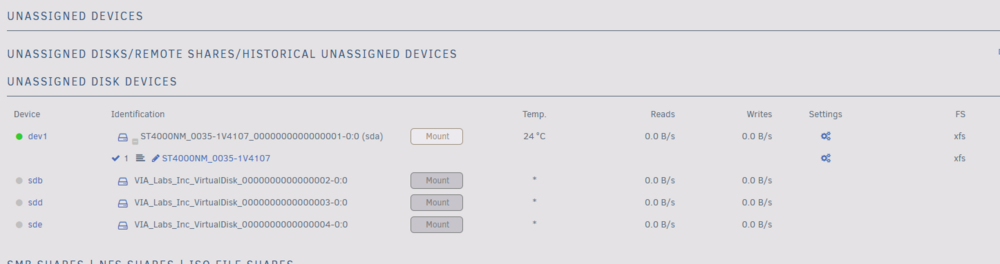
But where would it be mounted, though? I my replacement disk. I could use the new drive as parity disk then and just mount this one shown as data disk?
-
ah since the parity drive is just a mirror of the one drive, just mount it into the old slot? But creating a new config should also work as well, right?
-
I dont think i quite understand the transparency bit... I took the screenshot, when i already removed the faulty disk. Yeah i had only one data disk
-
Sorry misread the first question. Alert [JARVIS] - Disk 2 in error state (disk dsbl)
-
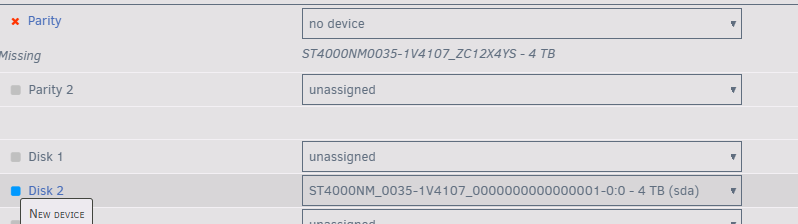
The original parity disk is still attached. The failed disk (which ran into issues in different slots again and again) is not
-
No it failed over night, after running for ~30 days with no issues.
-
Yeah, now I read that as well. But I didnt think I have an option to put another controller with my pc without putting cables out of the case https://psref.lenovo.com/syspool/Sys/PDF/ThinkCentre/ThinkCentre_M910_Tiny/ThinkCentre_M910_Tiny_Spec.pdf?clickid=zKu2mFTzGxyKUIh0tG0fhXFyUksyVfVDlQjg1w0&Program=3786&pid=242189&acid=ww%3Aaffiliate%3A74clty&cid=de%3Aaffiliate%3Axg02ds jarvis-diagnostics-20250402-1844.zip
-
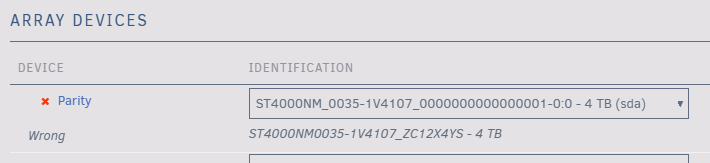
Sorry to resurrect this old thread, but It felt applicable. I currently have the issue, that I temporarily removed my HDD from the parity slot. Now ( I think due to the HDD bay being connected via USB) it is not getting the serial number of the hard drive correctly. Now I'm obviously scared that I will have data loss there. The currently selected HDD in my Parity Slot is the exact same drive, that was my parity before. Can I fix that by creating a new config as well? I DO have a failed HDD, that I have to return, but don't have the replacement yet (it was on disk 2). Should I wait until I have the replacement disk?