c0key
Members
-
Joined
-
Last visited
-
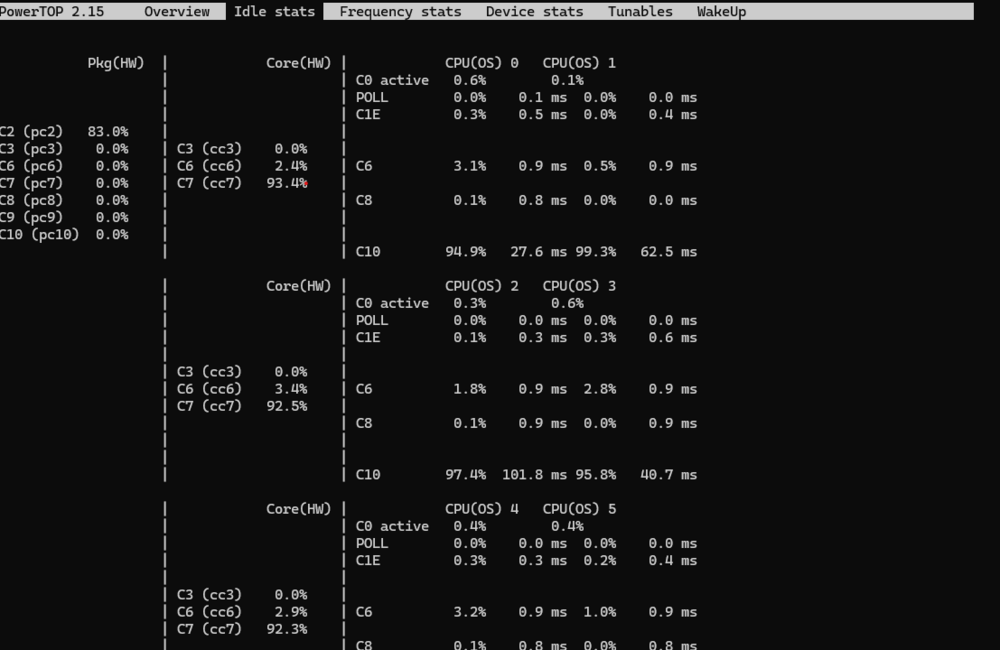
After installing the RTL8125 Drivers plugin, I was able to reach C3 and around 17W with spun down HDD but running some Dockers. I read about unlocking some hidden Asrock BIOS settings, but I would have to install Windows in this machine to achieve it and this sounds like a lot of hassle for another 2-5 Watts possibly. Or is there any other way?
-
Hi there, I am trying to get started with my unraid server. However, I am failing to get to a satisfying idle power consumption. Here is my setup: - ASRock HDV/M.2 Intel B760 with RTL8125BG 2.5 Gbit LAN - Intel i5 12500 - 16GB Kingston ValueRAM DDR5-5600 - 500GB Samsung SSD 980 M.2 PCIe 3.0 - 20 TB Exos X20 (currently only HDD) Except for a few plugins, my Unraid is clean and I don't even run an Array yet. Relevant BIOS settings have been done (activating C states, disabling Turbo, disabling other peripherals). Tunables are all on good after autotune. I set Normal CPU Scaling Governor to Power Save via Tips and Tweaks plugin. After some trouble with the Realtek chip, I managed to activate ASPM with ASPM-Helper: 00:06.0 PCI bridge: Intel Corporation 12th Gen Core Processor PCI Express x4 Controller #0 (rev 05) (prog-if 00 [Normal decode]) LnkCap: Port #5, Speed 16GT/s, Width x4, ASPM L1, Exit Latency L1 <16us LnkCtl: ASPM L0s L1 Enabled; RCB 64 bytes, LnkDisable- CommClk+ 00:1c.0 PCI bridge: Intel Corporation Raptor Lake PCI Express Root Port #1 (rev 11) (prog-if 00 [Normal decode]) LnkCap: Port #1, Speed 8GT/s, Width x4, ASPM L1, Exit Latency L1 <64us LnkCtl: ASPM L1 Enabled; RCB 64 bytes, LnkDisable- CommClk+ 01:00.0 Ethernet controller: Realtek Semiconductor Co., Ltd. RTL8125 2.5GbE Controller (rev 05) LnkCap: Port #0, Speed 5GT/s, Width x1, ASPM L0s L1, Exit Latency L0s unlimited, L1 <64us LnkCtl: ASPM L0s L1 Enabled; RCB 64 bytes, LnkDisable- CommClk+ 02:00.0 Non-Volatile memory controller: Samsung Electronics Co Ltd NVMe SSD Controller 980 (DRAM-less) (prog-if 02 [NVM Express]) LnkCap: Port #0, Speed 8GT/s, Width x4, ASPM L1, Exit Latency L1 <64us LnkCtl: ASPM L1 Enabled; RCB 64 bytes, LnkDisable- CommClk+ I only reach C2 states (checked via SSH) and measured an idle power consumption of 25W with Tapo P110M. What are things that I can check?