





havet24069
Members
-
Joined
-
Last visited
-
Hi there, sorry I have a really silly query, but can you confirm exactly what you mean by "unmount" disk 2 in an explain like I'm five way? I'm only familiar with that exact word as a button in Unassigned Devices so I want to be really clear and not make any assumptions that could cause problems. Essentially I'm intending to do the same as you, zero out an xfs encrypted disk to remove it from the array without breaking parity.
-
Ah, interesting - I hadn't really thought about it as a shrink operation but yes I guess that's technically one of the steps. Need to look into that a bit more and see if I want to go ahead - possibly a bit of pain now to sort it out may well be better than trying to do it later. Thank you for taking the time to answer on this.
-
Hi Jorge, thanks for taking a look at this. Ah thanks, that's the kind of thing I was concerned about. It's not the end of the world but given it takes over two days to rebuild parity with this array I'm keen to avoid it if possible. There is just enough space to temporarily place the content from Disk 3 on the other disks in the array if I split it up. Does this open the possibility to do it without any period of being unprotected?
-
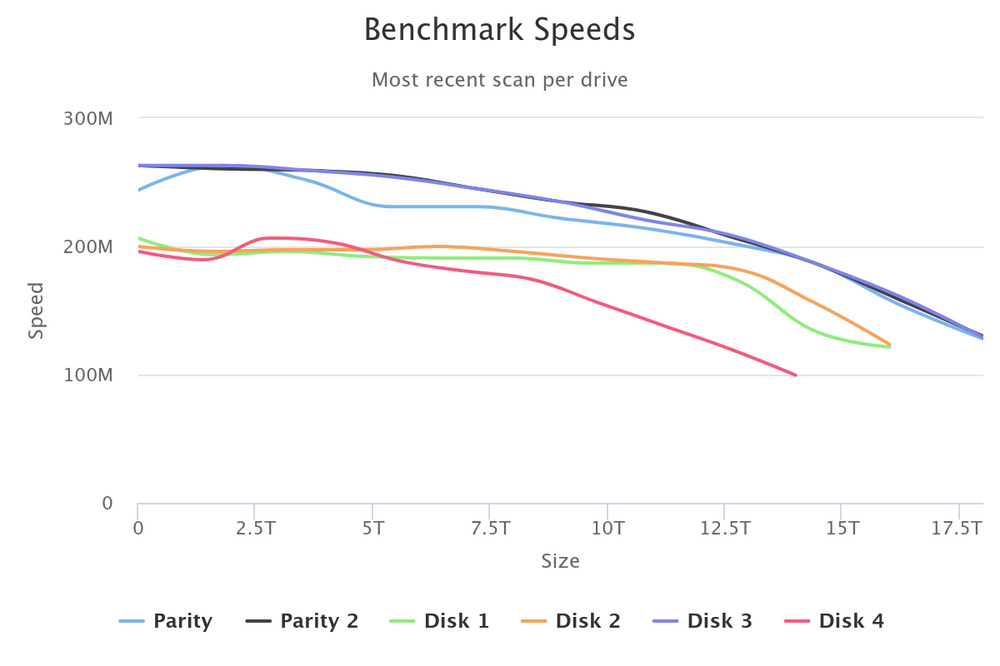
Hello, Just looking for some advice and feedback. Have been running the wonderful DiskSpeed plugin from jbartlett777 and noticed that my Parity 1 disk doesn't have a smooth speed curve and is a little slower than the other parity drive and one of the data drives meaning it's a slight bottleneck to the array write speed. It's not critical, but given that I have two parity drives and Disk 4 will at some point fail and be swapped with a larger faster drive, I'm thinking to swap Parity 1 and Disk 3 now. Would love if someone more experienced than me with such things could sanity check this thought and confirm if they would do the same in this situation? If it is reasonable to do this, would an efficient (and safe) method be the following: Drop Parity 1 as a Parity drive and then add it back as a Data drive (would Parity 2 become Parity 1 automatically or could this be explicitly configured in some way that means there's always parity coverage?) Allow parity to fully rebuild Use Unbalanced to move (or copy?) all data on Disk 3 to the new data drive Remove Disk 3 as a data drive and re-add it as a Parity drive (either Parity 1 or Parity 2 depending on step 1) Allow parity to fully rebuild I'm not super experienced with this stuff, so any warning or insights appreciated.
-
That's fair enough, everyone's situation and needs are slightly different
-
Thank you for this splendid explanation. There's nothing I specifically need in zfs, it was just a case of "unless there's a compelling reason, might as well use it". But you have indeed highlighted a very specific reason to go in a different direction and I'll definitely be following that advice. Hopefully someone can weigh in on the query about the encrypted drives, but I consider the original question completely addressed and am grateful for the time and advice of both MAM59 and itimpi in this. Very glad I asked ahead and saved some pain down the line! Many thanks.
-
Thanks both, appreciate the inputs. With regards to the issues using zfs in an array, is that a performance issue in terms of speed, or some kind of feature of the filesystem that doesn't work when used in that way? Sounds like xfs - encrypted might be the way to go for the array, and I'd probably go with btrfs - encrypted for the cached, would presume it defaults to that for good reasons. Another slightly related question, is there any difference in the process with rebuilding from a failed drive when using encrypted filesystem? The docs mention that there can be issues recovering from "certain kinds" of hardware failure, but I haven't found much information about what kinds those are and what works differently or less effectively in those circumstances. Thank you
-
Hello, Would just like to query the hivemind regarding which filesystem to use on a new array. The info that will hopefully be useful into giving that advice is below. Will start small with a single parity (18TB) and two data drives (16TB), then add over time as needed A number of smaller SSDs (256GB) will likely be used as a cache pool Will have some sort of backup strategy for critical data, involving various USB drives, TBD Single user (homelab) so multi-user stuff isn't important. It might or might not stay on 24x7 but intend to configure so drives spin down after a period of inactivity. The main aspect is that I'll be using encryption. Although the documentation cautions regarding that due to "complexity" with resolving some situations, I don't consider it optional. We're not talking nation-state stuff here, just basicially given it'll host at least an Immich instance and backups of local myDocuments type data, it's important that if the box gets stolen or something and ends up in the hands of someone vaguely competent, that they don't have an easy route to just grab all the data. Given the above, it seems like the following are the options: xfs - encrypted zfs - encrypted (the native support in v7) I would lean towards zfs, unless there's some compelling reason to stick to the existing xfs, and that's where I'm hoping the folks here would have some insight. I haven't been able to find much detail around the specifics, and a lot of it pertains to v6 and previous before the native support was added. Like I've seen mentions about adding new drives being more complex with zfs, but I'm unclear about the details of why, or if that's even relevant with the native support. Will appreciate any advice people have, thank ya'll.

