





caracola
Members
-
Joined
-
Last visited
-
Hey, you can take a look into this. The problem is unlikely the NFS version but more likely the storage point on the Server. I ran into this issue while I was trying to use xattr's within the FUSE File-System-Layer via NFS (and earlier with 9P). This operation is not supported. NFS4.2 is able to work with xattr, the FUSE File-System-Layer too. But as far as I understood it correctly, NFS (9P) are not able to write, read, etc. xattr within the FUSE ecosystem. Well, how I fixed that: I followed @JorgeB 's recommendation and implemented a separate ZFS Pool. Than I broke down my needs and focused me on the pure cloud functionallity. Fortunately in the meantime there were a really straight forward template created. https://forums.unraid.net/topic/200022-support-junkerderprovinz-opencloud/ What should I say: it is working as expected. Before my current state, I tried to validate @JorgeB 's theory regarding NFS/FUSE and started the official OpenCloud docker-compose file within a VM with shared storage via NFS and it worked for me.
-
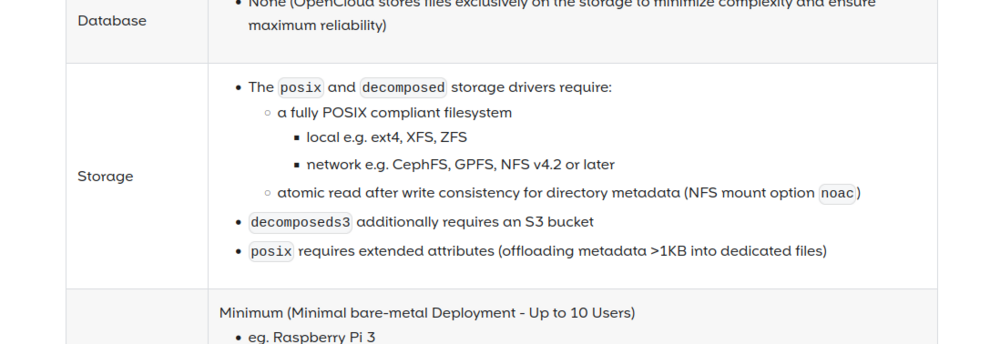
Honestly I did not try this because for my usecase the FS has to be POSIX compliant. SMB needs an extension to fullfill this. Native SMB is not (yet) supported. Requirements | OpenCloud DocsRuns on anything from a Raspberry Pi to a data center.
-
Yes, unraid does not support docker compose out of the box. There is a community app to add this feature. Here is also a script to get opencloud running on unraid. I did not tried it because this is not that kind of solution I am looking for. I want to deploy it within a VM in that way it was made for. And this is not a problem. It is not a problem to get opencloud running within a vm. The problem is to share the unraid pool via NFS or virtioFS to avoid storage issues in the VM.
-
Hey, Yes and no. The No: Honestly I did not try to get this work since a couple of weeks (or months in the meantime), because this was so frustrating drove me nuts. I hoped that any unraid maintainer would be interested in this but obviously this issue is not that "relevant". I guess there is occurs an issue somewhere between the both OS (unraid and alpine). I found a couple of posts in several forums about this topic. There definitely was an issue in the Kernel which had an impact of xattr and NFS. But according to my investigation this issue was solved in the Kernel's which are used by unraid and the alpine version I used. But.... What I found out, that these problems occurs not only in the combination alpine <-> unraid. I ran into the same error using Debian (I think I took trixie). The Yes: If this is not strange enough, with Ubuntu Server 24.04 it worked as expected. So, in case you do not need a real tiny base OS, give Ubuntu Server a try. Only a few thoughts: According to the Opencloud manual it is important that NFS-Version 4.2 is supported and used. On Server- and Client-Side. Well, nice to know but this is no guarantee because according to the specs from Debian and Alpine, both should support this version. Maybe I am to dumb or naiv but that lets me think there is something wrong on the unraid side. But on the other hand, it is working with Ubuntu Server. Since NFS and xattr are (more or less) standardized, I am wondering if the behaviour of the OS's differ somehwhere (Kernel) how to deal with it. In case you have further information or thoughts, please share here. I appreciate that. Update: Regarding the part I mentioned, that Ubuntu Server fixed this issue: I can not confirm that Ubuntu brings a solution. For whatever reason I am not able to reproduce it.
-
Hm okay. Good to hear 😉 Because the container is not running as privileged due to security reasons. Thus it is not able to modify the host system.
-
Sounds for me like a permission issue. Owner of the folders should be 1000:1000. The uid 1000 usually will get the first additional user. But you also can change the owner via terminal by typing: chown -R 1000:1000 /path/to/opencloud
-
Hello, I ran into an issue with an application (opencloud) which uses extended file attributes. The application is a cloud service. I set up a VM with Alpine 3.22 with an semi-automatic installation and setup script. To avoid the VM runs out of storage I first wanted to save the data outside the VM via virtioFS. Since I read NFS is the recommended protocol I tried this out. But I am not able to get the app run in unraid. After a couple of tries I set up a VM on my desktop (Linux mint) where it is running without issues. Knowing I have a running configuration I connected my desktop VM with unraid via NFS. But I ran into the same issues as mentioned before. Obviously (according to the opencloud log) there is an issue with xattr. opencloud-1 | {"level":"error","service":"storage-users","host.name":"92884baaca17","protocol":"http","error":"http service dataprovider could not be started,: tree: unfit storage '/var/lib/opencloud/storage/users': extended attributes not supported: xattr.Set /var/lib/opencloud/storage/users/posixfs-xattr-check-1339827557 user.posixfs.test: operation not supported","time":"2025-12-11T19:44:26Z","line":"github.com/opencloud-eu/reva/[email protected]/cmd/revad/runtime/drivenserver.go:91","message":"reva server error"} I tried to set and get extended attributes in unraid and in the VM separately. Both worked. But reading xattr from the from one to the other does not work. After some research I found an issue at github where the Kernel was the root cause. https://github.com/siderolabs/talos/issues/11843 Maybe you can check this? Is unraid supporting nfs V.4.2 natively? Update: I just tested ability to read and write xattr from the guest VM on the host. For all tests I used the NFS4 protocol with the same export rules. Mounting point: 192.168.178.43:/mnt/user/opencloud on /root/opencloud/persistent-data type nfs4 (rw,relatime,vers=4.0,rsize=1048576,wsize=1048576,namlen=255,hard,proto=tcp,timeo=600,retrans=2,sec=sys,clientaddr=192.168.178.125,local_lock=none,addr=192.168.178.43) First of all unraid on its own: root@Kiarax:~# touch /mnt/user/opencloud/self_test root@Kiarax:~# setfattr -n user.test -v "this is a test" /mnt/user/opencloud/self_test root@Kiarax:~# getfattr /mnt/user/opencloud/self_test -d getfattr: Removing leading '/' from absolute path names # file: mnt/user/opencloud/self_test user.test="this is a test" Alpine guest VM on unraid alpine-ocaido:~# touch /root/opencloud/persistent-data/alpine_testfile_on_unraid alpine-ocaido:~# setfattr -n user.test -v "this is a test" /root/opencloud/persistent-data/alpine_testfile_on_unraid setfattr: /root/opencloud/persistent-data/alpine_testfile_on_unraid: Not supported alpine-ocaido:~# getfattr /root/opencloud/persistent-data/alpine_testfile_on_unraid -d alpine-ocaido:~# Then I tried to read the xattr from the self test and I got no response. alpine-ocaido:~# getfattr /root/opencloud/persistent-data/self_test -d alpine-ocaido:~# A similar alpine guest VM on my desktop. No problems at all. alpine-ocaido:~# touch /root/opencloud/persistent-data/alpine-testfile_on_host alpine-ocaido:~# setfattr -n user.test -v "this is a test" /root/opencloud/persistent-data/alpine-testfile_on_host alpine-ocaido:~# getfattr /root/opencloud/persistent-data/alpine-testfile_on_host -d getfattr: Removing leading '/' from absolute path names # file: root/opencloud/persistent-data/alpine-testfile_on_host user.test="this is a test" alpine-ocaido:~# So, for whatever reason, I am not able to read or set extended attributes via NFS from the VM on the unraid environment. If anyone have an idea how or why, please do not hesitate! 🙃
-
Well, yes.. you can come to this assumption. But I think the feedback within this thread is a bit misleading, due to all these issues. I had really good experience when starting OC outside of unraid. First of all try to change ownership of your config and data directory within unraid to 1000:1000 Is the log file empty or only without errors, as you said?
-
No.. it is hard without any further information. But I am also not that familiar with nginx. But maybe this will help you: Behind External Proxy | OpenCloud DocsHow to run OpenCloud behind an external Nginx proxy with Certbot (manual setup).Actually this documentation is addressed for compose setups but maybe it gives you an idea to fix your problem.
-
How did you do this? Were you using the unraid compose plugin? So far I did not heart from any guy: "oh yeah, oc is running like a charm".. It seems there are some fundamental issues using opencloud (docker) on unraid. On some systems it will not run at all, on the next system it is running but will stuck at a specific kind of file (like nemu reported). My experience is somewhere between these.. All in all opencloud were build modular. You can choose which services you want to use and add them via compose. Unfortunately unraid is not (yet?) prepared for docker-compose without using separate services. I do not think that could be fixed by the unraid template. I tried to get it working on my local machine. I had NO issue. It worked as expected. Thus I think the problem lies in the OC repository or in the unraid OS - or both.
-
Not sure if I got you... You want to be able to access your cloud via lan (without proxy) and access it via www by your proxy? You could not get it to work without proxy, or could you?
-
Are you able to start and access oc without using any further 3rd services?
-
BTW: I am non of that too ! 😂 I am experimenting with Linux, Docker etc. since a couple of month (really). Excepting the fact that there is already some desktop environments available, Linux is that different than windows is. It can be mind blowing in the beginning. The Microsoft terminal is often only used by geeks. In Linux, and it does not matter which distribution, the terminal is your best friend. This is some kind of cool but also a lot of bothering - especially when your a new to Linux. IMO there is an general issue with the unRAID environment (because of the syncing issues and crashes). Maybe some kind of conflicts in filesystem, plugins or docker itself. After a dozent of misleading tries getting OC running on unraid I experimented with Ubuntu server. I was able to set up a really well working cloud instance of OC by installing it on a virtual machine. This could also be a workaround for the OC AIO installation. Another (not verified) way for the OC AIO installation, could be a DinD (Docker in Docker) runtime based on Linux alpine e.g. This could also be installed via the community application repository which is simpler then setting up a VM. But anyway, I think OC will not be the typical cloud, collaboration, sharing, radicale and so on .... platform for a 'by the way installation and configuration'. But maybe this will change. If anyone is interested in a step by step guide for the VM variant, let me know. I have a couple of other and more urgent projects running. So OC is not a topic for me at the moment. But I will start experimenting with the docker compose release at its time.
-
I reported a bug regarding this issue. https://github.com/opencloud-eu/opencloud/issues/1065
-
For my understanding and interpretation of the documentation, Opencloud as community application is "only" using the docker configuration. That means according to the documentation: Spin up a temporary local instance of OpenCloud using Docker. For the moment there is no community application with the docker compose setup existing. This would be the AIO variant with web extensions like the app store e.g. Before trying any kind of DNS configuration, try to get your frontend available within LAN. Quoting one of the maintainer: People are always struggling with DNS, filesystem permissions and reverse proxies, which is in 90% of the cases not an openCloud problem. To keep it simple. Please post a screenshot from: ls -la /mnt/user/[your data folder] ls -la /mnt/user/[your config folder]Please also check, whether cat /etc/passwd | grep 1000 gives any respone. Maybe this can also help: https://github.com/orgs/opencloud-eu/discussions/961


