





mcreekmore
Members
-
Joined
-
Last visited
-
Hey all, just wanted to let you know this template (mcreekmore/opencloud) has been officially deprecated due to the reasons I've listed previously in the thread :/ If you haven't already, please migrate to one of the other community members templates that have been posted here or elsewhere. Thank you!
-
Oh nice work! I'll have to upgrade and let you know if I have any issues. Thanks for your work on that
-
Nice! I use pocket-id in my homelab as well. Strange, the old template I didn't have any issues with but I set up a month or two ago
-
Hey Nemu looks like you've made a lot of progress! I would love to take some time and try out your scripts/template but life and health have been crazy recently. I did request Squid way back in June to mark my template as deprecated since it was clear that opencloud isn't just a simple docker template and I didn't have the capacity/know how to properly set it up.
-
I've come here for the exact same reason. Just upgraded to Unraid 7.2.1. I also noticed someone in this thread is able to see their UPS information (although they're saying its reporting correct information). I'm using the Network UPS Tools (NUT) for UNRAID plugin. I honestly don't care too much about seeing UPS information, I just thought I'd report that here. Though the main use case I would really love to resolve is being able to see and restart docker containers via the app without having to access the dashboard. Usually when I need to restart containers, its because they're "stuck" hogging 100% of the servers resources and loading the dashboard and then waiting for all the containers to load takes forever!
-
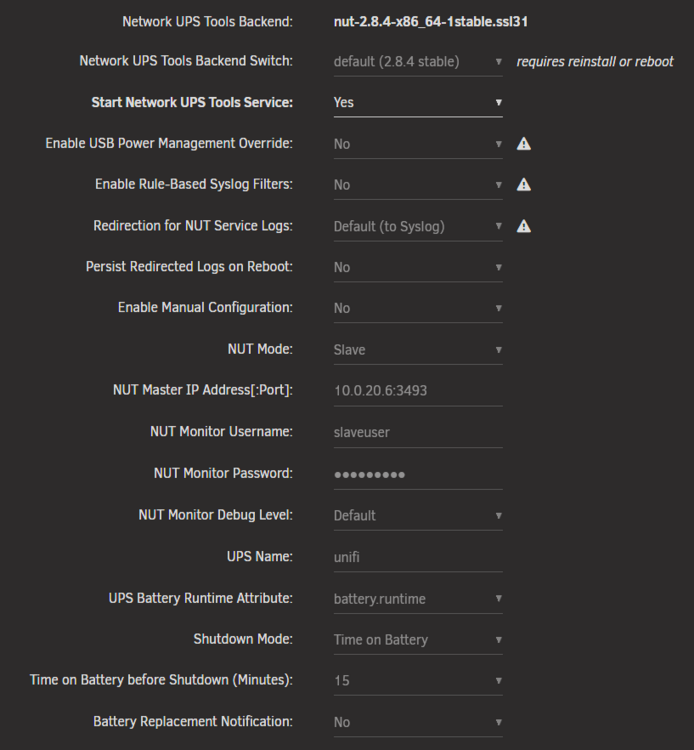
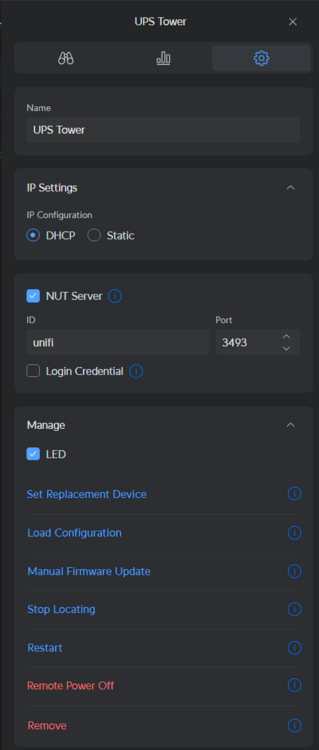
I case anyone else is having trouble with their Unifi UPS, here are my settings
-
Just commenting to say that my Unifi UPS Tower connected perfectly when I disabled the credentials on the UPS but used dummy credentials. Thank you!
-
Hey Mattti, I would try @Nemu 's template above as I've sort of given up on this template. OpenCloud seems to be very immature and moving rapidly and I simply don't have the time to dedicate to maintaining this template that I thought I would
-
Honestly I agree with you. When I started this template, the setup was simple enough except for the fact that it doesn't include the vast majority of "features" that one would expect out of what many here are hoping is a Nextcloud replacement. If you get this template working, you will have basic file syncing. The appstore is not included. Onlyoffice integration is not straight forward and users (including myself) have had issues getting the desktop app to sync with their instance. This project is clearly still in its infancy despite a "1.0.0" launch in the last 3 months. Now they're already on a v3 and the troubleshooting is seemingly more trouble than its worth at the moment. There's a fairly new repo in their project for docker-compose setups. IMO to get a fully-featured opencloud setup surpasses the time (and possible know-how) I have. Perhaps there can be an effort towards a nextcloud-aio-mastercontainer equivalent for this project but I doubt it can be me doing such.
-
Thanks for doing this. I'm currently troubleshooting my own instance. I had it working just fine as in I could upload and download files. I reset my instance and now running into issues though I never had the system-wide crash issue as reported by you and kstile
-
That would require additional configuration (i haven't gotten it to work). This template starts without it. Check their starter docs for more detailed docker compose for their "complete" stack Same as the first point. https://docs.opencloud.eu/docs/admin/getting-started/container/docker-compose
-
Glad you got it working! It's detailed in the app template to change the post argument but I understand that instruction can be a little buried/hard to see.
-
Hey thanks for checking and that's strange. I'll take a look after work sometime. Perhaps they've made changes to the rolling release. Can you run `New Permissions` on your appdata/opencloud folder? See if that fixes the permission issue
-
Can you try the CA template for the same opencloud-rolling image by joly0? See if you have any better luck.
-
Yeah unfortunately this project is still very early in development and that's sort of where I am at. Besides very limited functionality, I'm not really getting the "stack" to work quite yet. I noticed there is another CA template for the same container by joly0. Perhaps this is worth trying



