





mcreekmore
Members
-
Joined
-
Last visited
Everything posted by mcreekmore
-
Hey all, just wanted to let you know this template (mcreekmore/opencloud) has been officially deprecated due to the reasons I've listed previously in the thread :/ If you haven't already, please migrate to one of the other community members templates that have been posted here or elsewhere. Thank you!
-
Oh nice work! I'll have to upgrade and let you know if I have any issues. Thanks for your work on that
-
Nice! I use pocket-id in my homelab as well. Strange, the old template I didn't have any issues with but I set up a month or two ago
-
Hey Nemu looks like you've made a lot of progress! I would love to take some time and try out your scripts/template but life and health have been crazy recently. I did request Squid way back in June to mark my template as deprecated since it was clear that opencloud isn't just a simple docker template and I didn't have the capacity/know how to properly set it up.
-
I've come here for the exact same reason. Just upgraded to Unraid 7.2.1. I also noticed someone in this thread is able to see their UPS information (although they're saying its reporting correct information). I'm using the Network UPS Tools (NUT) for UNRAID plugin. I honestly don't care too much about seeing UPS information, I just thought I'd report that here. Though the main use case I would really love to resolve is being able to see and restart docker containers via the app without having to access the dashboard. Usually when I need to restart containers, its because they're "stuck" hogging 100% of the servers resources and loading the dashboard and then waiting for all the containers to load takes forever!
-
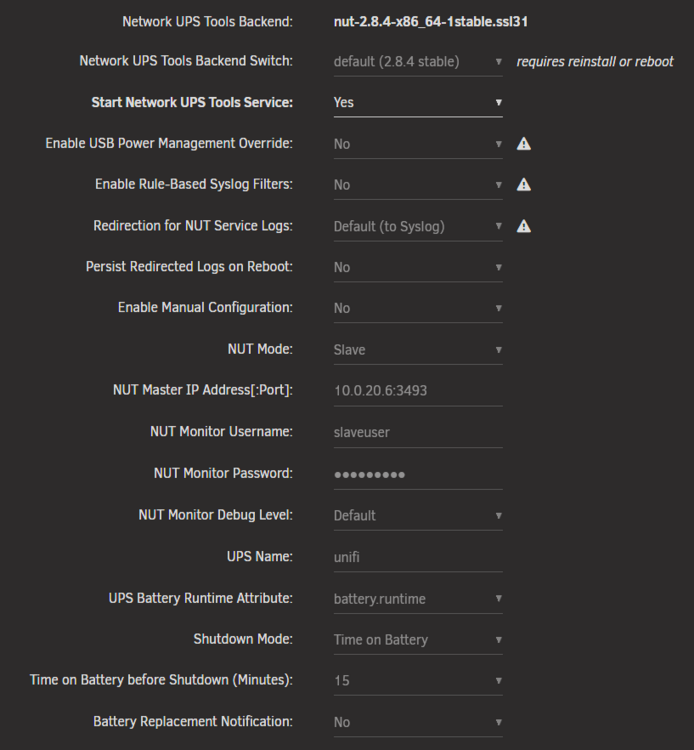
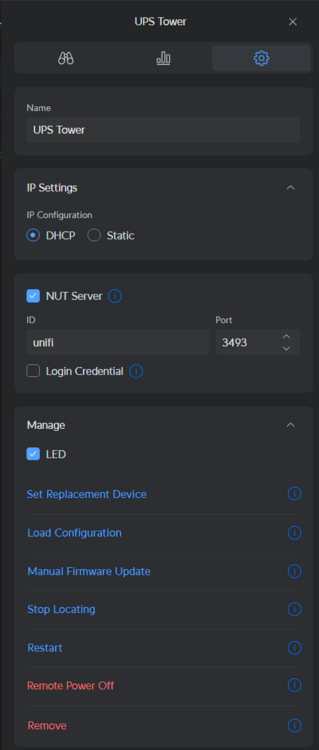
I case anyone else is having trouble with their Unifi UPS, here are my settings
-
Just commenting to say that my Unifi UPS Tower connected perfectly when I disabled the credentials on the UPS but used dummy credentials. Thank you!
-
Hey Mattti, I would try @Nemu 's template above as I've sort of given up on this template. OpenCloud seems to be very immature and moving rapidly and I simply don't have the time to dedicate to maintaining this template that I thought I would
-
Honestly I agree with you. When I started this template, the setup was simple enough except for the fact that it doesn't include the vast majority of "features" that one would expect out of what many here are hoping is a Nextcloud replacement. If you get this template working, you will have basic file syncing. The appstore is not included. Onlyoffice integration is not straight forward and users (including myself) have had issues getting the desktop app to sync with their instance. This project is clearly still in its infancy despite a "1.0.0" launch in the last 3 months. Now they're already on a v3 and the troubleshooting is seemingly more trouble than its worth at the moment. There's a fairly new repo in their project for docker-compose setups. IMO to get a fully-featured opencloud setup surpasses the time (and possible know-how) I have. Perhaps there can be an effort towards a nextcloud-aio-mastercontainer equivalent for this project but I doubt it can be me doing such.
-
Thanks for doing this. I'm currently troubleshooting my own instance. I had it working just fine as in I could upload and download files. I reset my instance and now running into issues though I never had the system-wide crash issue as reported by you and kstile
-
That would require additional configuration (i haven't gotten it to work). This template starts without it. Check their starter docs for more detailed docker compose for their "complete" stack Same as the first point. https://docs.opencloud.eu/docs/admin/getting-started/container/docker-compose
-
Glad you got it working! It's detailed in the app template to change the post argument but I understand that instruction can be a little buried/hard to see.
-
Hey thanks for checking and that's strange. I'll take a look after work sometime. Perhaps they've made changes to the rolling release. Can you run `New Permissions` on your appdata/opencloud folder? See if that fixes the permission issue
-
Can you try the CA template for the same opencloud-rolling image by joly0? See if you have any better luck.
-
Yeah unfortunately this project is still very early in development and that's sort of where I am at. Besides very limited functionality, I'm not really getting the "stack" to work quite yet. I noticed there is another CA template for the same container by joly0. Perhaps this is worth trying
-
Are you saying you were able to connect to the windows 11 desktop app with the local docker-compose setup?
-
I’m glad you like it! I’m not the author of the script, I just made the template lol. I have the same question myself. I was planning on reading through the code to see exactly how it works soon. Like I also had to figure out how to get every post without a filter since that wasn’t an example covered in the example config but you can just put an empty string. If you’re curious enough, I’d say you can submit an issue on the projects GitHub with a feature request
-
Overview: Get notified for new Reddit posts that match your search criteria. GitHub: https://github.com/RafhaanShah/Reddit-Post-Notifier GHCR: https://github.com/RafhaanShah/Reddit-Post-Notifier/pkgs/container/reddit-post-notifier
-
Do you have a reverse proxy you're using? If you put it behind it, are you able to access?
-
Can you post what you have in your template?
-
I also haven't quite figured out how to get the windows desktop client working. This project is still very young and I don't believe the rolling-release is "fully baked". In their docs they have a docker-compose setup which seems to be "batteries included". I haven't had the time to sit down and see what all is needed for the rolling release.
-
Hey sorry for the late reply, my forum notifications seem to be busted. Can you send what you have in your template?
-
THIS TEMPLATE HAS BEEN DEPRECATED Please see other community members templates mentioned later in this thread if you want to continue. Overview: Support for Docker image opencloud-rolling in the mcreekmore repo. Application: OpenCloud - https://github.com/opencloud-eu/opencloud Docker Hub: https://hub.docker.com/r/opencloudeu/opencloud-rolling GitHub: https://github.com/mcreekmore/unraid-templates
-
Hey all I've been fiddling with getting Terraform/OpenTofu to provision VMs on my Unraid and I was able to get it thanks to the work that chrisreeves has done already. I thought the readme was a bit bare and the code hadn't been touched in 2 years so I've cleaned it up, made it a bit easier to jump into and made a guide for others to follow along with the readme. Please check the repo for the most up to date steps as I plan on adding to this in the future to add some thing like using Backblaze as a S3 backend, provisioning a High Availability Kubernetes cluster and other things. https://github.com/mcreekmore/unraid-terraform Requirements A libvirt provider - Unraid will be this for us mkisofs - This is required on the device you are running Terraform and is used to create the image and located in the PATH. You can add this binary by running the shell script `sudo ./add_mkisofs.sh` in the proect root Libvirt needs to be listening on 0.0.0.0 on the Unraid server. See "Change libvirt Listen Address" below Terraform or OpenTofu (tested with OpenTofu v1.9.0) An ssh key that you've authorized to login to your root account on unraid. This can be done by going on the unraid dashboard to Settings > Manage Access > next to User: 'root': > Manage > paste your public key into the "SSH authorized keys" section Change Libvirt Listen Address Use your favorite command line editor to open `/etc/libvirt/libvirtd.conf` on the Unraid host Search for `listen_addr = "127.0.0.1"` Change to `listen_addr = "0.0.0.0"` Configuring variables Clone this repo to your machine git clone https://github.com/mcreekmore/unraid-terraform.git cd unraid-terraform In the `provider.tf` file and replace the following fields with yours: `root@unraid`: this should be an accessible ip/dns record that you can ssh into `/home/yourhomedir/.ssh/id_ed25519.pub`: change this to point to an ssh key that you have added In the `terraform.tfvars` file is where you'll set all of your preferences and paths to things like the image you'd like to use, your username, size of the disk, route to your public key for ssh access, and even the routes to your unraids domains and isos share. If you don't know what yours is, you can check by running `ip a` in your unraid terminal and look for the interface that provides you with your networks private IP If your private IP looks like 192.168.1.XX then your subnet would be "192.168.1.0/24" And that's it! We can now deploy a VM using Terraform/OpenTofu to your Unraid server! There's one last file we should look at though. Open the `user_data.yaml.tftpl` file. In here is a cloudinit configuration file. This file runs once the vm is initialized and handles some provisioning for us. If you'd like any programs installed by default you can add them in the `packages` section. Cloudinit is fairly powerful and an industry standard so look around their docs to see what all can be done with this. Running terraform Once you've customized the variables to your liking, we can now run the project. This project should work with both Terraform and OpenTofu, so for the sake of this tutorial i will keep it agnostic and assume you have your preferred tool aliased to `t` in your terminal. If you want to use Terraform just replace `t` with `terraform`, and for OpenTofu replace `t` with `tofu # initialize the project state t init # This will print a plan for what terraform/tofu plans to do t plan # Applies your configuration and builds the vm, type "yes" to confirm t apply # Or if you're tired of typing yes t apply -auto-approve Be patient, it may take a few minutes to initialize. Once the command has finished you should see a new VM in your unraid dashboard! You should be able to ssh into your vm passwordless with your ssh key, and then run `neofetch` and revel in the fruits of your labor. You can undo your changes with: t destroy Note on Terraform/OpenTofu lifecycle management. If you're new to the concept of Infrastrucrure as Code (IaC) and declarative infrastructure, the main thing to know is that all lifecycle management (i.e. changing, modifying, deleting) should be handled by terraform/tofu. These tools keep track of everything they've done in a state file. If you're using this project we just simply are using a local state file `terraform.tfstate`. If the real state and this file get out of sync, terraform won't know what to do. And please do **NOT** commit this file to version control. Thank you for taking a look at this project! If you're interested in tracking your terraform/tofu state files cheaply in an S3 bucket with Backblaze, keep an eye out! I'm working on a follow up that will teach you just that. And I'm also planning on expanding this project to also include steps on how to provision a kubernetes high-availability cluster using terraform and helm for your unraid server
-
+1 link still broken ;_;



