





MissFortune
Members
-
Joined
-
Last visited
Everything posted by MissFortune
-
It looks like the culprit was a bad/faulty/unstable CPU. One of the previously used parts I put in. I bought a new 5700G and put it in Monday night. Ran a memtest for about 40 minutes (with C States off, along with PSU typical idle), and transferred a 100GB folder and then a 200GB folder, along with some 20GB-ish folders I had laying around. Just to test it a bit more. Still knocking on wood, but so far so good. May or may not put the 64GB of RAM back in, but will probably wait until either put in a cache drive or have to open it up again. Will post in a few days if all is good.
-
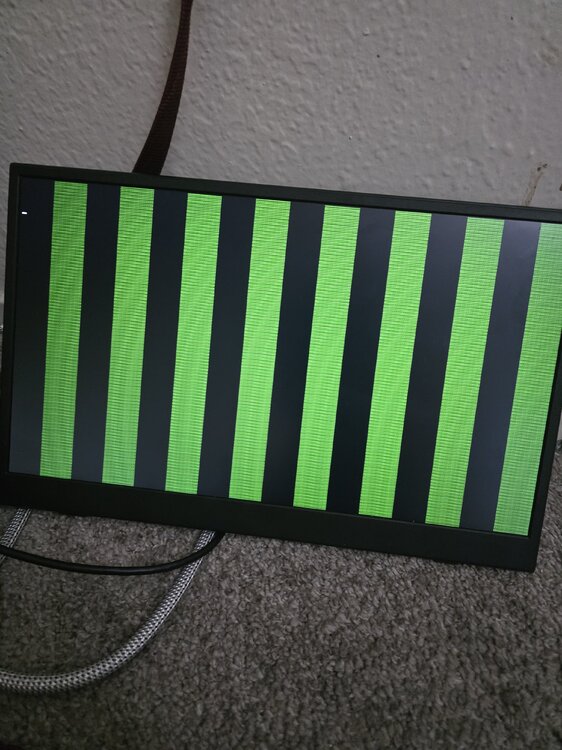
I've attached the diagnostics, don't know how much it'll help with how sudden it seems to crash, but maybe it'll help. As I was hard rebooting it (again), it started and crashed again, but got this artifacting: Rebooted again, tried a quick memtest and the system rebooted without any errors being thrown. It's super unlikely two completely different kits of RAM are both bad (especially since the kit I threw in was in a working system until a few months ago with zero issues. There's no GPU in the system, either. So, it feels like this artifacting might be RAM related, but the RAM has already been replaced with a known working kit. Could it be the iGPU? Don't know if that could cause the system lock up like this, though. Maybe the ram slots on the motherboard? I'd really like to avoid taking this to a computer repair place (since I just took it there a month or so ago to confirm the drives were dead.), especially with this being such an inconsistent issue. I can go eight hours with constant transferring and no issues, and then another time go 2 hours with no transferring before getting a crash/freeze. mfnas-diagnostics-20250427-1911.zip
-
Welp. Looks like it happened again. No idea what could be causing the NAS to lock up like this. Bad OS drive? Maybe CPU?
-
Just a quick update: I managed to find a 32GB 3200mhz kit of T-Force RAM buried in my closet. Figured that was more than enough to just test with. I'm knocking on all the wood right now, but so far so good after a few hours straight of transferring files. Seems like it was a bad kit of RAM (as of right now.). Will update in a few days, assuming nothing happens.
-
So, I recently built my NAS. It's been littered with problems from the jump thus far, and this is just another issue being added to the pile. Ordered 4 new 22TB Ironwolf Pro HDD drives > All were DOA > Returned and bought 4 24TB Ironwolf Pros on sale + coupon. All passed a smart test. > 10GBe NIC was DOA, bought another and that was fixed. Funny enough, all the used parts appear to be working fine, but more below. The hardware is pretty basic: 5700G (Used) x570s Aorus Elite (second latest bios) (also used) 64GB DDR4 RAM at 2133. (new) Intel 10Gbe NIC, but am currently using the motherboard's 2.5gbe NIC. (used, pull from server) 850w Corsair PSU. (new) Noctua Chromax fans, with Noctua PWM hub. (both new) Note on the Intel NIC: It's a fanless x540 that I ziptied a 60mm fan, with another intake fan blowing air on it. Anyways, NAS was built and was working fine for a few days just idling as I hadn't found time to start transferring files to it. But after moving nearly a TB over to the NAS drives, the NAS disconnected from my Windows PC and this popped up: "An error occurred while reconnecting F:. The local device name is already in use.". I try logging into the WebGUI and won't connect at all (in that the page won't even load). Said screw it and just gave a hard reboot, figuring once wouldn't hurt. A reboot fixed it for a few hours, but after moving some more files it happened again. Repeated the process, but starting looking into solutions. Learned how to SSH, tried pressing the power button to see if it'd gracefully shut down the drives in the event of another freeze. Go figure, the NAS locks up again and neither SSH (it times me out, so I can't log into it.) nor the power button works. So, the third time I hooked up my monitor and let it go again. It, of course, locks up again. But the monitor is black and turning it on gives a "No Signal" screen. Since there's no GPU in the system, and the behavior of the freezing, it felt like it's either CPU or RAM. So, I ran a memtest and it seemed to be going fine, but I step back about an hour and a half later to find the monitor black again and it wouldn't turn on again. I start it up again, go into the bios - to which I quickly get a frozen screen and green lines. RAM? I reboot the PC again and go into the bios, turn off the C States (as I've seen recommended.), along with changing the power supply idle control to typical idle current. Load back into the Unraid OS again and start sniffing around. I step back out to check the portable monitor and as I'm walking by to check it, the screen (filled with all the terminal lines and such) suddenly starts showing lines of green going vertically downward, just like what happened in the bios. I've unplugged it for now as I want to avoid all the hard reboots and potentially damaging the drives any further. I'm almost positive it's a hardware issue at this point. Just not exactly sure what. Green lines are usually seen on GPUs, but can that happen with a CPU that has integrated graphics like the 5700G? Never seen it myself, so don't really know. But would that cause the NAS to lock up like that? Given that the OS and everything else are so closely connected to the RAM, and the artifacts (which I know can happen with RAM), it feels like faulty RAM might be the issue here. Docker is currently disabled, so nothing to do with that, Fix Common Problems doesn't show anything that'd cause something lie this either. I figure I can just buy more RAM and possibly a CPU to test individually, and if one works, I'll just whatever's not needed. I doubt it's the motherboard, but I'll save that as a last case scenario (before a repair shop, at least.). I figured I'd ask here for any potential solutions before I go down a spending rabbit hole.

